See every event hook Matomo dispatches, in which order and with which arguments, to find the right hook when you build a Matomo plugin.
Never install this plugin on a production instance. It is a development tool: it shows internal hook arguments (configuration values, visitor data, request parameters) and writes a log file on every request. HooksViewer stays idle unless Matomo runs in development mode.
Features
- Every event, discovered automatically: the plugin scans
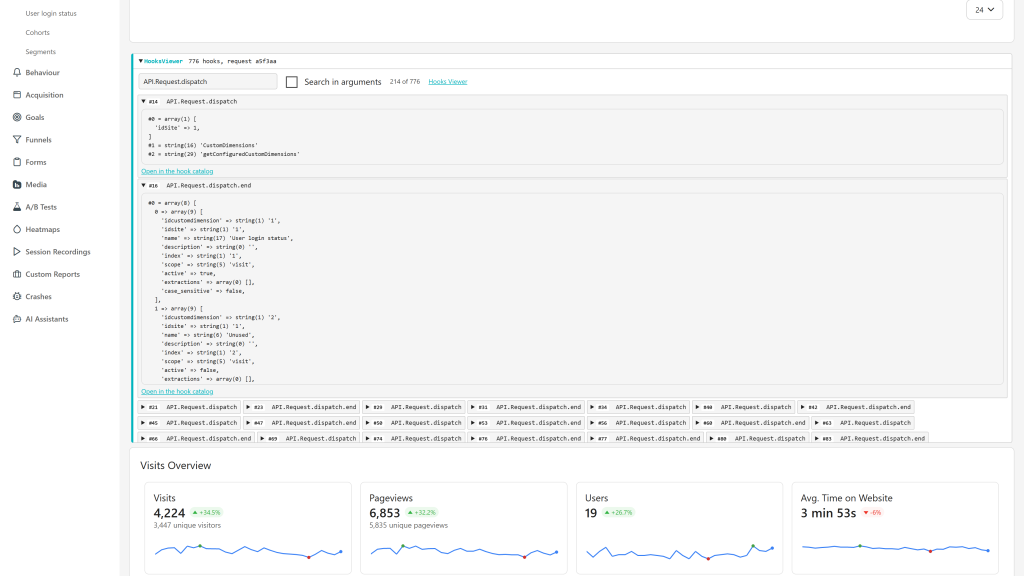
core/andplugins/forPiwik::postEvent()call sites and subscribes to every hook it finds, including the hooks of third-party plugins. The list is cached intmp/cache/hooksviewer-catalog.phpand rebuilt when the source tree changes. - Inline panel, for super users: every HTML response gets a collapsible HooksViewer panel with the hooks fired while it was built, in order. Full pages show it at the top, each widget and AJAX HTML fragment shows its own. Open a hook to read a pretty-printed, multi-line dump of its arguments.
- Search in the panel: filter the hooks by name, or tick Search in arguments to find the hook that receives a given report or setting.
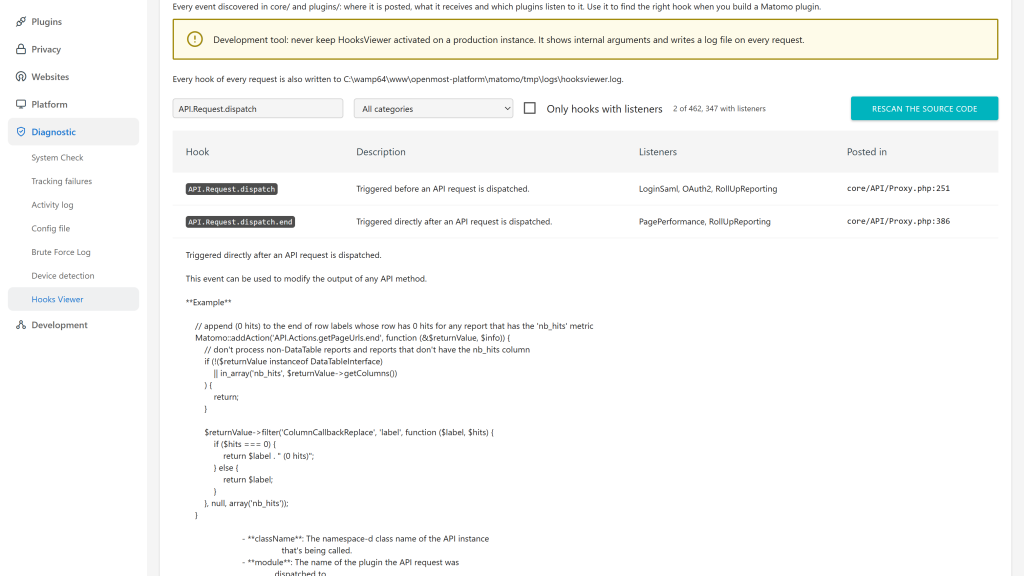
- Hook catalog (Administration > Diagnostic > Hooks Viewer): every known hook with its description and parameters from the source docblock, the file and line where it is posted, the plugins listening to it, a ready-to-paste
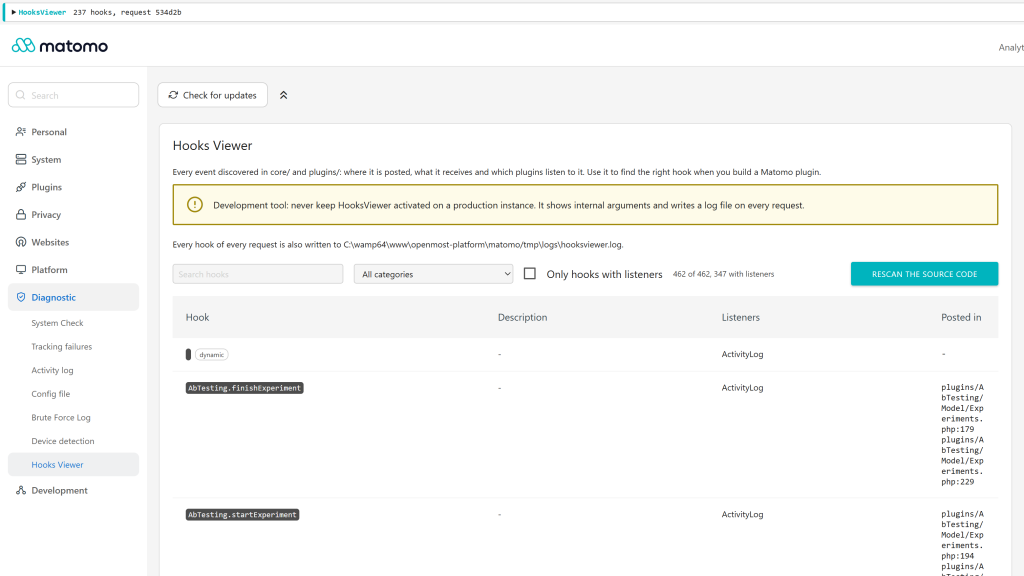
registerEvents()snippet and a link to the developer reference. Search it, filter it by category, show only the hooks with listeners, or rescan the source code on demand. Hooks whose name is built at runtime are listed as dynamic. - Log file at
tmp/logs/hooksviewer.log: every hook of every request, including API calls, tracker hits and console commands, with a timestamp, a request id and the arguments. Rotated above 10 MB. - Safe for Matomo responses: the panel is written once the response is complete, and only into HTML responses. API calls, JSON controller actions, exports, images, redirects and tracker hits stay byte-exact, and pages keep their doctype.
- Theme-aware: the panel and the argument dumps follow the light or dark Matomo theme.
- 12 languages: English, Arabic, Chinese (Simplified), Chinese (Traditional), Dutch, French, German, Italian, Japanese, Polish, Portuguese and Spanish.
Requirements
- Matomo 6 (
>=6.0.0-b1,<7.0.0-b1) - PHP 8.1 or higher
For Matomo 5, use HooksViewer 5.x.
Installation / Configuration
- Install the plugin from the Matomo Marketplace (Administration > Marketplace), on a development instance only, and activate it.
- Enable the Matomo development mode with
./console development:enable(orenabled = 1in the[Development]section ofconfig/config.ini.php). Without it, the plugin captures nothing and warns super users on every page. - Browse the page or trigger the workflow you care about, then expand the HooksViewer panel and search it, or run
tail -f tmp/logs/hooksviewer.log. - Click Open in the hook catalog on a hook, or go to Administration > Diagnostic > Hooks Viewer, to read its documentation and see who listens to it.
- Deactivate the plugin when you are done.
Sensitive values (tokens, passwords, secrets, cookies, sessions, API keys, visitor identifiers and IPs) are masked in the panel and in the log file. To show them, add this to config/config.ini.php:
[HooksViewer]
show_sensitive_values = 1
Privacy and data
- The panel and the hook catalog are only visible to super users, but the log file records the hooks of every request, including those of other users, with their arguments.
- Nothing is captured or logged unless Matomo runs in development mode. Outside development mode, and when the plugin is deactivated or uninstalled, the log files are deleted.
- Sensitive values are masked by default, see above.
- Nothing is sent outside your server.
- The log file and the catalog cache stay in Matomo's
tmp/directory.
Need help with Matomo?
Openmost is an official Matomo Implementation Partner. If you would rather hand over the build, we develop custom Matomo plugins from a written spec, tested on the Matomo versions you run, published on the Marketplace or delivered privately.
-
Hook catalog with registerEvents snippet
-
Hooks catalog with search and filters
-
Inline panel with hook arguments
HooksViewer is a development tool that subscribes to every Matomo event and surfaces them while you are browsing the Matomo UI or exercising the API.
Inline panel
Every HTML response (full pages, widgets, AJAX HTML fragments) gets a collapsible HooksViewer panel, visible to super users only. Its summary shows how many hooks fired and the request id. Expand it to list the hooks in the order they fired, then expand a hook to see a clean, indented dump of its arguments.
- Full pages show the panel at the very top of the page.
- Each dashboard widget shows its own panel, so hooks like
ViewDataTable.filterViewDataTable,Visualization.beforeRenderorMetrics.isLowerValueBetterare visible for the widget that triggered them. - Type in the search field to filter the hooks by name. Every word must match. Tick Search in arguments to also search the argument dumps, e.g. to find which hook receives a given report or setting.
- Open in the hook catalog jumps to the documentation of the hook.
The panel is a Vue component. On the rare responses where Matomo does not compile Vue components (error pages, some AJAX HTML), it falls back to the plain list of hook names.
Hook catalog
Administration > Diagnostic > Hooks Viewer (super users only) lists every known hook:
- Description and parameters, taken from the docblock written right
above the
postEvent()call, which is how Matomo documents its events. - Posted in: the file and line of each call site.
- Listeners: the activated plugins subscribing to the hook in
registerEvents(), and observers declared inobservers.global. - A
registerEvents()snippet to listen to the hook from your own plugin, and a link to the developer reference.
Search by hook name, description, listener or file, filter by category
(the part before the first dot, e.g. Request), or show only the hooks
that have listeners. Hooks marked dynamic are listened to but their
name is built at runtime (like Controller.CoreHome.index), so they
are not found in the source code.
Rescan the source code rebuilds the catalog immediately.
Log file
tmp/logs/hooksviewer.log receives one line per fired
event from every request, including JSON API calls, tracker hits,
console commands, and requests made by users who cannot see the panel.
Each line carries a timestamp, a short request id (the same one as in
the panel summary), an event index, the hook name, and a compact view of
the arguments.
tail -f tmp/logs/hooksviewer.log
The log is rotated to hooksviewer.log.1 once it grows above 10 MB.
Where the hook list comes from
The plugin does not ship a hand-maintained list. On the first request
after activation it scans core/ and plugins/ for every
Piwik::postEvent('…') call site, resolves same-file constant
references, and persists the result to
tmp/cache/hooksviewer-catalog.php. The cache is invalidated whenever
the source tree changes, so new events introduced by a Matomo upgrade
or by a third-party plugin appear automatically.
Wildcard event names (those containing PHP variables or sprintf
placeholders, e.g. Controller.$module.$action) are skipped because
they cannot be subscribed to as a single static name.
Response safety
Nothing is printed while a hook fires. Matomo renders templates and widgets into nested output buffers, so markup printed at that moment would end up inside HTML attributes, graph data or JSON bodies.
Instead, hooks are collected during the request and the panel is written once the response is complete:
- only when the final
Content-Typeis HTML; - right after
<body>for full pages, so the doctype stays first; - at the top of HTML fragments.
These responses are never modified:
module=API(JSON / XML / CSV / TSV / RSS)- controller actions returning JSON (
#[JsonResponse], e.g.Dashboard.getAllDashboards) matomo.phpandpiwik.php(tracker hits and image responses)- exports, images, redirects and plain text responses
- console commands
Use the log file to observe their hooks.
Useful references
- Event guide: https://developer.matomo.org/guides/events
- Core event reference: https://developer.matomo.org/api-reference/events
Development mode and masked values
HooksViewer only runs when Matomo is in development mode (./console
development:enable, or enabled = 1 in the [Development] section of
config/config.ini.php). Outside development mode it captures and logs
nothing, deletes its log files, and super users see a warning on every
page asking to enable development mode or to uninstall the plugin.
Tokens, passwords, secrets, cookies, sessions, API keys, visitor identifiers and IPs are masked in the panel and in the log file, including inside URLs. To see them on a development instance:
[HooksViewer]
show_sensitive_values = 1
Reminder
This plugin exposes internal arguments (including configuration values and visitor data) and writes a log file on every request while development mode is on. Never install it on a production instance.
How do I install the plugin?
It is published on the official Matomo Marketplace, like any other plugin:
- Open the administration panel as a super user.
- Go to Marketplace.
- Search for HooksViewer, install it, then activate it.
Which Matomo versions are supported?
HooksViewer 6.x runs on Matomo 6 (PHP 8.1+, MySQL 8.0+ or MariaDB 10.6+). For Matomo 5.10.0 or higher, use HooksViewer 5.x.
Why "never install in production"?
The plugin shows internal hook arguments (database configuration, visitor IPs, request parameters, etc.) and writes a log file on every request. Both are useful while debugging and unacceptable in production.
The plugin is activated but shows nothing.
HooksViewer only works when Matomo runs in development mode. Enable it
with ./console development:enable, or set enabled = 1 in the
[Development] section of config/config.ini.php. Until then, no hook
is captured or logged, and super users see a warning on every page. On
a production instance, uninstall the plugin instead.
Why are some values shown as *** (masked)?
Tokens, passwords, secrets, cookies, sessions, API keys, visitor
identifiers and IPs are masked in the panel and in the log file, also
when they appear as URL parameters. To see them on your development
instance, add show_sensitive_values = 1 to a [HooksViewer] section
of config/config.ini.php.
Where do I see the hooks?
Two places, at the same time:
- In the HooksViewer panel, at the top of each page and inside each widget. Expand it to list the hooks, expand a hook to read its arguments.
- In the log file at
tmp/logs/hooksviewer.log. This catches every hook from every request, including JSON API calls, tracker hits and console commands, where the plugin never adds any markup. Tail it withtail -f tmp/logs/hooksviewer.log.
Who can see the panel?
Only super users, and only super users can open the hook catalog. Everyone else browses Matomo normally, but the hooks of their requests are still written to the log file.
How do I find the right hook for my plugin?
- Browse the page where you want to act, expand the HooksViewer panel and search it. Tick Search in arguments to find the hook that receives the data you want to change.
- Click Open in the hook catalog to read the hook description and
parameters, see which plugins already listen to it, and copy the
registerEvents()snippet.
Where is the hook catalog?
Administration > Diagnostic > Hooks Viewer. It lists every hook found in the source code with its description, parameters, call sites and listeners, plus the hooks only known through their listeners.
Why is the panel at the top of the page and not where the hook fired?
Printing markup at the exact moment a hook fires broke Matomo: it ended up inside HTML attributes, graph data and JSON responses, and before the page doctype. The panel is now written once the response is complete. The hooks are still listed in the exact order they fired, and each widget gets its own panel.
I activated the plugin but the panel looks unstyled.
Matomo caches the merged stylesheet bundle on disk. The plugin clears that cache on activation. If you somehow get out of sync, deactivate the plugin and reactivate it: the next request rebuilds the bundle.
How does the plugin keep up with new Matomo events?
The list of subscribed hooks is not hand-maintained. The plugin
scans core/ and plugins/ for Piwik::postEvent('…') calls and
caches the discovered list under tmp/cache/. The cache is rebuilt
whenever the source tree changes, so new events appear automatically.
Does the plugin break Matomo's API or tracker?
No. The panel is only added to HTML responses. API responses, JSON controller actions, CSV exports, XML, images, redirects and tracker hits are left untouched. Use the log file to observe hooks fired during those requests.
Some hooks I expected to see are missing.
A few things to check:
- Is the event a wildcard (e.g.
Controller.$module.$action)? Those are skipped because they have no fixed name to subscribe to. - Did the event fire at all on this request? Check
tmp/logs/hooksviewer.log: if it's not there either, the code path was not reached. - Was the hook fired during a JSON or API request? No panel is added to those, check the log file.
- Does the panel say "more in tmp/logs/hooksviewer.log"? A single response keeps at most 5,000 hooks in its panel, the rest is in the log.
Will the log file fill my disk?
No. It is rotated to hooksviewer.log.1 once it grows above 10 MB, so
at most about 20 MB are kept.
How can I contribute?
Open an issue or a pull request on https://github.com/openmost/HooksViewer.
How long will it be maintained?
As long as I keep using Matomo across projects, which is the foreseeable future. I'm the first user of this plugin: if it breaks on a Matomo upgrade I'll see it before you do.
Version
6.2.1
License
GPL v3+
Keywords
viewer, hooks, event, events, dev
Last Updated
Oct 21st 2026
Requirements
Matomo >=6.0.0-b1,<7.0.0-b1
PHP >=8.1.0
Matomo 5.x, Matomo 6.x
Downloads
7732
Changelog
Authors
Websites
Activity
10 commits (last commit 9 days ago)
Developer
Support
ronan@openmost.com
View and download this plugin for a specific Matomo version:
- Matomo 5.x
- Matomo 6.x (currently selected)