Never install this plugin on a production instance. It is a development tool. Every page exposes internal arguments, appends to a log file, and adds DOM elements to Matomo's UI.
What it does
HooksViewer subscribes to every event Matomo dispatches and shows you, in real time, which hooks fire — where they fire, in what order, and with what arguments.
Two outputs run side by side:
- Inline panel in the Matomo UI: each event is rendered as a
<details><summary>block at the exact spot in the DOM where it was dispatched. Open the summary to see a pretty-printed, multi-line dump of the hook arguments. Widget XHRs (format=html) also surface their internal hooks likeViewDataTable.filterViewDataTable,Visualization.beforeRender,Metrics.isLowerValueBetter, etc. - Log file at
tmp/logs/hooksviewer.log. Every hook from every request — including JSON API calls, tracker hits, and CLI commands — is appended with timestamp, request id, and arguments. Watch withtail -f tmp/logs/hooksviewer.log.
The plugin never injects markup into JSON, XML, CSV, image, or tracker responses, so Matomo's API stays valid and the dashboard, widgets, and third-party clients keep working.
How the hook list stays current
The list of subscribed events is discovered automatically by scanning
core/ and plugins/ for Piwik::postEvent('…') call sites the first
time the plugin runs (and whenever a source file is added/removed/edited).
The result is cached in tmp/cache/hooksviewer-catalog.php.
You do not have to update the plugin when Matomo introduces new events — they show up the next time the cache is rebuilt.
Install
This plugin is published on the official Matomo Marketplace.
- Open the Marketplace in your Matomo admin.
- Search for HooksViewer.
- Install, then activate.
Use
- Activate the plugin while you are exploring or debugging.
- Browse the page or trigger the workflow you care about.
- Read the inline
<details>blocks, ortail -fthe log. - Deactivate the plugin when you are done.
Requirements
- Matomo 5.x
- PHP 7.4+
Author
Built by Openmost. Issues and pull requests welcome at https://github.com/openmost/HooksViewer.
License
GPL v3 or later.
-
Hook detail
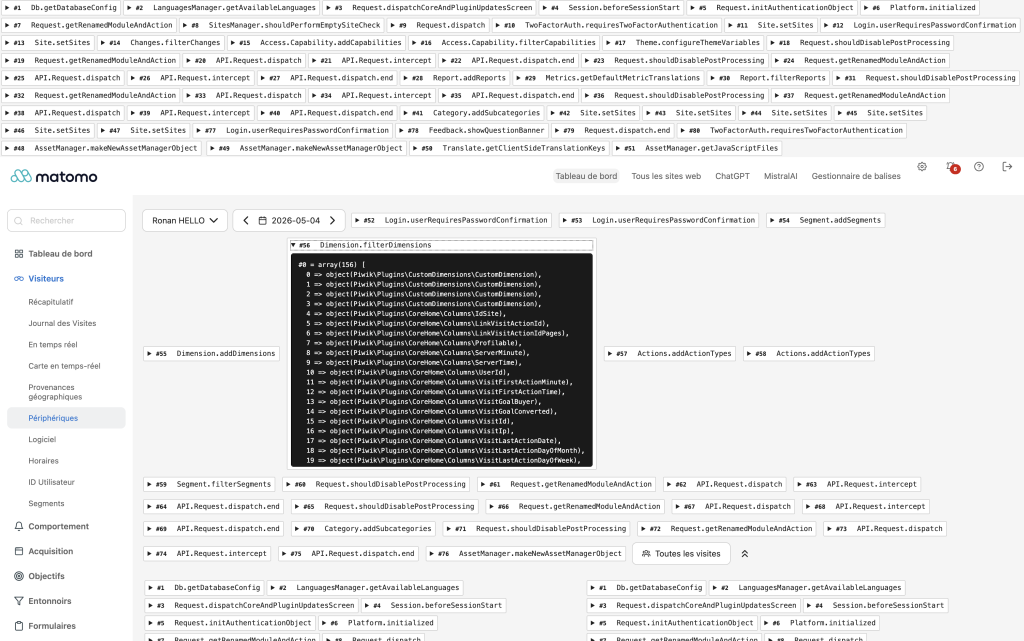
-
Hooks list
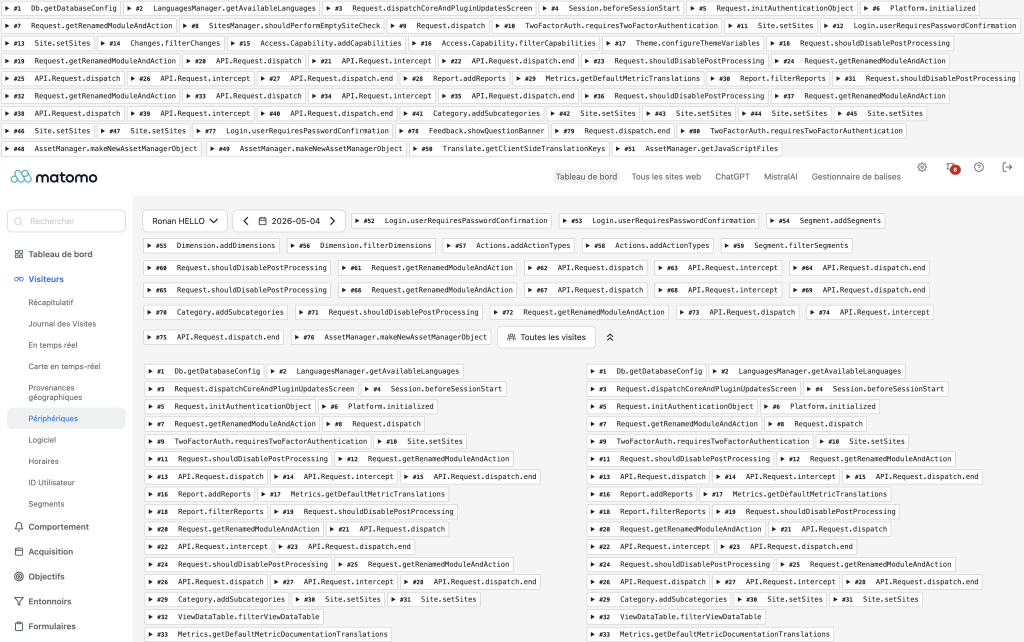
HooksViewer is a development tool that subscribes to every Matomo event and surfaces them, in real time, while you are browsing the admin or exercising the API.
Two outputs
Inline DOM — On HTML pages and on widget AJAX requests
(format=html), each fired event is rendered as a <details><summary>
block at the exact place in the response stream where it was dispatched.
Open the summary to see a clean, indented dump of the hook arguments.
Log file — tmp/logs/hooksviewer.log receives one line per fired
event from every request, including JSON API calls, tracker hits,
and CLI commands. Each line carries a timestamp, a short request id so
you can correlate concurrent requests, an event index, the hook name,
and a compact view of the args.
tail -f tmp/logs/hooksviewer.log
Where the hook list comes from
The plugin does not ship a hand-maintained list. On the first request
after activation it scans core/ and plugins/ for every
Piwik::postEvent('…') call site, resolves same-file constant
references, and persists the result to
tmp/cache/hooksviewer-catalog.php. The cache is invalidated whenever
the source tree changes, so new events introduced by a Matomo upgrade
or by a third-party plugin appear automatically.
Wildcard event names (those containing PHP variables or sprintf
placeholders, e.g. Controller.$module.$action) are skipped because
they cannot be subscribed to as a single static name.
Response safety
Some Matomo responses cannot tolerate any extra bytes:
module=API(JSON / XML / CSV / TSV / RSS)matomo.phpandpiwik.php(tracker hits and image responses)- CLI commands
For these, HooksViewer does not inject anything into the response.
Use the log file (tmp/logs/hooksviewer.log) to observe their hooks.
For HTML pages and widget AJAX (format=html), output is rendered
inline as <details> elements styled to stay readable on light and
dark themes alike.
Useful references
- Event guide: https://developer.matomo.org/guides/events
- Core event reference: https://developer.matomo.org/api-reference/events
Reminder
This plugin exposes internal arguments (including configuration values and visitor data) and writes a log file on every request. Never install it on a production instance.
How do I install the plugin?
It is published on the official Matomo Marketplace, like any other plugin:
- Open the administration panel.
- Go to Marketplace → Plugins.
- Search for HooksViewer, install it, then activate it.
Why "never install in production"?
The plugin renders internal hook arguments into the page (database configuration, visitor IPs, request parameters, etc.) and writes a log file on every request. Both are useful while debugging and unacceptable in production.
Where do I see the hooks?
Two places, at the same time:
- Inline in the DOM, as
<details><summary>blocks placed exactly where the event was dispatched. Works on regular admin pages and on widget AJAX content (format=html). - In the log file at
tmp/logs/hooksviewer.log. This catches every hook from every request — including JSON API calls, tracker hits, and CLI commands, where the plugin cannot safely inject markup. Tail it withtail -f tmp/logs/hooksviewer.log.
I activated the plugin but my CSS still looks unstyled.
Matomo caches the merged stylesheet bundle on disk. The plugin clears that cache on activation. If you somehow get out of sync, deactivate the plugin and reactivate it — the next request will rebuild the bundle.
How does the plugin keep up with new Matomo events?
The list of subscribed hooks is not hand-maintained. The plugin
scans core/ and plugins/ for Piwik::postEvent('…') calls and
caches the discovered list under tmp/cache/. The cache is rebuilt
whenever the source tree changes, so new events appear automatically
the next time the cache is invalidated.
Does the plugin break Matomo's API or tracker?
No. Inline output is only emitted for HTML responses (regular
pages and widget AJAX with format=html). API JSON, CSV exports,
XML, image responses, and tracker hits are left untouched. Use the
log file to observe hooks fired during those requests.
Some hooks I expected to see are missing.
A few things to check:
- Is the event a wildcard (e.g.
Controller.$module.$action)? Those are skipped because they have no fixed name to subscribe to. - Did the event fire at all on this request? Check
tmp/logs/hooksviewer.log— if it's not there either, the code path was not reached. - Was the hook fired during a JSON API call? Inline rendering is intentionally disabled for those; check the log file.
Is the plugin active for everyone in my Matomo instance?
Yes. While it is activated, every visitor and every admin user sees the inline output and the log file grows. Deactivate it as soon as you are done debugging.
How can I contribute?
Open an issue or a pull request on https://github.com/openmost/HooksViewer.
How long will it be maintained?
As long as I keep using Matomo across projects, which is the foreseeable future. I'm the first user of this plugin — if it breaks on a Matomo upgrade I'll see it before you do.
Version
2.0.1
License
GPL v3+
Keywords
viewer, hooks, event, events, dev
Last Updated
May 6th 2026
Requirements
Matomo >=5.0.0-stable,<6.0.0-b1
Matomo 5.x
Downloads
7384
Changelog
Authors
Websites
Activity
10 commits (last commit 4 months ago)
Developer
Support
ronan@openmost.io