Chat with your Matomo data and get one-click AI insights on any report, powered by Mistral AI or any OpenAI-compatible endpoint, plus an optional agent that queries your live reports through the Matomo MCP tools.
Features
Insights on any report
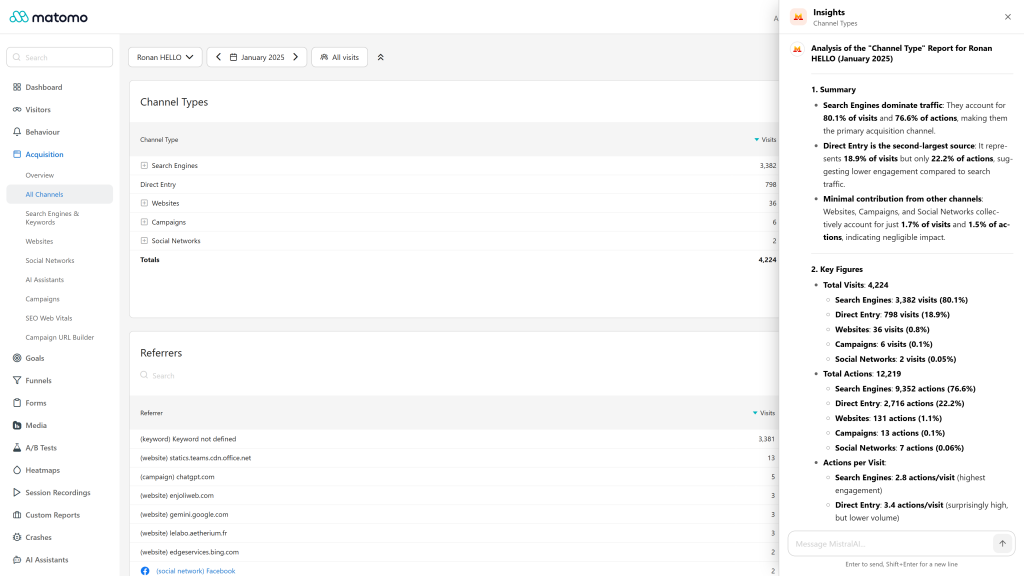
- An AI button in the header of each report opens an insight panel that analyses the report you are looking at, then lets you ask follow-up questions.
- The whole report is analysed as Matomo serves it, not only the visible rows: a compact payload with the rows, the totals, the metric names and units, and the exact API request behind the report.
- The analysis follows what you see: the active segment, the period and the compared periods or segments.
- The analysis also follows the table as you left it: the search, the sort, the flattening and up to 5 expanded rows, whose subtables are added to the analysis.
- Works with tables, evolution graphs, goals, custom reports and the other widgets backed by a Matomo report.
- When a widget cannot be analysed, the panel shows a clear message instead of a raw error.
- The panel is an accessible dialog: keyboard navigation, focus kept inside the panel, Escape to close.
Chat
- A dedicated Mistral AI page in the main menu, with suggested questions to get started.
- Answers stream in real time, with an automatic fallback for servers that do not support streaming.
- The conversation follows the latest message while it is written, and stops scrolling as soon as you scroll up to read.
- Answers are rendered as Markdown, with readable tables, highlighted code and copy buttons for an answer or a code block.
Agent mode, with MCP Server
When the MCP Server plugin, available on the Matomo Marketplace, is installed, activated and enabled, the chat and the insights switch to agent mode:
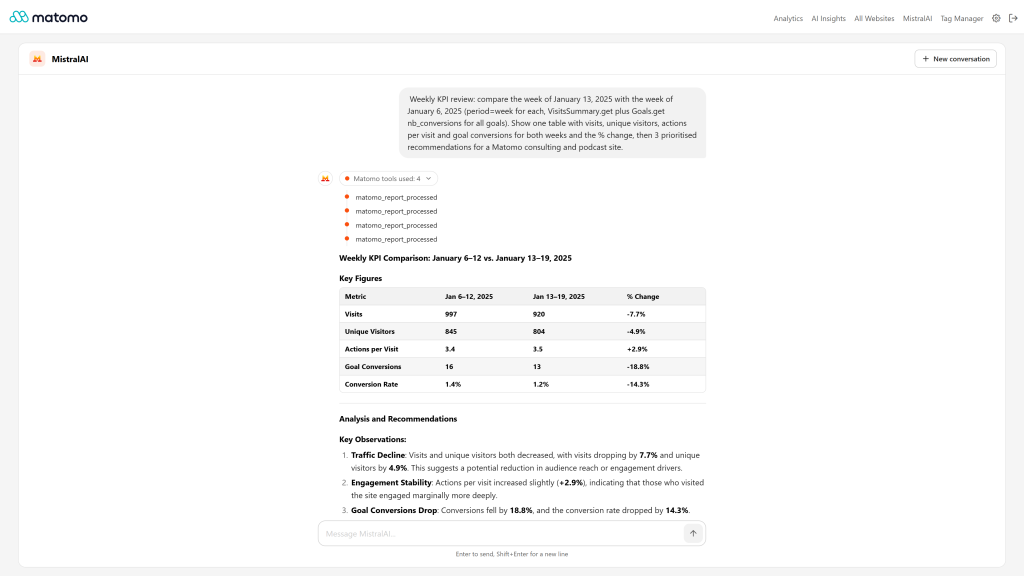
- The assistant queries your real reports through the Matomo tools to answer, for example to compare periods or fetch a subtable.
- Each tool call is listed in a step timeline under the answer.
- Tools run inside Matomo with the access of the current user: no public URL, OAuth client or extra token is needed.
- Write actions, such as creating a goal or an annotation, are only available when write mode is enabled in MCP Server. The assistant then always describes the change and waits for your explicit confirmation before it creates, modifies or deletes anything. This rule is added by the plugin and cannot be removed by editing the prompts.
- When agent mode is not available, the chat recommends the next step: install MCP Server, activate it, enable MCP or enable write mode. Super users get a direct link, other users are asked to contact their administrator.
- Agent mode has its own Agent mode model setting, because calling tools needs a larger model than chatting.
The agent mode is optional. Without MCP Server, the chat and the insights keep working with the plugin settings.
Connection and models
- One key is enough: the key of the website is used first, then the general key. The plugin never uses the Matomo AI Providers plugin, which has no Mistral AI provider, so the credential of another provider is never sent to Mistral AI.
- Works with Mistral AI (default) and any OpenAI-compatible chat completions endpoint served over HTTPS, including self-hosted models. The API key is optional on a custom host.
- The general API key is only sent to the general host: a website using its own host never receives it.
- Presets curated for conversation: Latest recommended (default, currently Ministral 3 14B), Mistral Medium 3.5, Mistral Large 3, Mistral Small 4, Ministral 3 14B, 8B and 3B. A custom model field accepts any other model name.
- When the configured model is deprecated, retired or not included in your Mistral AI plan, the chat explains it and links to the settings instead of showing the raw API error.
Prompts
- Default chat and insight prompts written for analytics: the chat answers as a senior analytics consultant, the insights follow a fixed structure (summary, key figures, notable patterns, recommendations).
- Default prompts of previous versions are upgraded automatically, custom prompts are kept.
- A prompt equal to the default is not stored, so future improvements of the defaults reach you. A Reset to default button restores the default prompts.
More
- Interface and default prompts translated into 13 languages: English, Arabic, Chinese (Simplified and Traditional), Dutch, French, German, Italian, Japanese, Polish, Portuguese, Spanish and Swedish.
- Follows the Matomo light and dark themes.
- Rate limit of 30 AI requests per hour, per user and per website, configurable in
config/config.ini.php. - HTTP API:
MistralAI.getResponse,MistralAI.getStreamingResponse,MistralAI.getInsights,MistralAI.getSiteSettings,MistralAI.setSiteSettingsandMistralAI.setSystemSettings.
Requirements
- Matomo 6.x (
>=6.0.0-b1,<7.0.0-b1) - PHP 8.1 or higher
- A Mistral AI API key, or an OpenAI-compatible HTTPS endpoint
- Optional, for the agent mode: the MCP Server plugin from the Marketplace. Write actions also require write mode to be enabled in the MCP Server settings.
Installation / Configuration
- Install and activate Mistral AI from Administration > Platform > Marketplace.
- As a super user, open Administration > System > Mistral AI:
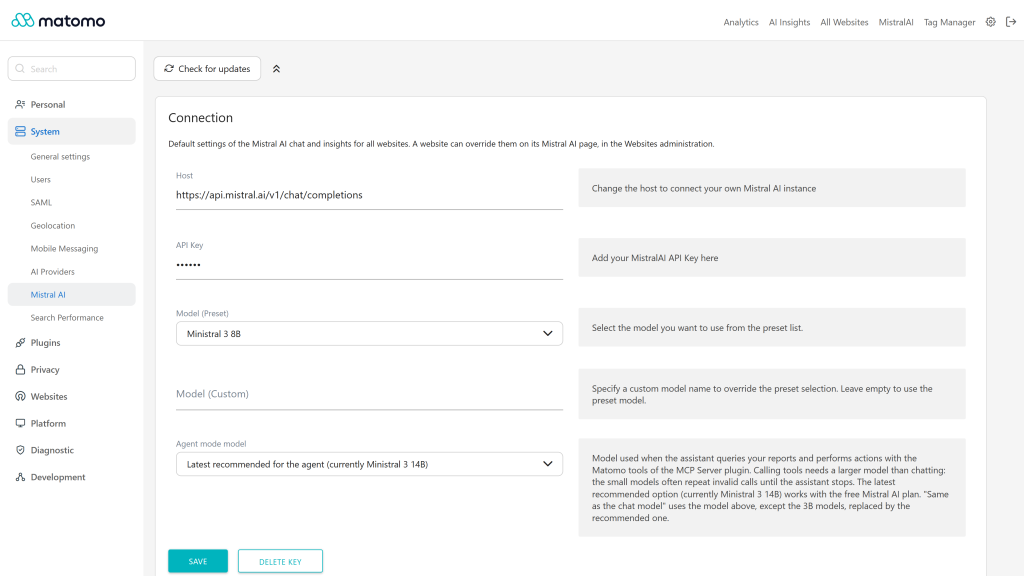
- Connection card: host (an HTTPS URL), API key, chat model and agent mode model. Each card is saved on its own. The saved key is never displayed, and a Delete key button removes it. Create a key in the Mistral AI console.
- Privacy card: check Allow sending Matomo data to the AI provider, off by default. Until a super user checks it, nothing is sent to the provider. The card shows where the data goes, and masks e-mail and IP addresses, removes URL query strings and excludes visitor-level data, all three on by default.
- Prompts card: chat and insight base prompts, with a Reset to default button.
- Optionally, override the settings for a website in Administration > Websites > Mistral AI (website admin access): host, API key, model and prompts, with a Delete key button and a Use the general prompts button. Empty fields use the general settings.
- For the agent mode, install, activate and enable MCP Server, and enable write mode in its settings if you want the assistant to perform actions. The chat guides you through each missing step.
Optionally, as a server administrator, tune the plugin in a
[MistralAI]section ofconfig/config.ini.php. Every key is optional:[MistralAI] ; name shown in the top menu, on the chat page and in the insights panel, 40 characters max display_name = "Company AI" ; AI requests per user and per website within the window, 0 disables the limit rate_limit_requests = 30 ; length of the window, in seconds rate_limit_window = 3600
Then open the Mistral AI page in the main menu, or click the AI button in the header of a report.
Privacy and data
- Insights send the data of the report you are looking at (labels, metrics and totals), its period, segment and comparisons, and the conversation, to the configured endpoint: Mistral AI by default, or your custom host.
- The chat sends your messages and the prompts. In agent mode, the results of the Matomo tools called by the assistant are also sent to the endpoint.
- Nothing is sent to the AI provider until a super user checks Allow sending Matomo data to the AI provider in Administration > System > Mistral AI, Privacy card. It is off by default: until then, the chat and the insights tell users to ask a super user to allow it.
- Before sending, e-mail and IP addresses are replaced with
[email]and[ip], and URL query strings are removed, in the report data and in the results of the Matomo tools. Both are on by default and can be turned off in the same Privacy card. - Visitor-level data (Visits Log, visitor profiles, real-time and User ID reports) is excluded by default: the insights and the agent cannot read it until a super user unchecks Exclude visitor-level data.
- Report labels can hold values set by visitors (page titles, URLs, referrers, campaign names, custom dimensions). Check the retention and privacy terms of the provider before connecting it, and prefer a self-hosted or EU-hosted endpoint when your data policy requires it.
- The chat shows every user a notice stating that their questions, and the Matomo data read to answer them, are sent to the AI provider configured by the Matomo administrator.
- When a Matomo tool fails in agent mode, the model only receives a generic error with a reference: the details stay in the Matomo logs.
- Insight requests are restricted to Matomo report and data methods, never to an arbitrary API method, and run with the access of the current user.
- API keys are stored in the Matomo settings and are never sent back to the browser. Conversations are not stored by the plugin.
- To keep all data on your infrastructure, point the host to a self-hosted model.
Need help with Matomo?
Openmost is an official Matomo Implementation Partner. We connect Matomo to AI assistants, BI tools and the rest of your stack with Matomo integrations built on official APIs, with documented and privacy-checked data flows.
-
Agent mode weekly KPI review with tool steps
-
Insights on any report in one click
-
Settings connection agent model and prompts
Chat with your Matomo data and get one-click AI insights on any report, powered by Mistral AI or any OpenAI-compatible endpoint.
Getting started
- Install and activate the plugin.
- Go to Administration > System > Mistral AI as a super user.
- In the Connection card, paste your Mistral AI API key, created in the Mistral AI console, and save.
- Open a report and click the AI button in its header, or open the Mistral AI page from the main menu.
Report insights
The AI button in the header of each report opens an insight panel. The analysis uses the full report as Matomo serves it: a compact payload with the rows, the totals, the metric names and units, and the exact API request behind the report. The active segment, the period and the compared periods or segments are taken into account, as well as the table as you left it: the search, the sort, the flattening and up to 5 expanded rows, whose subtables are added to the analysis. Tables, evolution graphs, goals, custom reports and the other widgets backed by a Matomo report are supported. You can ask follow-up questions in the same panel.
The panel is an accessible dialog: keyboard navigation, focus kept inside the panel, Escape to close.
Chat
The Mistral AI page of the main menu is a full chat with suggested questions. Answers stream in real time and are rendered as Markdown, with readable tables, highlighted code and copy buttons. The conversation follows the latest message while it is written, unless you scroll up.
Agent mode
With the MCP Server plugin (Matomo Marketplace) installed, activated and enabled, the assistant queries your real reports through the Matomo tools to answer. Each tool call appears in a step timeline under the answer.
- Read tools are available as soon as MCP is enabled.
- Write actions, such as creating a goal or an annotation, need write mode in the MCP Server settings. The assistant then always describes the change and waits for your explicit confirmation before it creates, modifies or deletes anything.
- When a step is missing, the chat recommends it: install MCP Server, activate it, enable MCP or enable write mode. Super users get a direct link, other users are asked to contact their administrator.
- Agent mode uses the Agent mode model of the general settings. Its default, "Latest recommended", works with the free Mistral AI plan. "Same as the chat model" reuses the chat model, except the 3B models, which are replaced by the recommended one.
Settings
General settings
Administration > System > Mistral AI (super user):
Card Setting Description Connection Host Chat completions endpoint, an HTTPS URL. Default:https://api.mistral.ai/v1/chat/completions
Connection
API key
Required for Mistral AI, optional for a custom host. Never displayed once saved, removed with Delete key
Connection
Model (Preset)
Latest recommended (default), Mistral Medium 3.5, Mistral Large 3, Mistral Small 4, Ministral 3 14B, 8B or 3B
Connection
Model (Custom)
Any model name, overrides the preset
Connection
Agent mode model
Model used with the Matomo tools
Privacy
Allow sending Matomo data to the AI provider
Off by default: nothing is sent until a super user checks it
Privacy
Mask e-mail and IP addresses
Replaced with [email] and [ip] before sending. On by default
Privacy
Remove URL query strings
The parameters after the ? of the URLs are removed before sending. On by default
Privacy
Exclude visitor-level data
Visits Log, visitor profiles, real-time and User ID reports are kept out. On by default
Prompts
Chat base prompt
Instructions of the chat
Prompts
Insight base prompt
Instructions of the insights
Each card is saved on its own. Reset to default fills in the default prompts in your language. A prompt equal to its default is not stored, so it follows the updates of the plugin. Default prompts saved by previous versions are upgraded automatically, custom prompts are kept.
Website settings
Administration > Websites > Mistral AI (website admin) overrides the host, API key, model and prompts for one website. Leave a field empty to use the general value. Use the general prompts makes the website follow the general prompts again.
Configuration file
A server administrator can tune the plugin in a [MistralAI] section of config/config.ini.php. Every key is optional:
[MistralAI]
; name shown in the top menu, on the chat page and in the insights panel, 40 characters max
display_name = "Company AI"
; AI requests per user and per website within the window, 0 disables the limit
rate_limit_requests = 30
; length of the window, in seconds
rate_limit_window = 3600
API key cascade
The key of the website is used first, then the general key. The general key is only sent to the general host, so a website using another host must set its own key. The plugin never uses the Matomo AI Providers plugin, which has no Mistral AI provider.
API
Method Access DescriptionMistralAI.getResponse
view
Chat answer, not streamed
MistralAI.getStreamingResponse
view
Chat or insight answer, streamed as Server-Sent Events
MistralAI.getInsights
view
Insight answer for a report widget
MistralAI.getSiteSettings
website admin
Settings of a website, the API key replaced by a placeholder
MistralAI.setSiteSettings
website admin
Saves the settings of a website
MistralAI.setSystemSettings
super user
Saves the general settings
Each user can send 30 requests per hour and per website.
Privacy and data
- Nothing is sent to the AI provider until a super user checks Allow sending Matomo data to the AI provider in Administration > System > Mistral AI, Privacy card. It is off by default: until then, the chat and the insights tell users to ask a super user to allow it.
- Before sending, e-mail and IP addresses are replaced with
[email]and[ip], and URL query strings are removed, in the report data and in the results of the Matomo tools. Both are on by default and can be turned off in the same Privacy card. - Visitor-level data (Visits Log, visitor profiles, real-time and User ID reports) is excluded by default: the insights and the agent cannot read it until a super user unchecks Exclude visitor-level data.
Requirements
- Matomo 6.0.0 or later, below 7.0.0.
- PHP 8.1 or later.
- A Mistral AI API key, or the URL of an OpenAI-compatible endpoint.
- Optional: the MCP Server plugin for agent mode.
Support
- Homepage: https://openmost.com/matomo/extensions/mistral-ai
- Issues: https://github.com/openmost/MistralAI/issues
- Email: ronan@openmost.com
How do I install and configure the plugin?
- Install the plugin from the Matomo Marketplace and activate it.
- Go to Administration > System > Mistral AI as a super user. In the Privacy card, check Allow sending Matomo data to the AI provider: it is off by default.
- Paste your Mistral AI API key in the Connection card and save.
You can create an API key in the Mistral AI console.
Can I change the rate limit or the name shown in the menu?
Yes, in a [MistralAI] section of config/config.ini.php: display_name renames the plugin in the top menu, on the chat page and in the insights panel, for example when you use a self-hosted model. rate_limit_requests sets the AI requests per user and per website (30 by default, 0 disables the limit) and rate_limit_window the length of the window in seconds (3600 by default). These values are kept when the plugin is updated.
The chat says that data sharing is not allowed
No Matomo data leaves your instance without an explicit decision: a super user must check Allow sending Matomo data to the AI provider in Administration > System > Mistral AI, Privacy card. Other users are asked to contact a super user.
Where are the settings?
The general settings are in Administration > System > Mistral AI (super user). The settings of a website are in Administration > Websites > Mistral AI (website admin). They are no longer in Administration > General settings nor in the website edit form.
Which API key is used?
The key of the website first, then the general key. The general key is only sent to the general host: a website that uses another host must set its own key. The plugin never uses the Matomo AI Providers plugin, which has no Mistral AI provider, so the key of another provider is never sent to Mistral AI.
How do I remove a saved API key?
Click Delete key next to the API key field, on the general settings or on the website settings. A saved key is never displayed again.
What is agent mode?
With the MCP Server plugin (Matomo Marketplace) installed, activated and enabled, the assistant queries your real reports through the Matomo tools to answer, and lists each tool call in a step timeline. Without it, the chat answers from the prompt and, for insights, from the report data. The chat recommends the missing step to unlock agent mode.
Can the assistant change things in Matomo?
Only when write mode is enabled in the MCP Server settings. The assistant then always describes the change and waits for your explicit confirmation in the conversation before it creates, modifies or deletes anything. This rule is added by the plugin and cannot be removed by editing the prompts.
Which model does agent mode use?
The Agent mode model of the general settings. Calling tools needs a larger model than chatting: the default, "Latest recommended" (currently Ministral 3 14B), works with the free Mistral AI plan. "Same as the chat model" reuses the chat model, except the 3B models, which are replaced by the recommended one.
Which models are supported?
The presets are curated for conversation: Latest recommended (default, currently Ministral 3 14B), Mistral Medium 3.5, Mistral Large 3, Mistral Small 4, Ministral 3 14B, 8B and 3B. Any other model, including Codestral, Devstral, Pixtral or a self-hosted model, can be set in the Model (Custom) field.
The chat says my model is not available or not included in my plan
Mistral AI retires old models, and some plans do not include every model (Mistral AI then answers "Rate limit exceeded" with a limit of 0 requests per minute). Choose another model in the settings, for example "Latest recommended", which follows the model recommended by each plugin release.
Can I use another endpoint than Mistral AI?
Yes. Set the host to any OpenAI-compatible chat completions endpoint served over HTTPS, such as a self-hosted model served by vLLM, Ollama or LocalAI. The API key is optional for a custom host: without a key, no Authorization header is sent.
What do the insights analyse?
The full report as Matomo serves it, not only the visible rows: the rows, the totals, the metric names and units, the active segment, the period and the compared periods or segments. Evolution graphs, goals and custom reports are supported. When a widget cannot be analysed, the panel shows a clear message.
I changed the default prompts in a previous version. Are they kept?
Yes. Custom prompts are kept. Default prompts saved by previous versions are upgraded automatically to the new defaults. Reset to default restores the defaults at any time.
Is my data sent to Mistral AI?
Your messages, the prompts and, for insights, the data of the report you are looking at are sent to the configured endpoint. Raw visitor data is never sent, unless the report itself contains it, such as the Visits Log. In agent mode, the results of the Matomo tools called by the assistant are sent too. To keep all data on your infrastructure, use a self-hosted model.
Who can use the plugin?
Every user with view access to a website can use the chat and the insights for that website. Each user can send 30 requests per hour and per website.
Does the plugin support the dark theme?
Yes, the chat and the insights follow the light and dark themes of Matomo.
Which languages are supported?
Arabic, Chinese (Simplified and Traditional), Dutch, English, French, German, Italian, Japanese, Polish, Portuguese, Spanish and Swedish. The default prompts are translated too.
What are the requirements?
Matomo 6.0.0 or later, below 7.0.0, and PHP 8.1 or later. The MCP Server plugin is optional, for agent mode.
How do I get support?
Report issues on GitHub or write to ronan@openmost.com.
Version
6.2.0
License
Keywords
chat, mistral, ai, mistralai, assistant, assistants, insight, insights
Last Updated
Oct 22nd 2026
Requirements
Matomo >=6.0.0-b1,<7.0.0-b1
PHP >=8.1.0
Matomo 5.x, Matomo 6.x
Downloads
18087
Changelog
Authors
Websites
Activity
61 commits (last commit 9 days ago)
Developer
Support
ronan@openmost.com
View and download this plugin for a specific Matomo version:
- Matomo 5.x
- Matomo 6.x (currently selected)