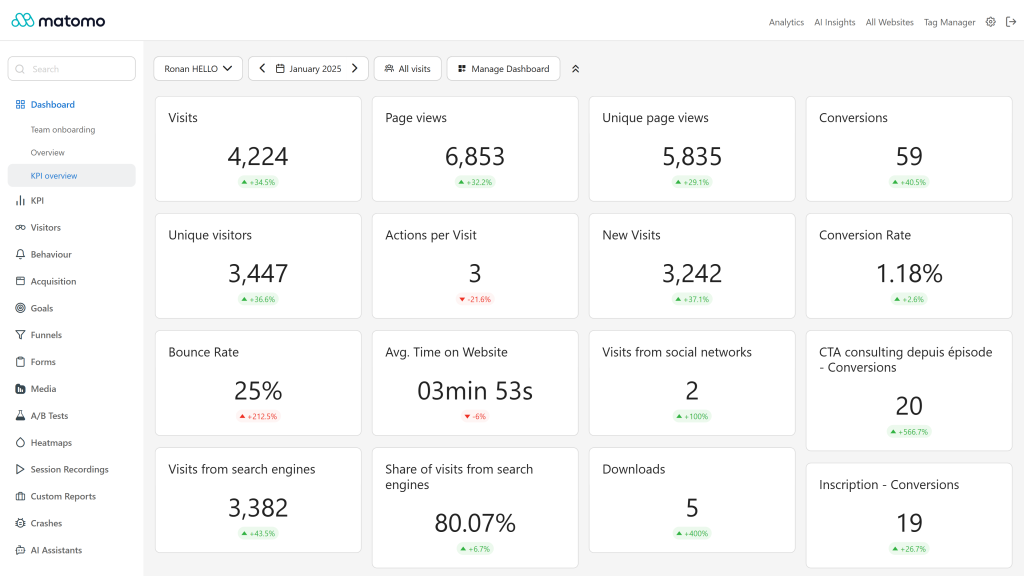
Single-number KPI widgets for your Matomo dashboards, each with its evolution against the previous period.
Features
- One widget per KPI: the value of the selected period, formatted like Matomo (numbers, percentages, durations, money), with an evolution badge comparing it with the previous period. For metrics where lower is better, such as the bounce rate, a decrease is shown as positive.
- Follows the dashboard context: site, period, date and the selected segment.
- Available widgets, grouped under the KPI category of the widget picker:
- Traffic: Visits, Unique visitors, Users, Page views, Unique page views, Returning users, Returning visitors, Unique returning visitors, New visits, Actions, AI agent visits and Human visits (both need the AIAgents plugin).
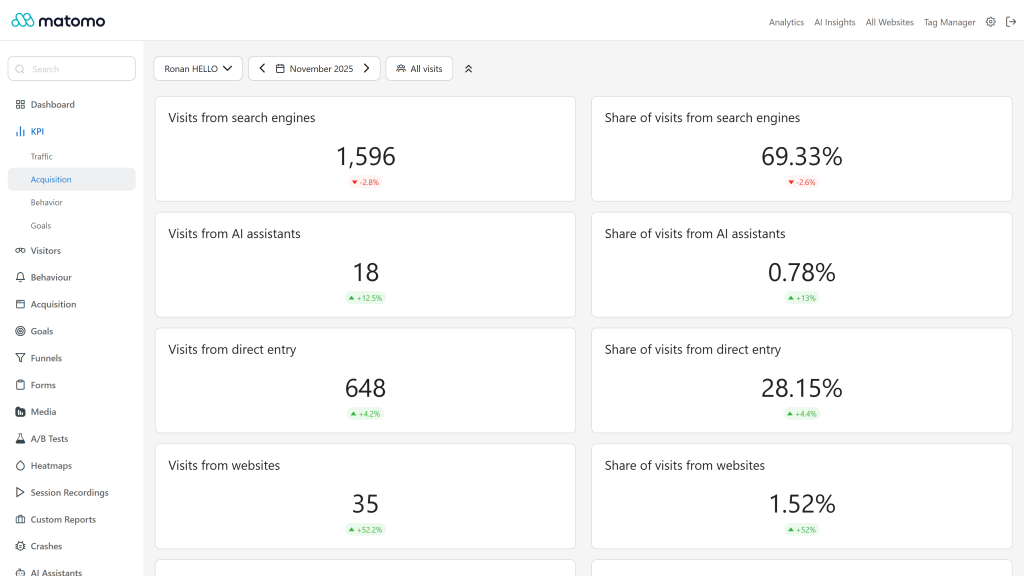
- Acquisition: Visits from search engines, AI assistants, direct entry, websites, social networks and campaigns, each with a matching "Share of visits" widget. The AI assistants widgets appear when your Matomo version tracks AI assistants as a referrer type.
- Behavior: Bounce rate, Actions per visit, Average time on site, Max actions in one visit, Downloads, Unique downloads, Outlinks, Unique outlinks, Internal searches, Search keywords and Average page load time (needs the PagePerformance plugin).
- Goals: Conversions, Conversion rate, Revenue and Visits with conversions for all goals, plus Conversions, Conversion rate and Revenue widgets for each goal of the site.
- Hidden when unavailable: widgets whose source plugin or metric is missing on your Matomo are not listed.
- Fast dashboards: all widgets of a dashboard share the same API calls, and values are cached through the Matomo cache (5 minutes for running periods, 1 hour for closed ones). Access is checked on every request, cached values included.
- Light and dark themes, translated into 12 languages.
Requirements
- Matomo 5.13.0 or later, below 6.0.0
- Optional: AIAgents for the AI agent and human visits widgets, PagePerformance for the page load time widget, Goals for the goal widgets
Installation / Configuration
- Install KPI Widgets from the Marketplace (Administration > Platform > Marketplace) and activate it.
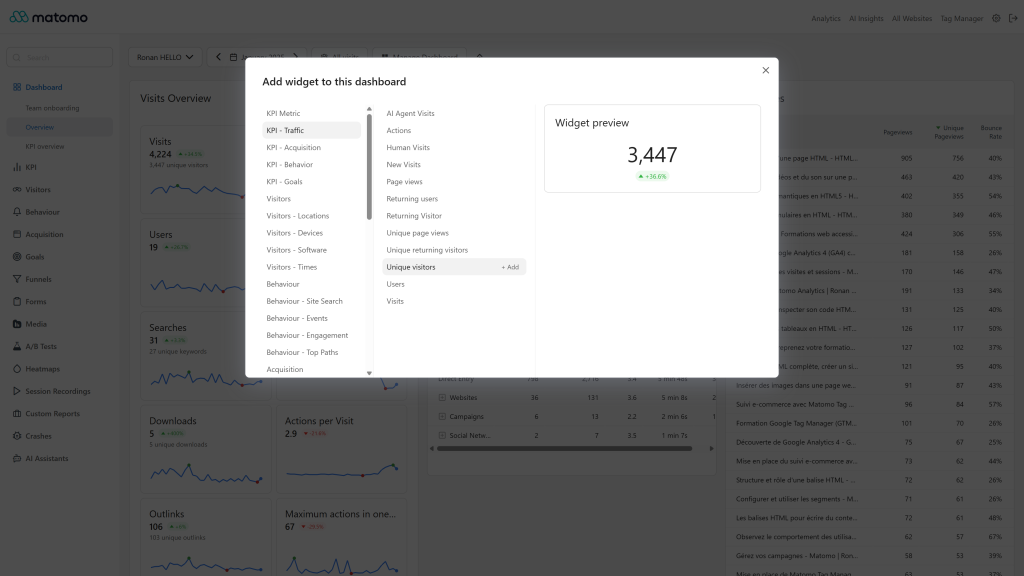
- Open a dashboard, open the "Dashboard" menu and pick widgets from the KPI category (Traffic, Acquisition, Behavior, Goals).
There are no settings. The plugin is available to every user who can view the site.
Privacy and data
Widgets read the reports already archived in your Matomo. The plugin sends no data to third parties.
Need help with Matomo?
Openmost is an official Matomo Implementation Partner. We also build custom Matomo dashboards and KPI reports for executives, marketing teams and clients, with KPIs defined with you and maintained over time.
-
KPI dashboard with evolution against previous period
-
KPI menu acquisition with AI assistants
-
Pick KPI widgets with live preview
KPI Widgets adds single-number widgets to the Matomo dashboard. Each widget shows the value of the selected period and an evolution badge against the previous period. Widgets follow the site, period, date and segment of the dashboard.
Add them from the "Dashboard" menu, in the KPI category. Widgets are grouped under four subcategories.
Traffic
- Visits, unique visitors, users
- New visits
- Returning visitors, unique returning visitors, returning users
- Actions, page views, unique page views
- AI agent visits and human visits (requires the AIAgents plugin)
Acquisition
- Visits from search engines, AI assistants, direct entry, websites, social networks and campaigns
- Share of visits for each of these channels
- The AI assistants widgets appear when your Matomo version tracks AI assistants as a referrer type
Behavior
- Bounce rate, actions per visit, max actions in one visit
- Average time on site
- Average page load time (requires the PagePerformance plugin)
- Downloads, unique downloads, outlinks, unique outlinks
- Internal searches, search keywords
Goals
- Conversions, conversion rate and revenue, for all goals and for each goal of the site
- Visits with conversions
Widgets whose source plugin or metric is not available are not listed. Values come from the Matomo API (API.get and Goals.get), shared by every widget of the dashboard and cached for 5 minutes on running periods, 1 hour on closed periods.
How do I add a KPI widget to a dashboard?
Open a dashboard, open the "Dashboard" menu, choose the KPI category, then a subcategory (Traffic, Acquisition, Behavior or Goals) and click the widget.
Why can't I find a widget, such as AI agent visits or page load time?
Widgets are hidden when their source is missing: AI agent and human visits need the AIAgents plugin, average page load time needs the PagePerformance plugin, and the AI assistants widgets need a Matomo version that tracks AI assistants as a referrer type.
How is the evolution calculated?
The value of the selected period is compared with the previous period of the same length. For metrics where lower is better, such as the bounce rate, a decrease is shown as positive.
Do the widgets follow segments?
Yes, the segment selected on the dashboard applies to every KPI widget.
Why does a value take a few minutes to update?
Values are cached for 5 minutes on periods still running and for 1 hour on closed periods, so dashboards with many widgets stay fast.
Is the plugin available to all users?
Yes. Any user who can view a site can add KPI widgets for it.
Which versions of Matomo are supported?
Version 5.3 and later need Matomo 5.13.0 or later. Use the 6.x versions for Matomo 6.