Get GA4 grade ecommerce analytics in Matomo, without changing a line of your shop.
Your shop already describes every product view, add to cart, checkout step and order in its GA4 dataLayer. Native Matomo ecommerce only keeps the order and a few product fields. Ecommerce Enhanced reads the whole GA4 dataLayer and turns it into the reports GA4 users rely on: product and brand performance, item lists, promotions, coupons, shopping and checkout funnels, sales by source / medium, buyers and revenue per user. Your data stays in your Matomo, with no sampling.
One checkbox in Matomo Tag Manager, or one line in your tracking code, and it works with WooCommerce, Shopify, Magento, PrestaShop and every shop that speaks GA4.
What you get for free
Collection that just works
- Reads GA4 dataLayer pushes,
gtag()calls and legacy Universal Analytics Enhanced Ecommerce, from any CMS or extension (GTM4WP, Google Analytics for WooCommerce, Shopify, Magento, PrestaShop, Elevar, Stape...). - Turned on with a checkbox in the Matomo Tag Manager "Matomo Configuration" variable (recommended), with one line in your tracking code (
_paq.push(['EcommerceEnhanced::enable'])), or event by event from JavaScript with_paq.push(['EcommerceEnhanced::track', ...]). - Every GA4 ecommerce event: item list views and clicks, product views, wishlist, adds and removals from cart, cart views, checkout, shipping and payment steps, purchases, refunds, promotion views and clicks.
- Native Matomo carts and orders are still sent, so the Ecommerce reports, goals and abandoned carts you know keep working, even if you deactivate the plugin.
- Variants kept apart, even when they share a SKU, with brand, list, promotion, coupon and discount per product line.
- Item lists and promotions remembered from the click to the order, as GA4 attributes them.
- Duplicate orders blocked, even when the confirmation page is reloaded or order ids are anonymised.
- Privacy by design:
user_data(emails, phone numbers, addresses, hashed identifiers) is never read, product fields outside GA4 are only sent for the item dimensions you created, coupon codes can be hashed or skipped.
Reports GA4 users expect
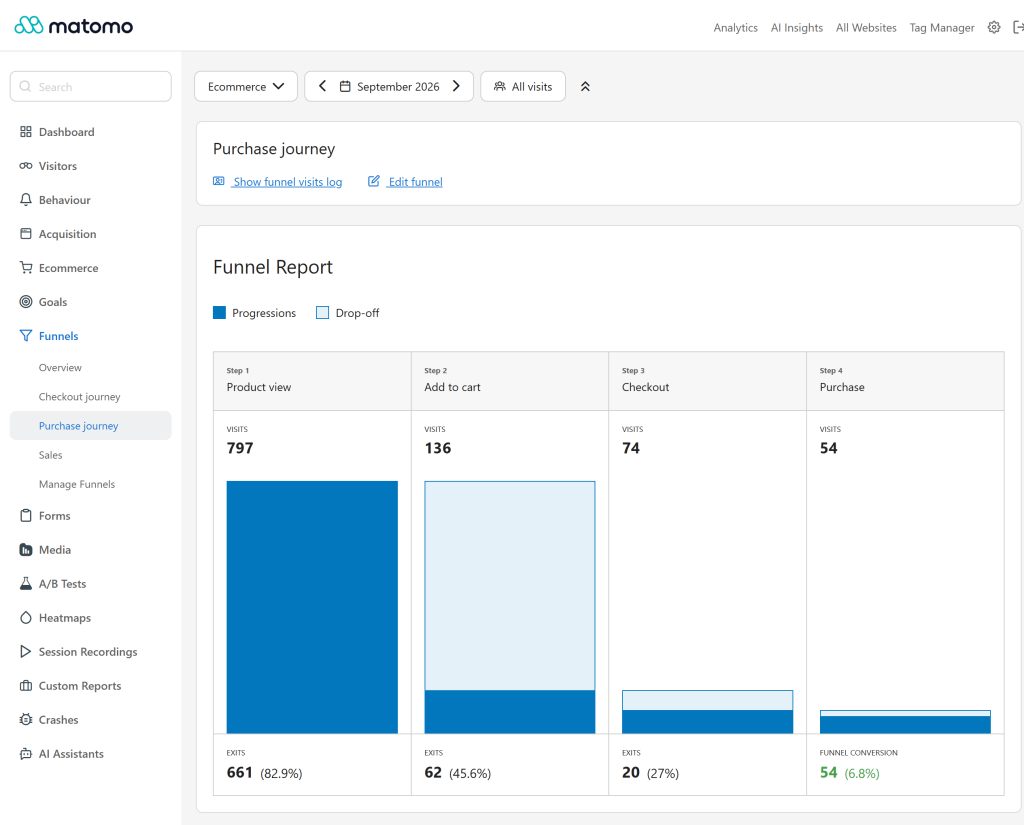
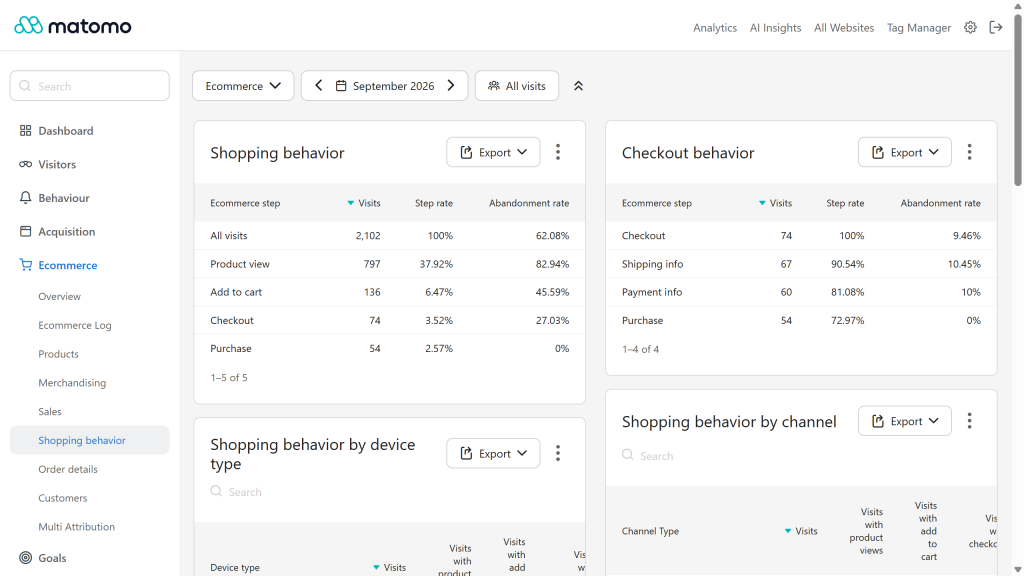
- Shopping behavior and checkout behavior funnels, with step and abandonment rates, without the Funnels plugin.
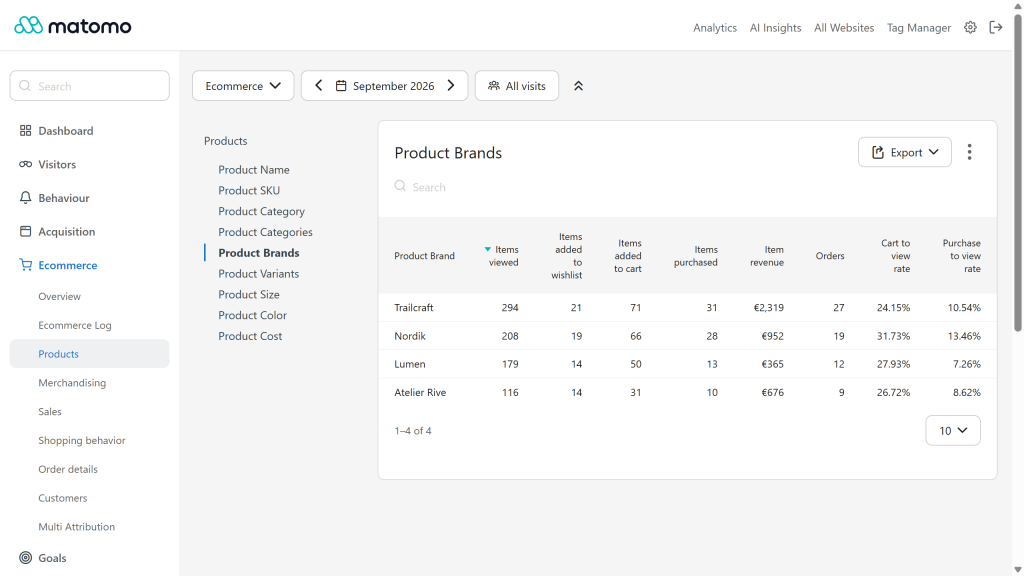
- Product performance, and Product Categories, Product Brands and Product Variants in the dimension switcher of the native Products report, next to Product Name, SKU and Category: views, adds to cart, purchases, item revenue, cart to view and purchase to view rates.
- Item lists and promotions: views, clicks, click rate, and the items added to cart and bought after them.
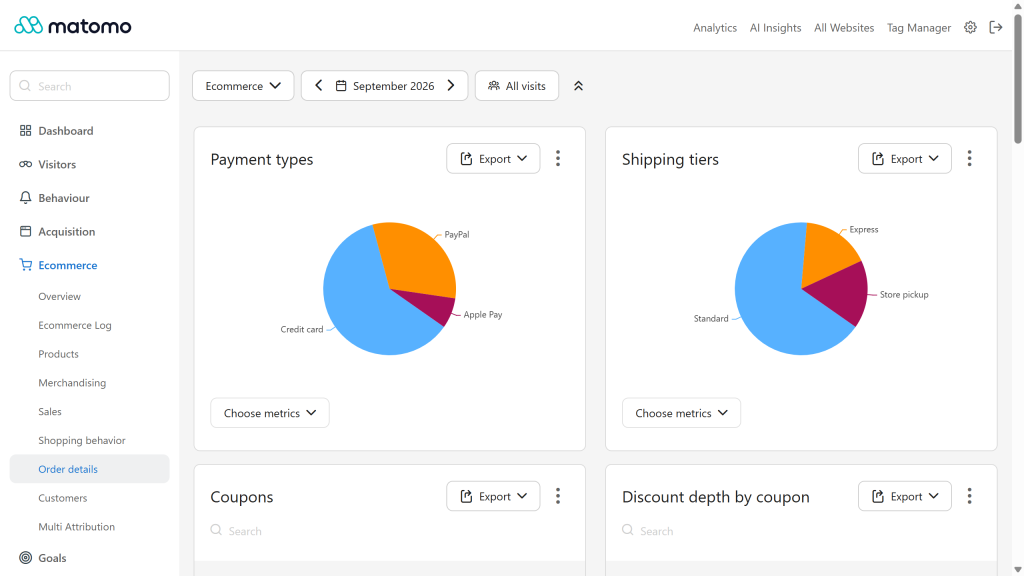
- Order details: orders, revenue and average order value by coupon, payment type, shipping tier, customer type (new or returning), affiliation and currency.
- Transactions: every order with its revenue, tax, shipping, items, coupon, payment and shipping choices.
- Sales by source / medium, the way GA4 shows it:
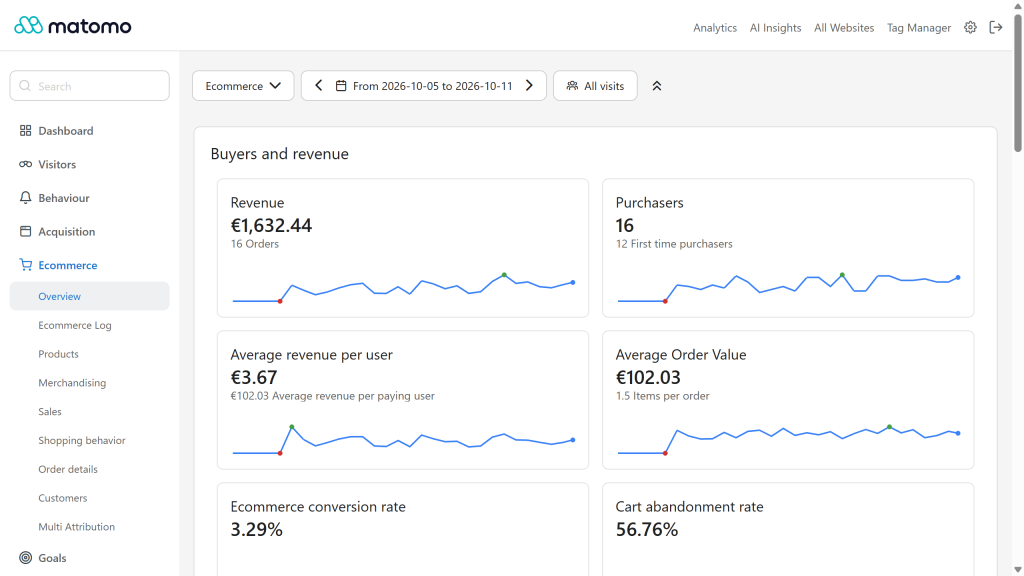
google / organic,newsletter / email,(direct) / (none). - Buyers and revenue: purchasers, first time purchasers, revenue per user (ARPU) and per paying user (ARPPU), average order value and items per order, conversion rate and cart abandonment rate.
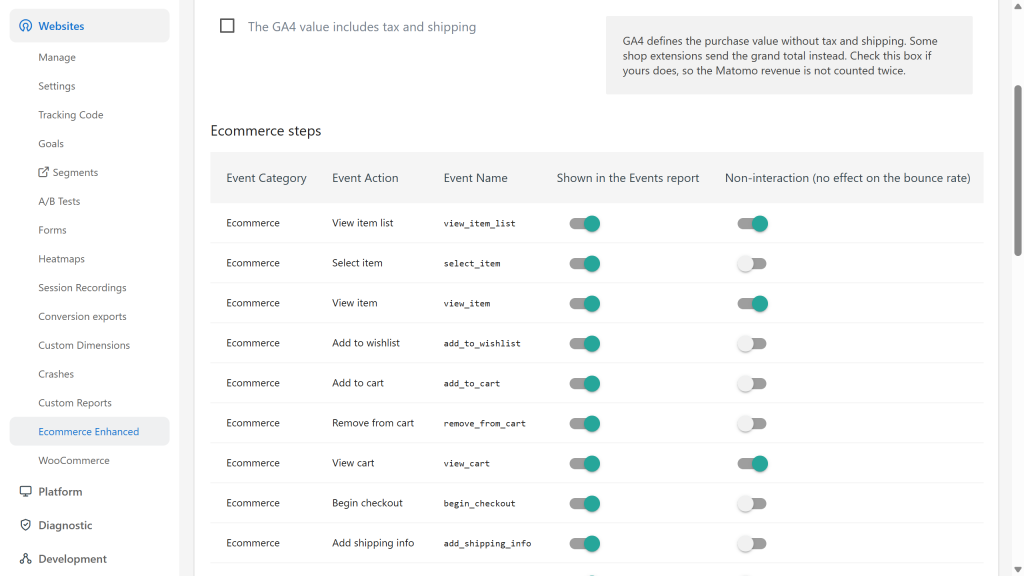
- Every step also appears in the Events report (category "Ecommerce"), with viewing steps kept out of the bounce rate, as in GA4.
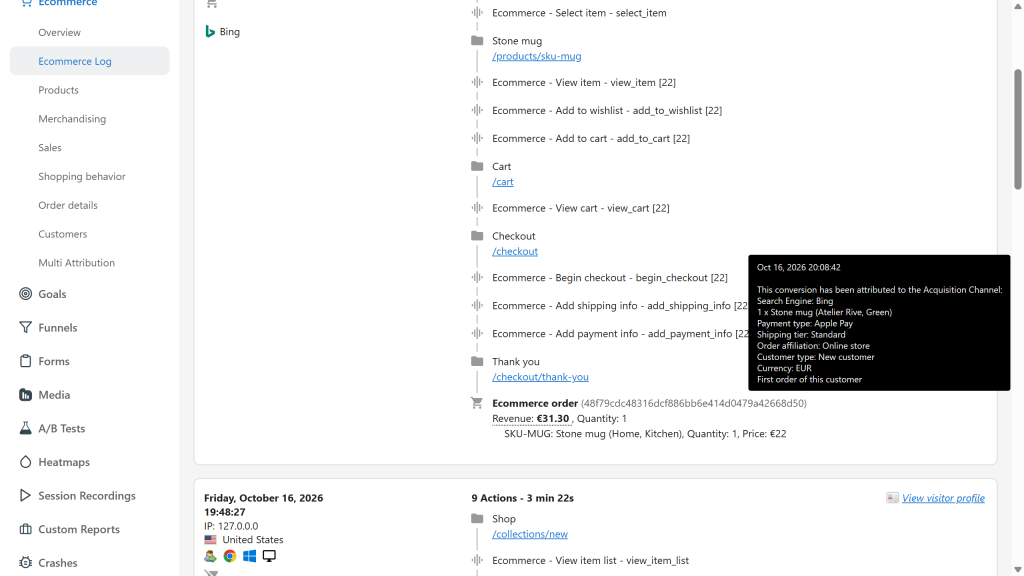
- The visitor log shows the detail of each step: products, list, promotion, coupon, payment, shipping and order rank of the customer.
- One click creates the funnels of the Funnels plugin, when it is activated: the sales funnel of the ecommerce orders, and the Purchase journey and Checkout journey of GA4.
Native Matomo integration
- 23 new segments (
eeItemBrand,eeOrderCoupon,eeStep,eePromotionName...), for example "visits that added to cart without buying":eeStep==add_to_cart;eeStep!=purchase. - Every field available in Custom Reports, the segment editor, the API, scheduled reports and dashboards.
- GDPR tools (data subject export and deletion) and the deletion of old raw data cover every stored row.
What Premium adds
Every Premium report is visible in the free edition with a preview, so you know what you get. Premium shows them with your data, from the data already collected: no new tracking, no history lost, no report to rebuild.
- Active users and buyers (Premium): 1, 7 and 30 day active users and buyers (DAU, WAU, MAU) and the DAU / MAU stickiness ratio.
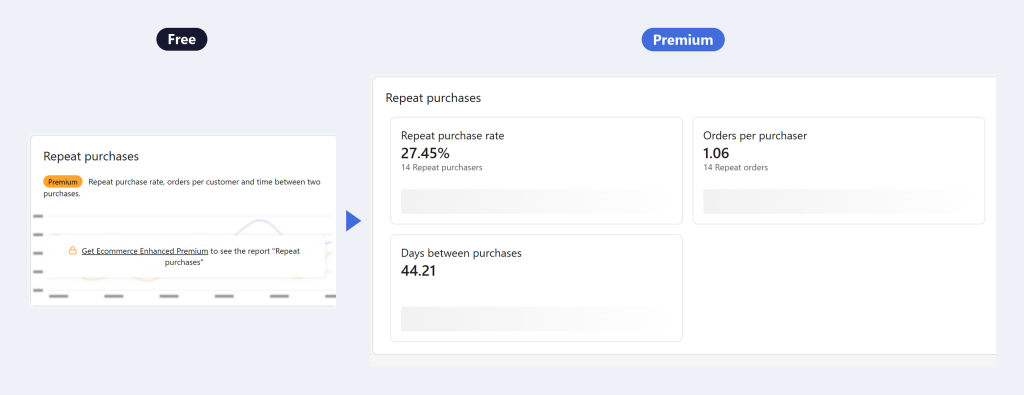
- Customers (Premium): repeat purchase rate, time between purchases, retention cohorts by day, week or month of the first purchase as a heatmap, customer lifetime value and RFM segments.
- Acquisition (Premium): sales by first user source, time and visits from the first visit to the first purchase, abandoned carts by channel.
- Shopping behavior (Premium): the shopping and checkout funnels split by device and by channel.
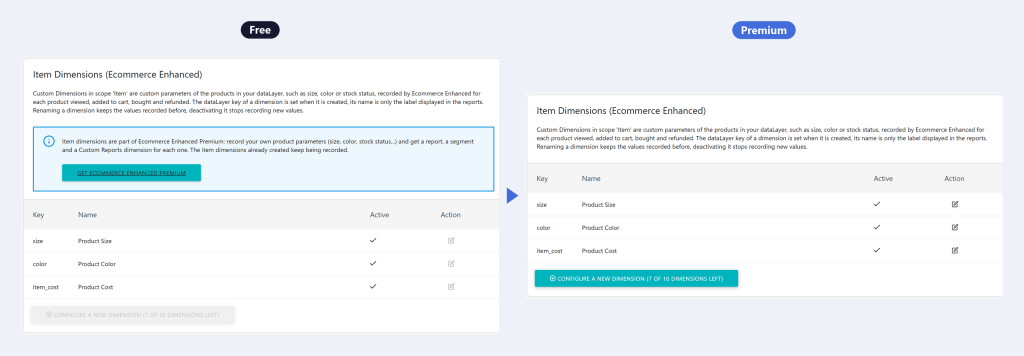
- Item dimensions (Premium): your own product parameters (size, color, stock status...), configured as an "Item" scope of Custom Dimensions, each with a report in the Products dimension switcher, a segment and a Custom Reports dimension.
- Merchandising (Premium): products bought together (market basket analysis), most abandoned products, product profit and margin from your cost of goods.
- Orders (Premium): refunds, refund rate by product and net revenue, discount depth by product, coupon and category, orders by basket size and value, revenue of foreign currency orders converted to your website currency.
Why the GA4 format
GA4 ecommerce is the most widely used ecommerce dataLayer format. Most shop platforms and their extensions already emit it (WooCommerce with GTM4WP or Google Analytics for WooCommerce, Shopify, Magento, PrestaShop, Elevar, Stape and many more). Reading it means your shop does not need any Matomo specific development. The legacy Universal Analytics Enhanced Ecommerce format and gtag() calls are read as well.
Official GA4 references:
- Measure ecommerce
- Recommended events reference: every event and parameter Ecommerce Enhanced reads
-
Buyers and revenue in the Ecommerce overview
-
Ecommerce steps in the visitor log
-
Ecommerce steps settings
-
Payment types and shipping tiers
-
Premium Item dimensions free preview and report
-
Premium Repeat purchases free preview and report
-
Products report by brand category and variant
-
Purchase journey funnel
-
Shopping behavior and checkout behavior
Installation
Install and activate the plugin, then enable Ecommerce for your website (Administration, Websites, Manage). Then turn on the reading of the dataLayer, with one of the two methods below.
Recommended: Matomo Tag Manager
- In your container, edit the "Matomo Configuration" variable: check "Read the GA4 ecommerce dataLayer (Ecommerce Enhanced)" and "Register As Default Tracker", so ecommerce events reach the Matomo tracker of the container.
- Edit the container itself (Tag Manager, Manage Containers): check "Actively synchronise from the Google Tag Manager data layer" and leave "Ignore Google Tag Manager data layer" unchecked. Shop extensions push their GA4 events to
dataLayer: the container copies every push into its own data layer, where Ecommerce Enhanced reads it. Without this setting, thedataLayerpushes of your shop are not seen. - Publish a new version of the container.
At Openmost we recommend this method: the settings live in your container, so they are turned on, tested in preview mode and versioned without touching the code of your shop.
Ecommerce events pushed directly to the Matomo Tag Manager data layer, _mtm.push({event: 'purchase', ecommerce: {...}}), are read as well. Ecommerce Enhanced reads the container data layer only, so a push synchronised from the dataLayer is never counted twice.
Other method (not recommended): the classic tracking code
Without Matomo Tag Manager, add one line to your Matomo tracking code, before trackPageView:
var _paq = window._paq = window._paq || [];
_paq.push(['EcommerceEnhanced::enable']);
_paq.push(['trackPageView']);
// ... the rest of your tracking code
The tracker replays the ecommerce events already in the dataLayer, then reads every new push. If your dataLayer has another name:
_paq.push(['EcommerceEnhanced::enable', {dataLayerName: 'myDataLayer'}]);
It works the same way, but every change then means editing the tracking code of your shop.
Without a dataLayer, or choosing each event yourself
With either method above, Ecommerce Enhanced reads every ecommerce push of the dataLayer: this is the recommended setup. To decide yourself which events are sent and when, for example from your own Matomo Tag Manager tags, do not turn on the reading of the dataLayer and send each event from JavaScript instead, with the same GA4 fields. The mapping, reports and settings stay the same:
_paq.push(['EcommerceEnhanced::track', 'add_to_cart', {
  currency: 'EUR',
  value: 30.00,
  items: [{item_id: 'SKU_123', item_name: 'Organic tee', item_variant: 'Red', price: 30.00, quantity: 1}]
}]);
An object shaped like a dataLayer push (GA4, Universal Analytics or gtag() arguments) can also be passed as is:
_paq.push(['EcommerceEnhanced::push', {event: 'purchase', ecommerce: { /* GA4 purchase fields */ }}]);
_paq.push(['EcommerceEnhanced::setCurrency', 'EUR']) sets the currency used when an event has none, like gtag('set', {currency: 'EUR'}).
Expected dataLayer pushes
Clear the previous ecommerce object before each push, as GA4 recommends: dataLayer.push({ecommerce: null});. Ecommerce Enhanced reads each push on its own, the reset is harmless.
Item fields
Every items entry can carry these fields. item_id or item_name is required.
item_id
product SKU (also id, sku, variant_id)
item_name
product name (also name, title)
item_brand
brand
item_category to item_category5
categories (a single "A/B/C" category is split, as in Universal Analytics)
item_variant
variant, kept apart even when two variants share a SKU
price
unit price, already discounted
quantity
quantity, 1 when missing
discount
unit discount
coupon
item coupon
item_list_id, item_list_name, index
list the item was shown or selected in, and its position
promotion_id, promotion_name, creative_name, creative_slot
promotion the item came from
affiliation, location_id, item_group_id
supplier or store, physical location, parent product
any other field
item dimension (Premium), recorded when an item dimension with this dataLayer key exists, see Item dimensions
Item list and promotion fields set on the event apply to the items that lack them. When an item is selected in a list or a promotion (select_item, select_promotion), it keeps that list or promotion when it is later added to cart and bought.
view_item_list
dataLayer.push({
  event: 'view_item_list',
  ecommerce: {
    item_list_id: 'related_products',
    item_list_name: 'Related products',
    items: [
      {item_id: 'SKU_123', item_name: 'Organic tee', item_brand: 'Lumen', item_category: 'Apparel', price: 30.00, index: 1}
    ]
  }
});
Read: item_list_id, item_list_name, items. The first 30 items of a list are recorded.
select_item
dataLayer.push({
  event: 'select_item',
  ecommerce: {
    item_list_id: 'related_products',
    item_list_name: 'Related products',
    items: [{item_id: 'SKU_123', item_name: 'Organic tee', index: 1}]
  }
});
Read: item_list_id, item_list_name, items. The list is remembered for the item.
view_item
dataLayer.push({
  event: 'view_item',
  ecommerce: {
    currency: 'EUR',
    value: 30.00,
    items: [{item_id: 'SKU_123', item_name: 'Organic tee', item_brand: 'Lumen', item_category: 'Apparel', item_variant: 'Red', price: 30.00}]
  }
});
Read: currency, value, items. When it is pushed before the first page view, the native Matomo product view is also set.
add_to_wishlist
dataLayer.push({
  event: 'add_to_wishlist',
  ecommerce: {currency: 'EUR', value: 30.00, items: [{item_id: 'SKU_123', item_name: 'Organic tee', price: 30.00}]}
});
Read: currency, value, items.
add_to_cart and remove_from_cart
dataLayer.push({
  event: 'add_to_cart',
  ecommerce: {
    currency: 'EUR',
    value: 60.00,
    items: [{item_id: 'SKU_123', item_name: 'Organic tee', item_variant: 'Red', price: 30.00, quantity: 2}]
  }
});
Read: currency, value, items. GA4 only sends the items added or removed, while a native Matomo cart update needs the whole cart: the plugin keeps a copy of the cart in the browser, applies each add and removal to it and sends the whole cart, so abandoned carts are reported natively. remove_from_cart has the same shape. See Browser storage and consent.
view_cart
dataLayer.push({
  event: 'view_cart',
  ecommerce: {currency: 'EUR', value: 60.00, items: [/* every item of the cart */]}
});
Read: currency, value, items. The items list the whole cart: the cart kept by the plugin is corrected if it differs.
begin_checkout
dataLayer.push({
  event: 'begin_checkout',
  ecommerce: {currency: 'EUR', value: 60.00, coupon: 'SUMMER10', items: [/* every item of the cart */]}
});
Read: currency, value, coupon, items. Checkout step 1.
add_shipping_info
dataLayer.push({
  event: 'add_shipping_info',
  ecommerce: {currency: 'EUR', value: 60.00, shipping_tier: 'Express', items: [/* cart items */]}
});
Read: currency, value, coupon, shipping_tier, items. Checkout step 2. The shipping tier is copied to the order when the purchase event lacks it.
add_payment_info
dataLayer.push({
  event: 'add_payment_info',
  ecommerce: {currency: 'EUR', value: 60.00, payment_type: 'Credit card', items: [/* cart items */]}
});
Read: currency, value, coupon, payment_type, items. Checkout step 3. The payment type is copied to the order when the purchase event lacks it.
purchase
dataLayer.push({
  event: 'purchase',
  ecommerce: {
    transaction_id: 'T_12345',
    currency: 'EUR',
    value: 60.00,
    tax: 12.00,
    shipping: 4.90,
    coupon: 'SUMMER10',
    affiliation: 'Online store',
    payment_type: 'Credit card',
    shipping_tier: 'Express',
    customer_type: 'new',
    items: [
      {item_id: 'SKU_123', item_name: 'Organic tee', item_brand: 'Lumen', item_variant: 'Red', price: 30.00, quantity: 1},
      {item_id: 'SKU_123', item_name: 'Organic tee', item_brand: 'Lumen', item_variant: 'Blue', price: 30.00, quantity: 1}
    ]
  }
});
Read: transaction_id (required), currency, value, tax, shipping, discount, coupon (several codes separated by commas), affiliation, payment_type, shipping_tier, customer_type (new or returning, the Google Ads new_customer flag is read too), customer_lifetime_value, items.
The native Matomo order is recorded with a revenue of value + tax + shipping, as GA4 defines value without tax and shipping. If your shop sends the grand total in value, check "The GA4 value includes tax and shipping" in the website settings. A purchase is recorded once: reloading the confirmation page does not record it again.
refund
dataLayer.push({
  event: 'refund',
  ecommerce: {
    transaction_id: 'T_12345',
    currency: 'EUR',
    value: 30.00,
    items: [{item_id: 'SKU_123', item_variant: 'Red', price: 30.00, quantity: 1}]
  }
});
Read: transaction_id, currency, value, tax, shipping, items (partial refund). The refund is matched to its order, even when Matomo anonymises order ids.
view_promotion and select_promotion
dataLayer.push({
  event: 'view_promotion',
  ecommerce: {
    promotion_id: 'summer_sale',
    promotion_name: 'Summer sale',
    creative_name: 'summer_banner',
    creative_slot: 'home_hero',
    items: [{item_id: 'SKU_123', item_name: 'Organic tee'}]
  }
});
Read: promotion_id, promotion_name, creative_name, creative_slot, items. select_promotion has the same shape, and the promotion is remembered for its items.
Search results
A page of search results is an item list: send it as view_item_list with a list of its own, for example item_list_id: 'search_results' and item_list_name: 'Search results'. It then appears in the item list reports, and the products clicked or bought from it are attributed to it. The terms searched are already in the Site Search reports of Matomo.
Other formats
- gtag:
gtag('event', 'purchase', {...})calls are read like the GA4 pushes above,gtag('set', {currency: 'EUR'})sets the default currency. - Universal Analytics Enhanced Ecommerce:
impressions,click,detail,add,remove,checkout(step 1 begin checkout, 2 shipping, 3 payment),checkout_option,purchase,refund,promoViewandpromoClickare converted to their GA4 events. UArevenueis the grand total and is converted to the GA4value. - Event names prefixed with
dl_(Elevar) or suffixed with_stape(Stape) are recognised. - Event names otherwise follow GA4 exactly, letter case aside:
add_to_cartis read,addToCartorAddToCartis ignored.
What is never recorded
user_data and the other event level fields outside the GA4 ecommerce parameters are never read. Coupon codes are stored as a hash unless "Keep coupon codes readable" is turned on in the website settings. Other product fields are only sent by the tracker, and recorded, when you create an item dimension for them: choosing what they hold is the responsibility of the site owner and their DPO.
Browser storage and consent
To send whole carts and to never record an order twice, the tracker keeps a little state in the browser:
mtm_ee_cart_<idSite>inlocalStorage: the copy of the cart. It is shared by every tab and kept between visits, like the shop cart, and expires after 48 hours without change.mtm_ee_checkout_<idSite>insessionStorage: the shipping and payment choices of the current checkout.mtm_ee_sel_<idSite>insessionStorage: the list and promotion of the products selected in the current tab, to credit them when the product is added to cart or bought.mtm_ee_txinlocalStorage: a hash of the last 50 order ids already sent.
This storage follows the cookie rules of your Matomo tracker. When cookies are disabled (disableCookies) or wait for consent (requireCookieConsent before rememberCookieConsentGiven), nothing is written and the state only lives in the current page. When consent is withdrawn (forgetCookieConsentGiven, forgetConsentGiven or optUserOut), every key above is removed at once, and so is the copy kept in the page. Browser storage is subject to the same consent rules as cookies: if your site relies on a consent exemption for audience measurement, check with your DPO that it covers these keys.
Without browser storage, an add to cart on a new page only sends the item just added. Push view_cart and begin_checkout with every item of the cart, as GA4 expects: the plugin then corrects the cart it sends.
Website settings
Administration, Websites, Ecommerce Enhanced (website administrators):
- The GA4 value includes tax and shipping: for shops that send the grand total in
value. - Ecommerce steps: a table with one line per step, its event category (
Ecommerce), event action (Add to cart) and event name (the GA4 event name,add_to_cart), and two switches:- Shown in the Events report: the step is also a Matomo event. Switched off, it is still recorded in the Ecommerce Enhanced reports.
- Non-interaction: the step keeps the visit alive but does not count as an action, so it does not lower the bounce rate. Viewing steps (
view_item_list,view_item,view_cart,view_promotion) are switched on by default, as in GA4.
- Keep coupon codes readable (do not hash them): off by default, each code is hashed before it is stored, so single use and gift codes are never readable. Turn it on for shared promotional codes (
SUMMER10) you want to read in the reports. - Unit cost item parameter (Premium): the item dimension that holds the unit cost of goods, for the profit reports.
The same page creates the funnels of the Funnels plugin, when it is activated: the sales funnel of the ecommerce orders, and the Purchase journey and Checkout journey of GA4, named in the language of the user who creates them. A funnel that already exists is kept, recognised by its steps. A sales funnel configured by hand is never replaced: when it differs from the complete template, an "Update the sales funnel configuration" button applies the template. The steps must be shown in the Events report for Funnels to see them.
Item dimensions (Premium)
Custom parameters of your products, for example a size, a color or a stock status, are configured with Ecommerce Enhanced Premium in Administration, Websites, Custom Dimensions, in the "Item" scope added next to the visit and action scopes. Each item dimension has:
- a dataLayer key, set when it is created: the key of the parameter in the items of your dataLayer, for example
color; - a name, the label displayed in the reports, for example "Product Color", which can be changed at any time without touching the tracking.
dataLayer.push({
  event: 'add_to_cart',
  ecommerce: {
    items: [{
      item_id: 'SKU_123',
      item_name: 'Organic tee',
      price: 30,
      quantity: 1,
      color: 'Red'
    }]
  }
});
Add the parameter the same way to the items of every ecommerce event (view_item, begin_checkout, purchase...). Each item dimension then has a report in the dimension switcher of the Products report, a segment (eeItemDimension1...) and a Custom Reports dimension.
10 item dimensions are available per website. More can be added from the command line, up to 30, as for the visit and action scopes:
./console customdimensions:add-custom-dimension --scope=item --count=5
The tracker only sends the item keys of the active item dimensions of the website: their list is written into matomo.js, which Matomo rewrites as soon as an item dimension is created, renamed, activated or deactivated. If your website loads a copy of the tracker (CDN, self-hosted file), refresh that copy after changing your item dimensions, as after any change of the Matomo tracker.
Renaming an item dimension keeps the values recorded before, deactivating it stops recording new values. Only the item dimensions you create are stored, whatever their key: what they collect is the choice of the site owner and their DPO. Without Premium, the item dimensions already created are kept and still recorded, and they are listed marked "Premium" in the segment editor and in Custom Reports.
Reports
In the Ecommerce menu, in the order a shop owner reads them (Premium in italics):
- Overview: buyers and revenue (purchasers, first time purchasers, ARPU, ARPPU, average order value, items per order, conversion rate, cart abandonment rate) as sparklines and over time; refunds and net revenue; daily, weekly and monthly active users and buyers.
- Products: the native report, with Product Categories, Product Brands, Product Variants and one report per item dimension added to its dimension switcher, after Product Name, SKU and Category.
- Merchandising: product performance with views, wishlist and cart adds, purchases, item revenue and rates; item lists and promotions; products bought together; profit and margin by product, category and brand.
- Sales: sales by source / medium, next to the native sales by channel, campaign, page and location; sales by first user channel and source / medium.
- Shopping behavior: the shopping and checkout funnels with step and abandonment rates; the same journey by device type and by channel; abandoned carts by channel and source / medium, most abandoned products.
- Order details: transactions (every order with its revenue split and GA4 details); orders by basket size and by order value; payment types and shipping tiers (pies); coupons and discount depth by coupon, product and category; refunds over time and refunded products; affiliations and order currencies.
- Customers: repeat purchases, with the retention cohorts by day, week or month right below; new and returning customers; time to first purchase; lifetime value by channel; RFM segments.
Premium reports appear as locked cards, in the place of the report, until Ecommerce Enhanced Premium is activated.
Segments
Every stored field is a segment, also available in Custom Reports:
- order:
eeOrderCoupon,eeOrderPaymentType,eeOrderShippingTier,eeOrderCustomerType,eeOrderCurrency,eeOrderAffiliation; - cart and order lines:
eeItemBrand,eeItemVariant,eeItemListId,eeItemListName,eeItemCoupon,eeItemDiscount,eeItemAffiliation,eeItemLocationId; - shopping steps:
eeStep(GA4 event name),eeListId,eeListName,eeCheckoutStep,eeCheckoutOption,eePromotionId,eePromotionName,eePromotionCreativeName,eePromotionCreativeSlot; - item dimensions (Premium):
eeItemDimension1,eeItemDimension2...
For example eeStep==add_to_cart;eeStep!=purchase selects the visits that added to cart without buying.
Deactivating and uninstalling the plugin
The native Matomo ecommerce keeps working: carts and orders are always sent as native requests. While the plugin is deactivated its data is kept, but GDPR deletions and the deletion of old raw data no longer cover it.
Uninstalling the plugin keeps its data as well: the log_ee_order_item, log_ee_event and log_ee_event_item tables and the ee_* columns of log_conversion stay in the database, and installing the plugin again reuses them. Matomo itself deletes the website settings of a plugin when it is uninstalled.
Removing the data
To delete the data recorded by the plugin, run this command before deactivating or uninstalling it:
./console ecommerceenhanced:remove-data
./console ecommerceenhanced:remove-data --idsite=3,7
Without --idsite it deletes the data of every website. The native Matomo ecommerce data (orders, carts, products) is kept, and so are the reports already archived, which only hold totals. Then, to also drop the tables and columns, uninstall the plugin and run (with your table prefix):
DROP TABLE matomo_log_ee_order_item, matomo_log_ee_event, matomo_log_ee_event_item;
ALTER TABLE matomo_log_conversion DROP COLUMN ee_affiliation, DROP COLUMN ee_coupon, DROP COLUMN ee_currency,
    DROP COLUMN ee_customer_type, DROP COLUMN ee_payment_type, DROP COLUMN ee_shipping_tier;
Database backups made before keep their copy of the data: delete or expire them as your retention policy requires.
Large databases
Installing the plugin adds six empty columns to the log_conversion table. On MySQL 8.0.12+ and MariaDB 10.3.2+ this is instant. On older versions the table is rebuilt: run ./console core:update from the command line on large databases.
Does my shop need any development?
Usually not. WooCommerce (with GTM4WP or Google Analytics for WooCommerce), Shopify, Magento, PrestaShop, Elevar, Stape and most shop extensions already push GA4 ecommerce events to the dataLayer. Enable the plugin with one line in your tracking code, or one checkbox in Matomo Tag Manager, and those events are read as they are. The Documentation tab lists every push the plugin expects.
Do I need Matomo Tag Manager or Google Tag Manager?
Matomo Tag Manager is the recommended way: check "Read the GA4 ecommerce dataLayer (Ecommerce Enhanced)" in the "Matomo Configuration" variable of your container and "Actively synchronise from the Google Tag Manager data layer" in the container settings, and the settings are tested in preview mode and versioned without touching your shop. Without Tag Manager, _paq.push(['EcommerceEnhanced::enable']) in your Matomo tracking code works too. Google Tag Manager is not needed: the plugin reads the dataLayer your shop already fills.
How do I check that it works?
Open the Visitor log of your website after a test visit: each ecommerce step (product view, add to cart, checkout, purchase) is listed with its products, list, promotion, coupon, payment and shipping. The steps also appear in the Events report, under the "Ecommerce" category.
Nothing is recorded, my tracker is self-hosted or served from a CDN
The plugin adds its code to the matomo.js file served by your Matomo. Matomo updates this file automatically when it is writable, otherwise run ./console custom-matomo-js:update. A copy of matomo.js hosted elsewhere (CDN, your own server, a WordPress plugin bundling the tracker) does not contain it: update that copy from your Matomo after activating the plugin and after each plugin update.
Why are the reports empty before the activation date?
The plugin records the details of each ecommerce step from its activation on: earlier visits never sent them. Your native Matomo ecommerce reports keep their full history.
I updated the plugin, why do past reports still show the old numbers?
Reports are built during archiving. To rebuild past periods with the latest version, invalidate and re-archive them, for every period type (the default of the command), for example:
./console core:invalidate-report-data --sites=1 --dates=2026-01-01,2026-12-31
./console core:archive
Adjust --sites and --dates to your data.
Why is the revenue different from my shop back office?
GA4 defines value without tax and shipping, so the plugin records an order revenue of value + tax + shipping. If your shop already sends the grand total in value, check "The GA4 value includes tax and shipping" in Administration, Websites, Ecommerce Enhanced. Refunds and cancelled orders are not subtracted from the native revenue: refunds and net revenue are reported by Ecommerce Enhanced Premium.
Can an order be counted twice?
No. Reloading the confirmation page does not send the order again, and Matomo keeps a single order per order id.
Is it compatible with consent banners and cookieless tracking?
Yes. The plugin follows the cookie settings of your Matomo tracker: with disableCookies, or while requireCookieConsent waits for consent, nothing is written in the browser, and withdrawing consent removes what was stored at once. user_data (emails, phone numbers, addresses, hashed identifiers) is never read, a product field outside the GA4 ones is only sent when you created an item dimension for it, and coupon codes are hashed by default. See "Browser storage and consent" in the Documentation tab.
Do I need the Funnels plugin?
No. The shopping and checkout funnels are built in. When the Funnels plugin is activated, the plugin settings can also create its sales funnel and the GA4 Purchase journey and Checkout journey in one click.
What happens if I deactivate the plugin?
Carts and orders keep being sent as native Matomo ecommerce requests, so your native Ecommerce reports, goals and abandoned carts keep working. The data recorded by the plugin is kept, also after uninstalling, and is used again if you reinstall it.
What does Premium add, and do I lose data by upgrading later?
Ecommerce Enhanced Premium adds customer, retention, merchandising, refund and multi-currency reports, previewed in the free edition. It reads the data the free plugin already collects, so upgrading later shows your full history without any tracking change. More on Ecommerce Enhanced Premium.
Will it slow down my large Matomo database?
Installing the plugin adds six empty columns to the log_conversion table, instant on MySQL 8.0.12+ and MariaDB 10.3.2+. On older versions run ./console core:update from the command line. Reports are built during archiving, like the native ones.
Which versions of Matomo are supported?
Version 6.x of the plugin supports Matomo 6 (PHP 8.1 or later). Use the 5.x versions of the plugin for Matomo 5 (PHP 7.2.5 or later).
Version
6.0.2
License
Keywords
variant, funnel, ecommerce, e-commerce, ga4, datalayer, enhanced-ecommerce, brand, coupon, promotion, checkout
Last Updated
Oct 21st 2026
Requirements
Matomo >=6.0.0-b1,<7.0.0-b1
PHP >=8.1.0
Matomo 5.x, Matomo 6.x
Downloads
1
Changelog
Support
ronan@openmost.com
View and download this plugin for a specific Matomo version:
- Matomo 5.x
- Matomo 6.x (currently selected)