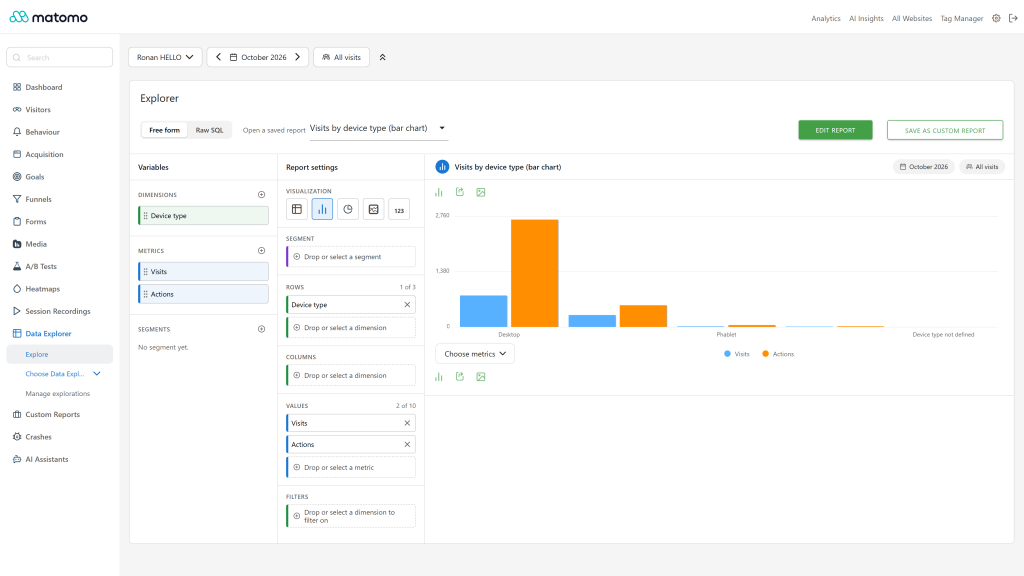
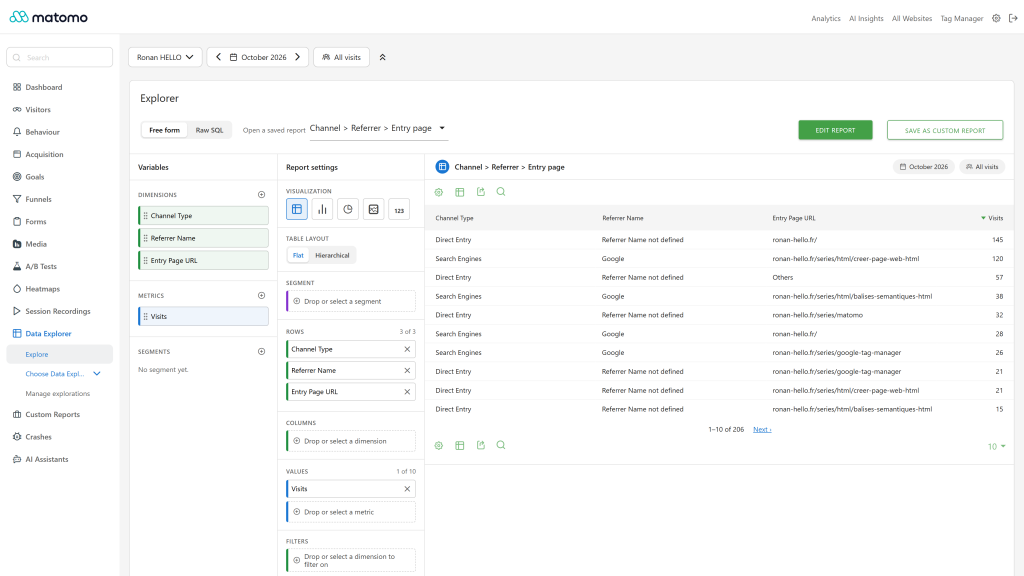
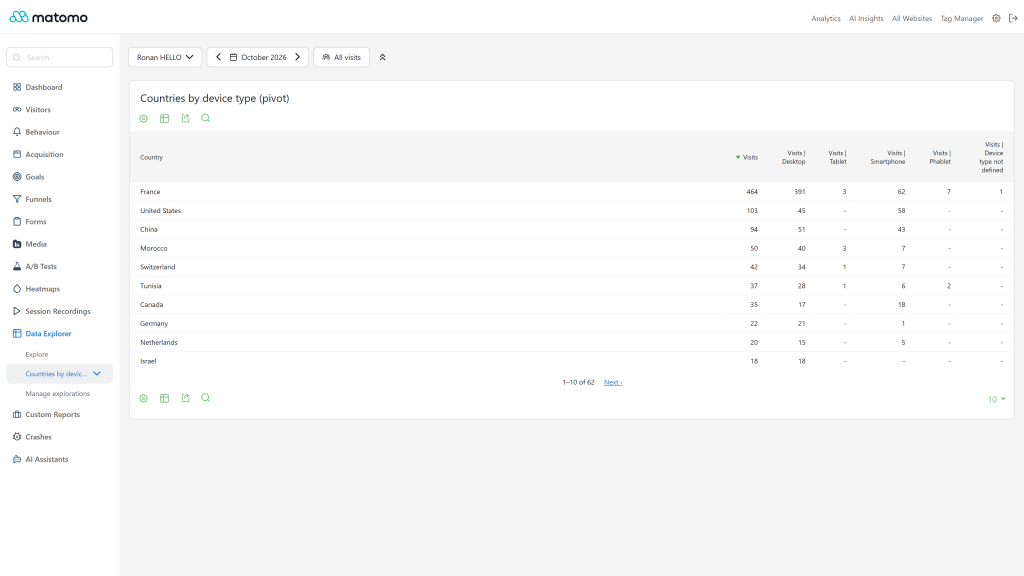
Explore your Matomo data the way you would in GA4 Explorations, then save the result as a report in the Matomo menu. Super users can also write raw SQL on the Matomo tables, run through a read-only database user.
Features
- Free-form explorer: drag dimensions, metrics and segments into rows, columns, values and filters, and see the result as you build it. The preview and the saved report follow the same row limits, so a saved report shows what you previewed.
- Visualizations: the Matomo table, evolution graph, bar chart, pie chart and sparkline (KPI card), the same in the explorer and in the saved report. A table shows a totals row, and any report can apply one saved segment as a filter.
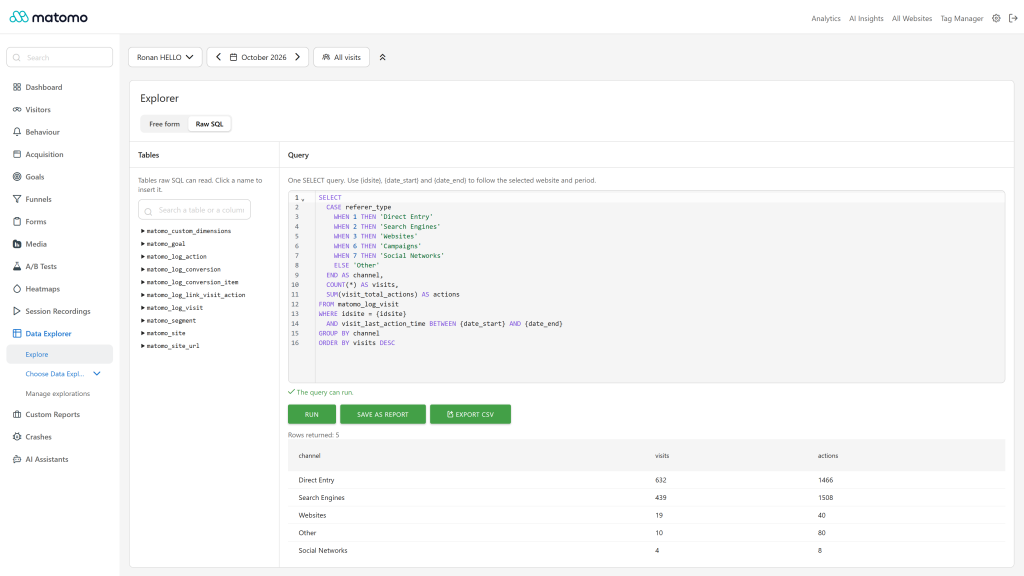
- Raw SQL for super users: a SQL editor with a table and column browser, a validity check before running, CSV export, and placeholders for the site and the period. Queries run with a read-only database user that you create.
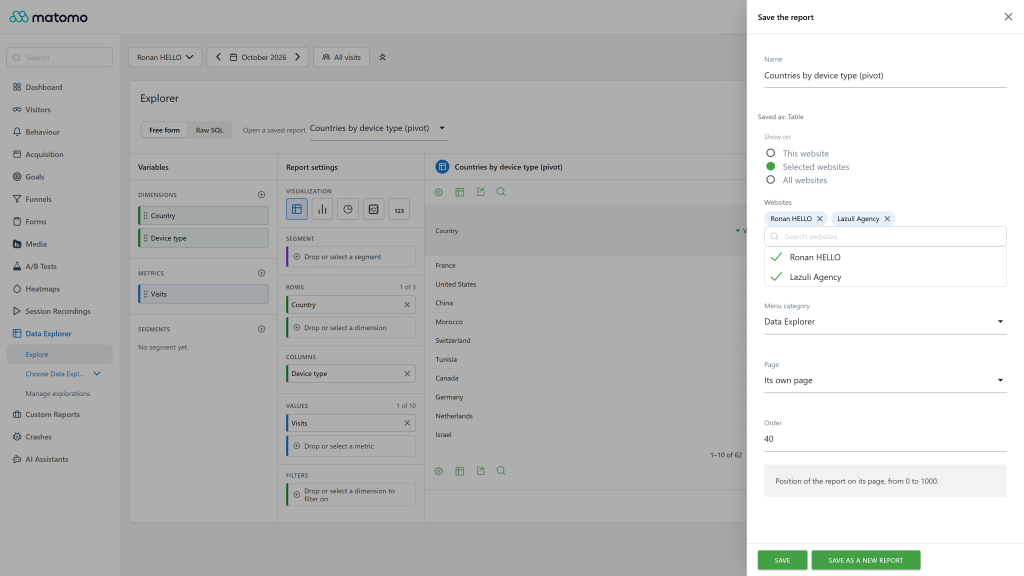
- Saved reports in the menu: a saved report becomes a page of the Matomo reporting menu, in the category and subcategory you pick, for one website, a list of websites or all websites. It also works as a dashboard widget, in the API, in exports and in scheduled reports like any other report. A raw SQL report can be scheduled when every column of its select list has a name (
AS alias or a plain column), * and unnamed expressions are only known once the query ran.
- Export: the explorer result has the Matomo export of reports (CSV, TSV, XML, JSON and more).
- Manage explorations: a page of the Data Explorer menu lists the reports saved on the website, with links to their page and to the explorer, a search and deletion.
- Roles: users with view access open the saved reports and explore the visual explorer (the anonymous user only opens saved reports), users with write access save reports on the websites they can write to, admins edit or delete any report of their websites, and only super users run raw SQL and save a report for all websites.
- Translated into 12 languages.
Requirements
- Matomo 5.12.0 or later (below 6.0.0).
- MySQL 5.7 or later, or MariaDB, as required by Matomo. PHP version as required by your Matomo.
- For raw SQL only: a MySQL user able to create another read-only user.
Read-only SQL user setup
Raw SQL never runs with the Matomo database user. Open Administration > System > Data Explorer (super user): the page shows the statements to create a user that can only read the allowed tables, and the section to add to config/config.ini.php.
- Run the displayed
CREATE USER and GRANT SELECT statements as a MySQL administrator, with your own strong password instead of the placeholder. There is one GRANT SELECT per table, never a grant on the whole database.
- Add the displayed block to
config/config.ini.php with the same password:
[DataExplorer]
readonly_username = "matomo_readonly"
readonly_password = "your-password"
Add readonly_host, readonly_port, readonly_dbname, readonly_unix_socket or readonly_tables_prefix only when this user connects somewhere else than Matomo. Anything that is not set follows the [database] section.
The setup page then shows the state: ready, missing grants (with the lines to run), a user that can write or reads too much (raw SQL stays disabled), or a failed connection.
The 11 tables that raw SQL can read are log_visit, log_link_visit_action, log_conversion, log_conversion_item, log_action, log_page_view_time, site, site_url, goal, custom_dimensions and segment. Every other table is refused, including the archive tables and the user, option and plugin tables.
Configuration
All keys go in a [DataExplorer] section of config/config.ini.php. At install, only the row cap keys and dataexplorer_sql_row_limit are written there, with their current values. The per-dimension keys _dimensions_N are written as concrete numbers, so a later edit of a _default key does not change them: edit the _dimensions_N keys directly. Every other key is optional and uses its default when absent.
Key
Default
Meaning
datatable_archiving_maximum_rows_dataexplorer_default
core value (500)
Rows kept in the main table of a report, the rest is summed into "Others"
datatable_archiving_maximum_rows_dataexplorer_dimensions_N
the default above
Same cap for reports with N row dimensions (1 to 9)
datatable_archiving_maximum_rows_subtable_dataexplorer_default
100
Rows kept in each subtable
datatable_archiving_maximum_rows_subtable_dataexplorer_dimensions_N
the default above
Same for subtables of reports with N row dimensions (2 to 9)
dataexplorer_max_dimensions
3
Row dimensions allowed in a report, from 1 to 9
dataexplorer_sql_row_limit
core value (50000)
Hard cap on the rows one SQL statement of the visual explorer reads
dataexplorer_tuple_chunk_size
1000
Most label combinations one SQL statement of the visual explorer filters on: deeper levels of a report run in batches of this size
raw_sql_row_limit
10000
Rows a raw SQL query returns
max_execution_time_seconds
30
Time limit of a raw SQL query
raw_sql_cache_ttl
300
Seconds a raw SQL result is cached, 0 disables the cache
raw_sql_max_points
30
Points of a raw SQL line chart or KPI sparkline (the query runs once per point)
dataexplorer_sql_max_length
65536
Longest accepted query, in bytes
dataexplorer_sql_max_subqueries
50
Most subqueries and UNION branches in one query
invalidation_months
6
Months of history invalidated when a report is saved
readonly_*
none
Connection of the read-only user, see above
readonly_charset, readonly_collation, readonly_adapter
follow [database]
Advanced, optional: set only if the read-only connection needs different values
Raising the row caps or the number of dimensions makes the archives bigger and slower. A higher number of dimensions multiplies the subtables of each report. Lowering dataexplorer_max_dimensions disables the saved reports that use more row dimensions: they leave the menu and stop being archived until the value is raised again.
Archiving
Saved visual reports are archived by core:archive like the core reports, so they open fast and work with segments, periods, the API and scheduled reports. When you save a report that computes something new (dimensions, metrics, filters, segment, visualization), the last invalidation_months months of history are invalidated and rebuilt by the next archiving run. A rename or a move in the menu keeps the history, and placing a report on more websites only builds the history of the added websites. Saving a report on an instance that relies only on browser-triggered archiving fills its history on the next full archiving run, not instantly.
Raw SQL reports are not archived: they run live on the read-only connection, with the time limit, the row limit and the cache above.
Each raw SQL run is logged at the INFO level (query hash, user, site, status, duration, row count, never the values) and triggers the DataExplorer.rawSqlExecuted event. Set log_level = INFO in the [log] section to see these lines, or let an activity log plugin listen to the event.
Limits
- Raw SQL accepts a strict subset of SELECT.
WITH (common table expressions) is refused, and so are statements other than one SELECT, and some valid MySQL forms that the guard cannot prove safe. The refusal message points at the part of the query it could not accept.
- The placeholders
{idsite}, {date_start} and {date_end} work in WHERE, ON and HAVING conditions and inside select expressions, for example SUM(v.visit_last_action_time >= {date_start}) or CASE WHEN v.idsite = {idsite} THEN 1 END. A bare placeholder as a whole select column or in GROUP BY is refused: wrap it in parentheses, ({date_start}) AS start.
- A query that is not provably limited to the website of the report is flagged as a warning in the editor. It cannot be saved on a site, and a saved one is not run, until every per-site table is filtered with
{idsite}.
- Only the 11 tables listed above can be read. Archive tables and plugin tables are not readable.
- A report has at most 10 metrics, and a KPI card exactly one.
- The visual preview uses the same row caps as saved reports (500 rows per table by default, see the Configuration table).
- Phase one supports free-form explorations only.
FAQ
Can a user with view access see raw SQL reports? Yes, a saved report is a report like the others: view access opens it. Only super users write or edit the SQL. The anonymous user (public dashboards) is served the cached result only: a raw SQL report shows its data once a signed-in user has opened it for the same period, so a public page never triggers a query on the database.
Does raw SQL see other websites? A query is checked against the website of the report. When the guard cannot prove that every per-site table is filtered with {idsite}, the editor flags it and the query cannot be saved on a site or run as a saved report.
Can I use it without raw SQL? Yes. The visual explorer needs no extra database user.
Privacy and data
Everything runs inside your Matomo and its database. The plugin sends no data to third parties.
Need help with Matomo?
Openmost is an official Matomo Implementation Partner. We design, audit and extend Matomo setups, see openmost.com.