AI-Powered Report Insights
Get instant AI-generated insights for any Matomo report. The plugin adds an "Insights" button to all report widgets that analyzes your data and provides actionable recommendations.
- Works with all report types (visitors, actions, referrers, goals, custom dimensions, custom reports, etc.)
- Supports data tables, evolution graphs, and series visualizations
- Conversation mode: ask follow-up questions about your report data
Dedicated AI Chat
A full-featured chat interface for asking questions about your analytics data.
- Accessible from the main menu under "ChatGPT"
- Real-time streaming responses (with automatic fallback for unsupported servers)
Flexible Model Configuration
Choose from preset models or specify custom model names.
Preset Models:
- GPT-5.1 / GPT-5
- GPT-4.1 / GPT-4.1 Mini / GPT-4.1 Nano
- GPT-4o / GPT-4o Mini
- GPT-4 Turbo
- o3 / o3 Mini
- o1 / o1 Mini / o1 Pro
Custom Models:
Specify any model name to use models not in the preset list, perfect for:
- New OpenAI models
- Self-hosted LLMs (LLaMA, Mistral, etc.)
- Other OpenAI-compatible providers
Multi-Site Configuration
Configure different AI settings per website using Measurable Settings:
- Override system-wide host, API key, and model per site
- Customize prompts for specific websites
- Leave empty to use system defaults
Custom Host Support
Connect to any OpenAI-compatible API endpoint:
- OpenAI (default)
- Azure OpenAI
- Self-hosted solutions (Ollama, LocalAI, vLLM, etc.)
- Other providers (Anthropic via proxy, Mistral, etc.)
Note: API key is optional when using custom hosts, making it easy to connect to local LLM instances.
Customizable Prompts
Tailor the AI's behavior with custom prompts:
- Chat Base Prompt: Customize how the AI responds in conversations
- Insight Base Prompt: Customize how the AI analyzes report data
Multi-Language Support
Full translations available in:
- English
- German (Deutsch)
- Spanish (Espaol)
- French (Franais)
- Italian (Italiano)
- Dutch (Nederlands)
- Swedish (Svenska)
-
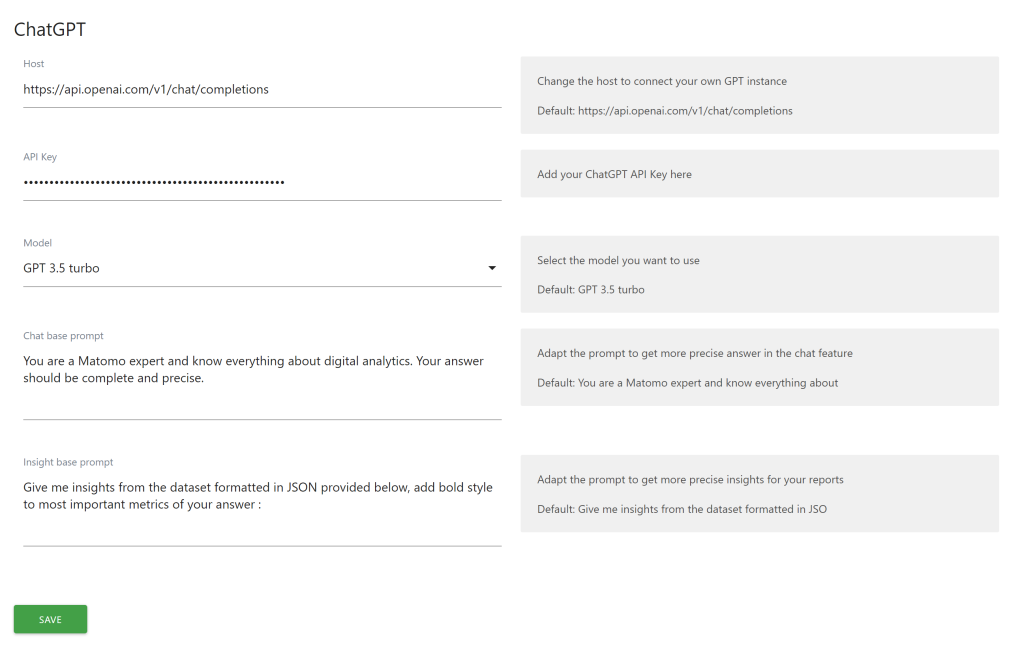
General settings
-
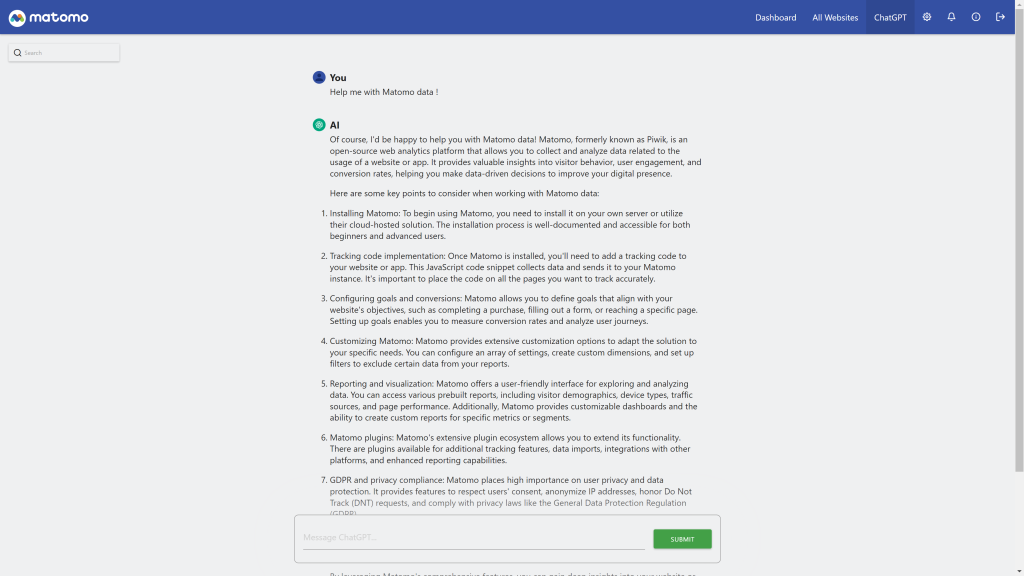
Get information from chat
-
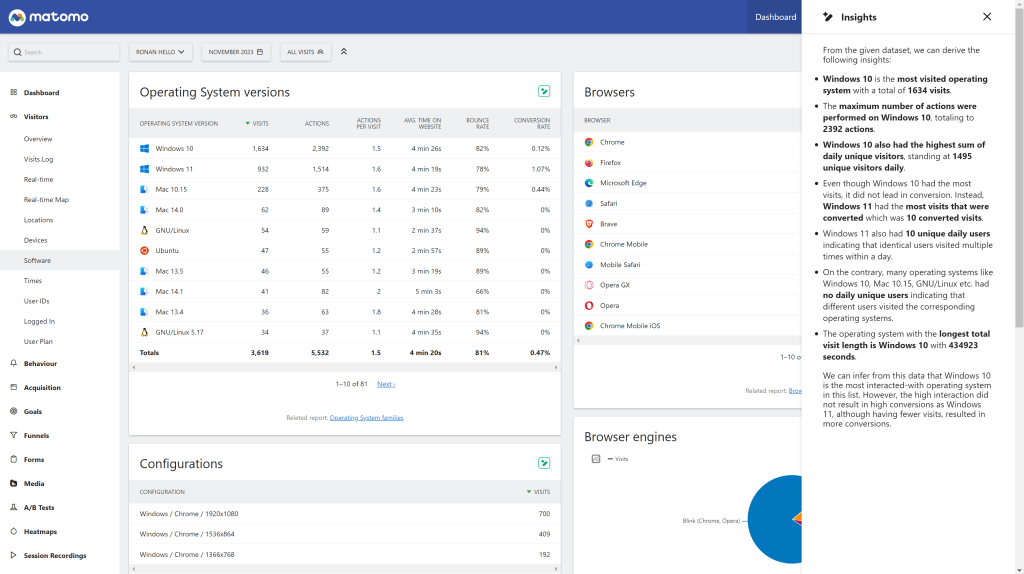
Insights from your reports in one click
-
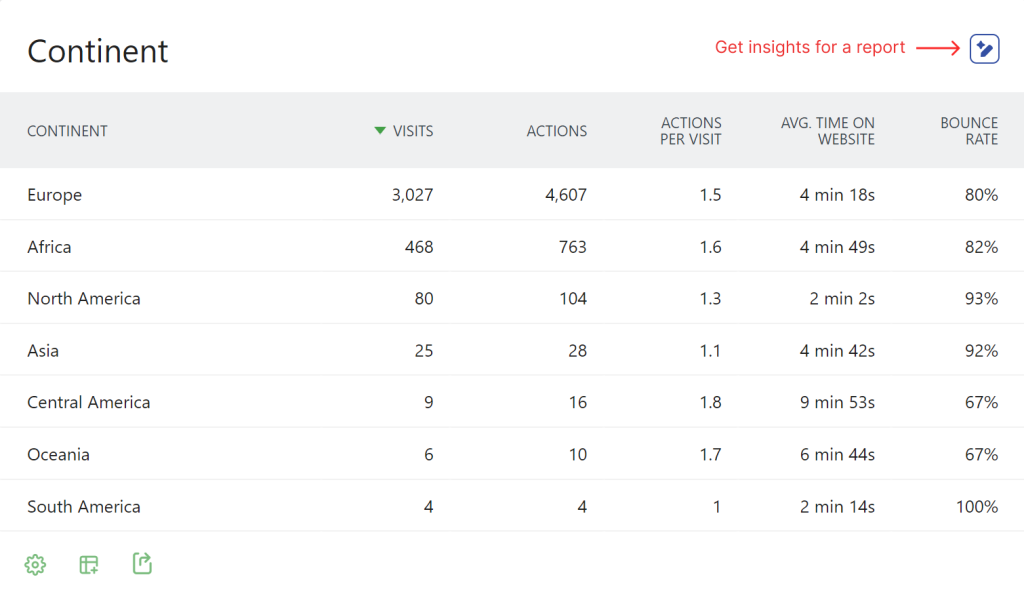
Simple click AI insight
Integrate AI-powered analytics insights and chat functionality into your Matomo instance using ChatGPT or any OpenAI-compatible API.
Features
AI-Powered Report Insights
Get instant AI-generated insights for any Matomo report. The plugin adds an "Insights" button to all report widgets that analyzes your data and provides actionable recommendations.
- Works with all report types (visitors, actions, referrers, goals, custom dimensions, custom reports, etc.)
- Supports data tables, evolution graphs, and series visualizations
- Conversation mode: ask follow-up questions about your report data
Dedicated AI Chat
A full-featured chat interface for asking questions about your analytics data.
- Accessible from the main menu under "ChatGPT"
- Real-time streaming responses (with automatic fallback for unsupported servers)
- Errors returned by the model API are displayed as a notice directly in the chat, so misconfiguration is easy to spot
Flexible Model Configuration
Choose from preset models or specify custom model names:
Preset Models:
- GPT 5.5 (default)
- GPT 5.4 / GPT 5.4 Mini / GPT 5.4 Nano
- GPT 5.1
- GPT 5 Mini / GPT 5 Nano / GPT 5 (Latest)
- GPT 4.1 / GPT 4.1 Mini / GPT 4.1 Nano
- GPT 4o / GPT 4o Mini / GPT 4o (Latest)
- GPT 4 / GPT 4 Turbo
The preset list only includes conversational models suited for chatting about report data. Reasoning models (o-series) and *-pro variants are intentionally excluded — they are tuned for one-shot deep analysis rather than back-and-forth discussion and would produce a poor chat experience.
Custom Models:
Specify any model name to use models not in the preset list, perfect for new OpenAI models, self-hosted LLMs, or other providers. If a custom model is rejected by the configured endpoint, the upstream error message will be shown in the chat.
Custom Host Support
Connect to any OpenAI-compatible API endpoint:
- OpenAI (default)
- Azure OpenAI
- Self-hosted solutions (Ollama, LocalAI, vLLM, etc.)
- Other providers (Anthropic via proxy, Mistral, etc.)
Dark Theme Support
The chat and insight components use Matomo's native CSS theme variables, so the UI automatically follows your Matomo theme — both light and dark — without any additional configuration.
Installation
From Marketplace
- Go to the Administration panel as a super user
- Navigate to the Marketplace section and select "Plugins"
- Search for "ChatGPT"
- Install and activate the plugin
Manual Installation
- Download the plugin from GitHub
- Extract to your
/plugins folder
- Activate the plugin in Matomo's Plugin settings
Configuration
System Settings (Global)
Navigate to Administration > General Settings > ChatGPT to configure:
Setting
Description
Host
API endpoint URL. Default: https://api.openai.com/v1/chat/completions
API Key
Your OpenAI API key (required for OpenAI, optional for custom hosts)
Model (Preset)
Select from available model presets
Model (Custom)
Override preset with a custom model name
Chat Base Prompt
System prompt for chat conversations
Insight Base Prompt
System prompt for report insights
Measurable Settings (Per-Site)
All system settings can be overridden per website in the site's Measurable Settings. Leave fields empty to use system defaults.
This is useful for:
- Using different models for different sites
- Customizing prompts for specific website contexts
- Using separate API keys per site
Usage
Getting Report Insights
- Navigate to any report in Matomo
- Click the "Insights" button (sparkle icon) in the report header
- View AI-generated insights in the side panel
- Ask follow-up questions to dive deeper into the data
Using the Chat
- Go to ChatGPT in the main menu
- Type your question about analytics
- Receive AI-powered responses with streaming support
- Continue the conversation with follow-up questions
API Reference
The plugin provides the following API methods:
Method
Description
ChatGPT.getResponse
Get AI response for messages (non-streaming)
ChatGPT.getStreamingResponse
Get AI response with SSE streaming
ChatGPT.getInsight
Get AI insights for report data
ChatGPT.getModels
Get list of available preset models
Parameters
ChatGPT.getResponse
- idSite - Site ID
- period - Period (day, week, month, year)
- date - Date string
- messages - Conversation messages in ChatGPT format
ChatGPT.getInsight
- idSite - Site ID
- period - Period
- date - Date string
- reportId - Report identifier
- messages - Conversation messages
All API methods require appropriate view permissions for the requested site.
Multi-Language Support
The plugin interface is available in:
- English
- German (Deutsch)
- Spanish (Español)
- French (Français)
- Italian (Italiano)
- Dutch (Nederlands)
- Swedish (Svenska)
Requirements
- Matomo 5.0.0 or higher
- PHP 7.4 or higher
- Valid API key (for OpenAI) or accessible custom host
Support
How do I install this plugin?
This plugin is available in the official Matomo Marketplace:
- Go to the Administration panel
- Navigate to the Marketplace section and select "Plugins"
- Search for "ChatGPT"
- Install and activate the plugin
- Configure your API settings in Administration > General Settings > ChatGPT
Alternatively, download the plugin from GitHub and extract it to your /plugins folder.
What do I need to make it work?
You need an OpenAI API key, which you can obtain at https://platform.openai.com/. If you're using a custom host (like a self-hosted LLM), an API key may be optional.
Can I use models other than OpenAI's?
Yes! The plugin supports any OpenAI-compatible API endpoint. You can connect to:
- Azure OpenAI
- Self-hosted solutions (Ollama, LocalAI, vLLM)
- Other providers (Mistral, Anthropic via proxy, etc.)
Simply configure the custom host URL in the plugin settings.
Which models are supported?
The plugin includes presets for the following conversational chat-completion models:
- GPT 5.5 (default)
- GPT 5.4 / GPT 5.4 Mini / GPT 5.4 Nano
- GPT 5.1
- GPT 5 Mini / GPT 5 Nano / GPT 5 (Latest)
- GPT 4.1 / GPT 4.1 Mini / GPT 4.1 Nano
- GPT 4o / GPT 4o Mini / GPT 4o (Latest)
- GPT 4 / GPT 4 Turbo
You can also specify any custom model name for models not in the preset list.
Why aren't reasoning models (o1, o3) or *-pro variants in the list?
Reasoning models and *-pro variants (gpt-5-pro, gpt-5.5-pro, o1-pro, o3-pro, etc.) are tuned for one-shot deep analysis with multi-second "thinking" latency, not for back-and-forth conversation. They were removed from the preset list because they produced a poor chat experience for discussing report data. They also use a different OpenAI endpoint (/v1/responses) that this plugin does not target. If you really want to try one, you can still type its name in the Model (Custom) field — any error returned by the API will be displayed directly in the chat.
What happens if my model name is wrong or the API returns an error?
The plugin now surfaces upstream API errors as a danger notice directly inside the chat (for both streaming and non-streaming requests). You'll see the actual error message returned by OpenAI (or your custom host) — for example, an invalid model name, quota issue, or authentication problem — instead of a silent failure.
Does the plugin support dark mode?
Yes. The chat and insight components are styled with Matomo's native CSS theme variables (--theme-color-background-contrast, --theme-color-border, etc.), so they automatically follow whichever Matomo theme is active — light or dark — with no extra configuration.
Is the plugin available to all users in my Matomo instance?
Yes, once activated, all users with view permissions can access the AI features for their permitted sites.
Can I configure different settings per website?
Yes! Use Measurable Settings to override the system-wide host, API key, model, and prompts for specific websites. Leave fields empty to use system defaults.
How do I get insights for a report?
- Navigate to any report in Matomo
- Click the "Insights" button (AI icon) in the report header
- View AI-generated insights in the side panel
- Ask follow-up questions to dive deeper into the data
Does the plugin support streaming responses?
Yes, real-time streaming responses are supported. The plugin automatically falls back to non-streaming mode if your server doesn't support Server-Sent Events (SSE).
Can I customize the AI's behavior?
Yes, you can customize:
- Chat Base Prompt: Controls how the AI responds in chat conversations
- Insight Base Prompt: Controls how the AI analyzes report data
These can be set globally or per website.
What languages are supported?
The plugin interface is translated into:
- English
- German (Deutsch)
- Spanish (Español)
- French (Français)
- Italian (Italiano)
- Dutch (Nederlands)
- Swedish (Svenska)
What are the requirements?
- Matomo 5.0.0 or higher
- PHP 7.4 or higher
- Valid API key (for OpenAI) or accessible custom host
Is my data sent to OpenAI?
When you use the Insights feature or Chat, the relevant report data and your messages are sent to the configured API endpoint (OpenAI by default). If you have data privacy concerns, consider using a self-hosted LLM solution.
How can I contribute to this plugin?
You can contribute by:
- Reporting issues on GitHub
- Forking the project and submitting pull requests
- Contacting the developer at ronan@openmost.io
How long will this plugin be maintained?
The plugin is actively maintained. The developer uses Matomo on many projects and will continue to patch and improve the plugin.