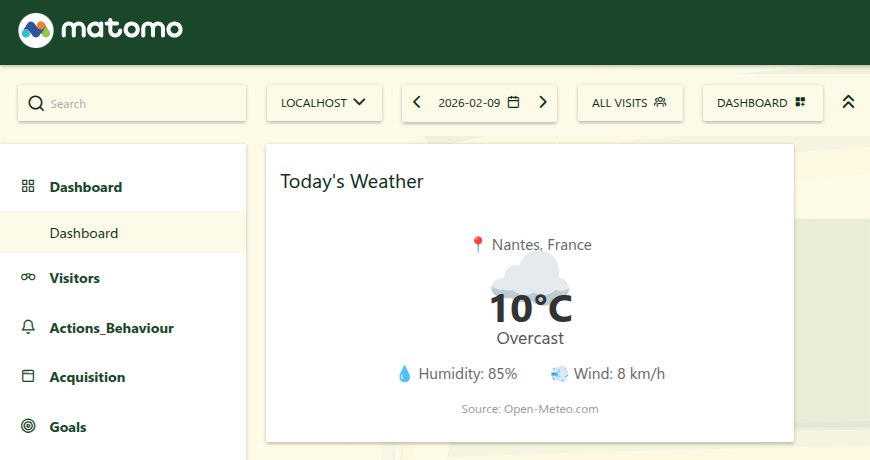
Display real-time weather information directly on your dashboard. The widget shows current temperature, weather conditions, humidity, and wind speed for any location in the world.
Powered by the free Open-Meteo API — no API key required.
Features
- Configurable location — Set any city by latitude/longitude from the admin settings
- Metric & Imperial units — Switch between °C/km/h and °F/mph
- Multilingual — Weather descriptions are fully translated (English and French included)
- Smart caching — API responses are cached for 30 minutes to keep your dashboard fast
- Graceful degradation — Serves cached data if the weather API is temporarily unavailable
- Dark mode compatible — Uses CSS custom properties for theme support
How it works
Once activated, add the "Today's Weather" widget to any dashboard. Configure the location and units in Administration > General Settings > WeatherWidget.
Installation
- Copy the
WeatherWidget folder to your Matomo plugins/ directory
- Activate the plugin in Administration > Plugins
- Add the widget to your dashboard via Dashboard > Add a widget > Weather > Today's Weather
Configuration
All settings are available in Administration > General Settings under the WeatherWidget section.
Location Settings
Setting
Description
Default
Latitude
Latitude of the location (-90 to 90)
48.8566 (Paris)
Longitude
Longitude of the location (-180 to 180)
2.3522 (Paris)
City name
Display name shown in the widget
Paris, France
Timezone
PHP timezone identifier used for the API
Europe/Paris
You can find the latitude and longitude of any city using Open-Meteo's geocoding or any mapping service.
Units
Option
Temperature
Wind Speed
Metric
°C
km/h
Imperial
°F
mph
Caching
The plugin caches weather data for 30 minutes using Matomo's Option storage. This means:
- The first request after cache expiry will fetch fresh data from the API
- Subsequent requests within 30 minutes are served instantly from cache
- If the API is unreachable, the plugin will serve stale cached data rather than showing an error
Data Source
Weather data is provided by the Open-Meteo API, a free and open-source weather API. No API key or registration is required.
The following current weather parameters are displayed:
- Temperature (2m above ground)
- Weather condition (WMO weather code)
- Relative humidity (2m above ground)
- Wind speed (10m above ground)
How do I change the displayed city?
Go to Administration > General Settings, find the WeatherWidget section, and update:
- Latitude and Longitude — the geographic coordinates of the city
- City name — the label displayed in the widget (can be anything)
- Timezone — must be a valid PHP timezone identifier (e.g.
Europe/Paris, America/New_York, Asia/Tokyo)
Where can I find coordinates for my city?
You can use any of these methods:
- Open-Meteo Geocoding API
- Search your city on Google Maps and read the coordinates from the URL
- Use any online latitude/longitude lookup tool
Does this plugin send data to external services?
The plugin makes HTTPS requests to api.open-meteo.com to retrieve current weather data. Only the configured latitude, longitude, and timezone are sent as URL query parameters. No personal or analytics data is transmitted.
How often is the weather data refreshed?
Weather data is cached for 30 minutes. After the cache expires, the next dashboard visit triggers a fresh API call.
What happens if the weather API is down?
If the API is unreachable, the plugin serves the last successfully cached data. An error is only displayed if no cached data exists at all (e.g. on first use).
Can I use Fahrenheit instead of Celsius?
Yes. Go to Administration > General Settings > WeatherWidget and change the Units setting to Imperial. This switches to °F for temperature and mph for wind speed.
Is the widget compatible with dark mode?
Yes. The widget uses CSS custom properties with light-mode fallbacks, so it adapts to both light and dark themes.