Organize your websites into groups, and browse them by group in the website selector and in the All Websites dashboard.
Features
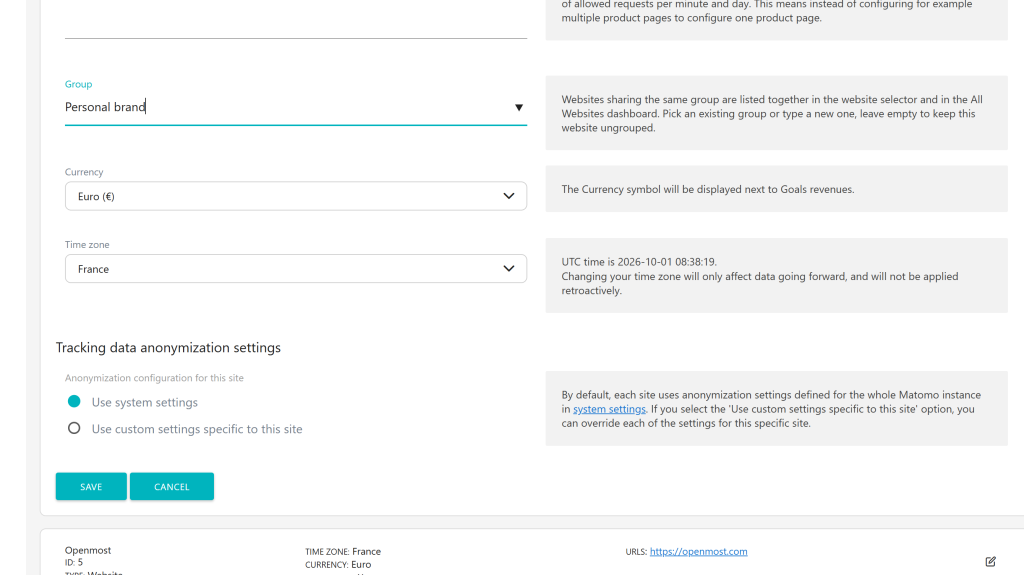
- Group field on every website: set the group in Administration > Websites > Manage. Existing groups are suggested while typing, and a group typed with a different case joins the existing one ("clients" joins "Clients").
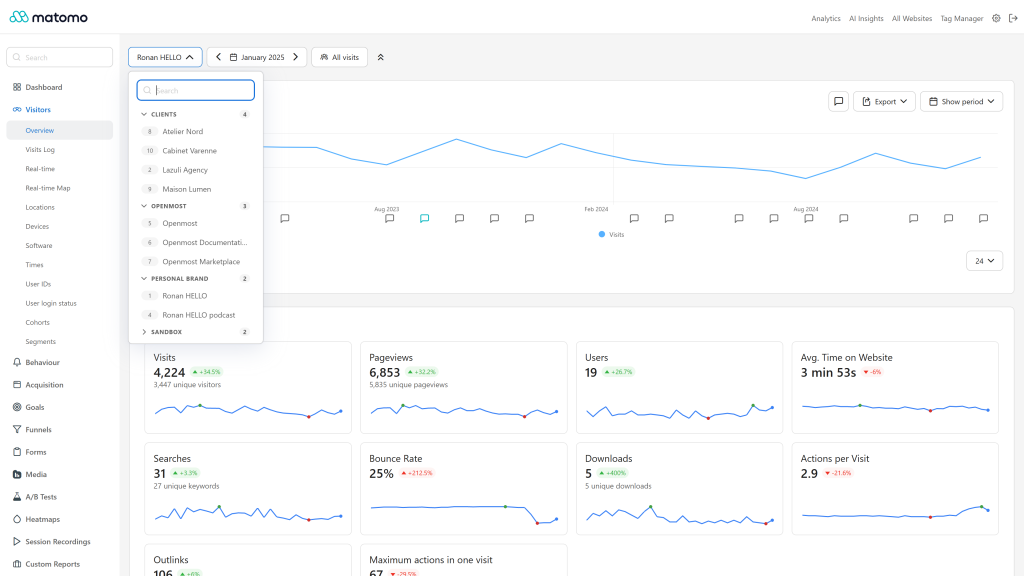
- Grouped website selector: websites are listed under collapsible group headers showing the number of websites, sorted by group then by name, with the website id before each name. Websites without a group are listed last under "Ungrouped".
- Smart defaults: with 10 websites or more, groups start collapsed except the group of the current website, and the groups you open or close are remembered in your browser. While searching, all groups are open and the search also matches group names.
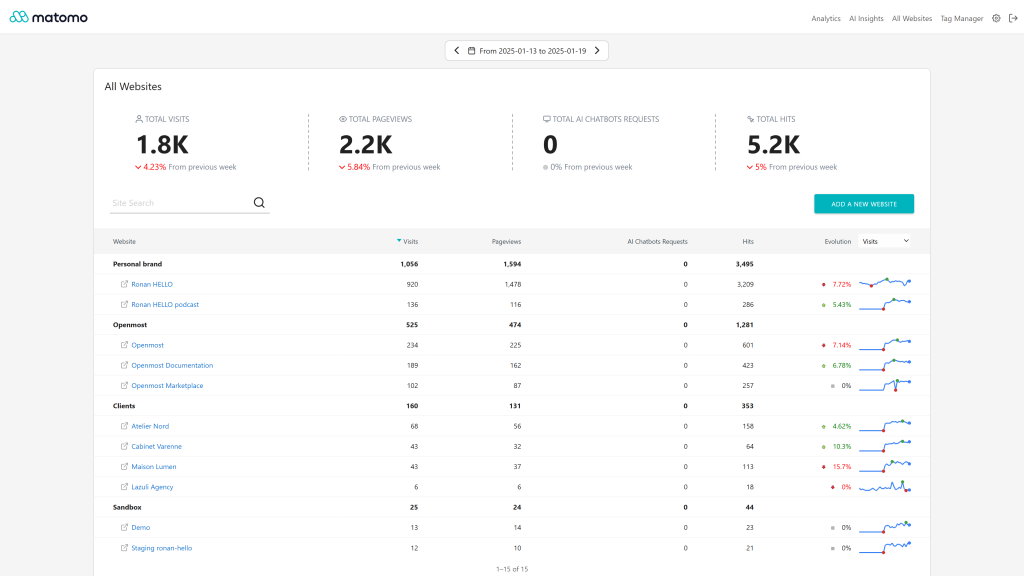
- All Websites dashboard by group: groups are stored as native Matomo website groups, so the All Websites dashboard lists your websites by group, with totals per group.
- SitesManager API: the
group parameter of SitesManager.addSite and SitesManager.updateSite sets the group shown by the plugin.
- Website cards: the group is shown on the Websites > Manage cards.
- Permissions: any user with admin access on a website can change its group.
- API:
SiteGroups.getSiteGroups returns the group of every website the current user can view.
- Keyboard accessible group headers.
Requirements
- Matomo 5.0.0 or later (
>=5.0.0,<6.0.0-b1)
Installation / Configuration
- Install and activate the plugin from Administration > Platform > Marketplace.
- Edit a website in Administration > Websites > Manage and fill in the Group field. Leave it empty to remove the website from its group.
- More than 15 websites? The Matomo website selector lists 15 websites by default. Raise
site_selector_max_sites in the [General] section of config/config.ini.php (for example site_selector_max_sites = 100) to see every group complete without searching.
Groups saved with SiteGroups 5.1 and older are moved automatically to the Matomo website groups during the update to 5.2. Groups are kept if the plugin is uninstalled, and when you update to Matomo 6 and SiteGroups 6.x. See docs/index.md.
Need help with Matomo?
Openmost is an official Matomo Implementation Partner. For instances with many websites, we build custom Matomo dashboards and KPI reports that give each team the view it needs, including aggregated reporting across sites.
-
Browse websites by group in the selector
-
Group totals in All Websites dashboard
-
Set the group in website settings
SiteGroups organizes your websites into groups, and lists them by group in the website selector and in the All Websites dashboard.
Set the group of a website
- Go to Administration > Websites > Manage.
- Edit a website and fill in the Group field.
- Save. Leave the field empty to remove the website from its group.
Existing groups are suggested while typing, and a group typed with a different case joins the existing one, for example "clients" joins "Clients". The group is also shown on the website card of the Websites > Manage page.
Groups are stored as native Matomo website groups (the group of the website), so the group parameter of SitesManager.addSite and SitesManager.updateSite also sets them:
curl -X POST "https://matomo.example.com/index.php" \
  -d "module=API&method=SitesManager.addSite&format=json" \
  -d "siteName=My website&group=Clients&token_auth=YOUR_TOKEN"
SiteGroups.getSiteGroups returns the group of every website the current user can view.
Website selector
As soon as one website has a group, the website selector lists your websites under group headers:
- groups are sorted by name, websites without a group are listed last under "Ungrouped",
- click a header (or press Enter or Space) to open or close the group,
- the website id is displayed before each website name,
- each header shows the number of websites of the group,
- with 10 websites or more, groups start collapsed except the group of the current website. The groups you open or close are remembered in your browser,
- while searching, all groups are open and the search also matches group names.
The selector lists 15 websites by default, and 15 search results at most. With more websites, raise the Matomo setting site_selector_max_sites so every group is complete without searching:
; config/config.ini.php
[General]
site_selector_max_sites = 100
Updating to Matomo 6
SiteGroups 6.x stores the groups the same way, nothing changes for your groups. Coming from SiteGroups 5.1 or older? Your groups are moved automatically during the update.
How to install this plugin
This plugin is available in the official marketplace of Matomo. You have to install it the same way as other plugins:
- Go to the administration panel
- Look for the Marketplace section and select "Plugins" in the dropdown
- Then search for "SiteGroups", install and activate the plugin.
Who can change the group of a website?
Any user with admin access on the website, in Administration > Websites > Manage. A super user can also set it with the group parameter of SitesManager.addSite and SitesManager.updateSite.
Why are my groups not visible in the website selector?
Group headers are only displayed when at least one of your websites has a group. If you just changed a group, reload the page.
Why are all the groups collapsed?
When you can access 10 websites or more, groups start collapsed, except the group of the current website, to keep the list short. Open the groups you use: your choice is remembered in your browser. While searching, all groups are open.
Why does the website selector show only some of my websites?
The Matomo website selector loads 15 websites when it opens, and shows 15 results at most for a search. The groups are built from these websites, so with more websites a group can look incomplete, or be missing until you search for it. To list more websites, raise site_selector_max_sites in the [General] section of config/config.ini.php:
[General]
site_selector_max_sites = 100
This is a Matomo setting, it applies to every user of the instance. A very high value loads more data each time the selector opens.
Are my groups kept when I update to Matomo 6?
Yes, SiteGroups 5.2 and 6.x both store them as native Matomo website groups.
Is the plugin active for all Matomo users in my instance?
Yes, if you choose this plugin for your Matomo instance, all users will be able to use it.
How can I contribute to this plugin?
You can help us develop this plugin by contacting us, or open an issue or a pull request on GitHub. Any way you consider legitimate to contribute is welcome.
How long will this plugin be maintained?
As long as possible. We use Matomo on many projects and are the first users of this plugin: if we see errors, we patch it as fast as possible!