Organize your websites into groups, and browse them by group in the website selector and in the All Websites dashboard.
Features
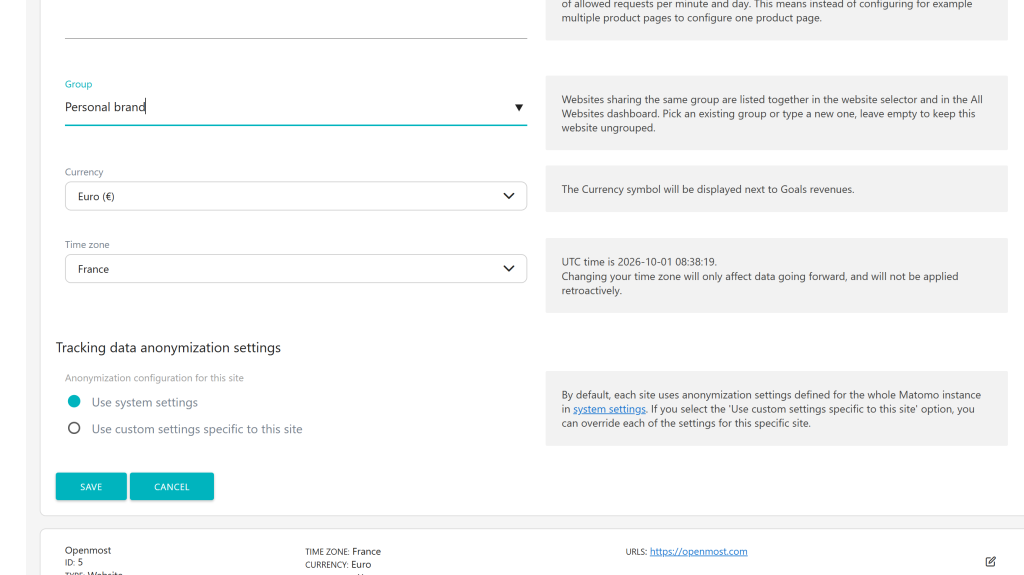
- Group field on every website: set the group in Administration > Websites > Manage. Existing groups are suggested while typing, and a group typed with a different case joins the existing one ("clients" joins "Clients").
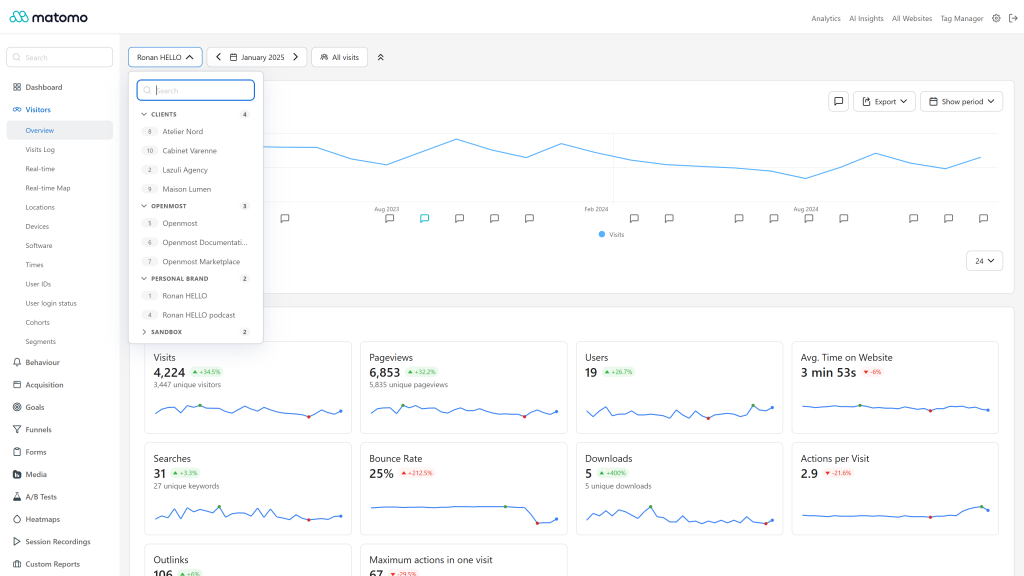
- Grouped website selector: websites are listed under collapsible group headers showing the number of websites, sorted by group then by name, with the website id before each name. Websites without a group are listed last under "Ungrouped".
- Smart defaults: with 10 websites or more, groups start collapsed except the group of the current website, and the groups you open or close are remembered in your browser. While searching, all groups are open and the search also matches group names.
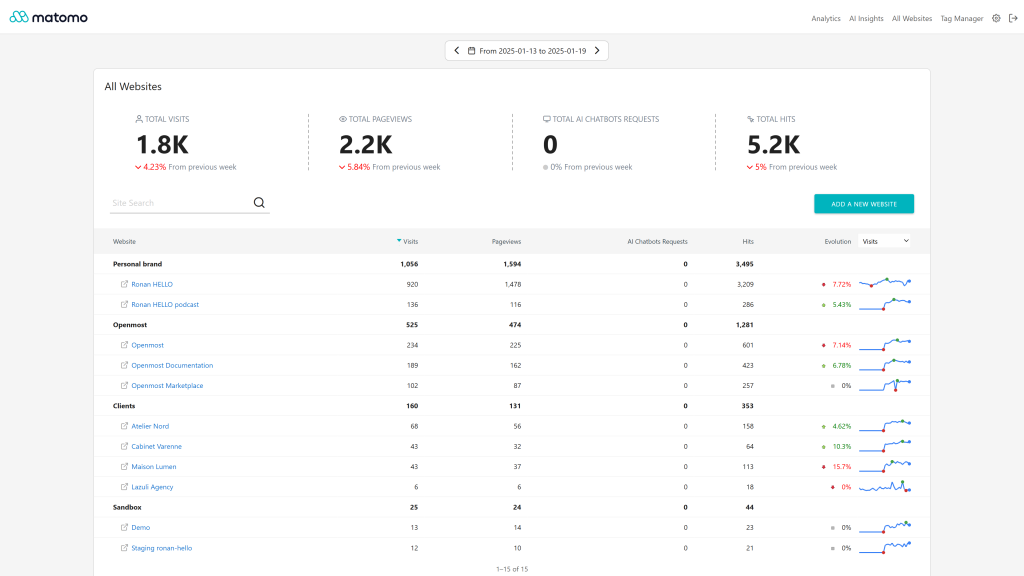
- All Websites dashboard by group: groups are stored as native Matomo website groups, so the All Websites dashboard lists your websites by group, with totals per group.
- Website cards: the group is shown on the Websites > Manage cards.
- Permissions: any user with admin access on a website can change its group.
- API:
SiteGroups.getSiteGroups returns the group of every website the current user can view.
- Keyboard accessible group headers, light and dark modes.
Requirements
- Matomo 6 (
>=6.0.0-b1,<7.0.0-b1)
- PHP 8.1 or higher
Installation / Configuration
- Install and activate the plugin from Administration > Platform > Marketplace.
- Edit a website in Administration > Websites > Manage and fill in the Group field. Leave it empty to remove the website from its group.
Groups saved with SiteGroups 5.x are moved automatically to the Matomo website groups during the update. Groups are kept if the plugin is uninstalled. See docs/index.md.
Need help with Matomo?
Openmost is an official Matomo Implementation Partner. For instances with many websites, we build custom Matomo dashboards and KPI reports that give each team the view it needs, including aggregated reporting across sites.
-
Browse websites by group in the selector
-
Group totals in All Websites dashboard
-
Set the group in website settings
SiteGroups organizes your websites into groups, and lists them by group in the website selector and in the All Websites dashboard.
Set the group of a website
- Go to Administration > Websites > Manage.
- Edit a website and fill in the Group field. Existing groups are suggested while typing, pick one or type a new group name.
- Save. Leave the field empty to remove the website from its group.
Any user with admin access on a website can change its group. A group typed with a different case joins the existing group, for example "clients" is saved as "Clients" when this group already exists.
The group is also shown on the website card of the Websites > Manage page.
Website selector
As soon as one website has a group, the website selector lists your websites under group headers:
- groups are sorted by name, websites without a group are listed last under "Ungrouped",
- each header shows the number of websites of the group, click it (or press Enter) to open or close the group,
- the website id is displayed before each website name,
- with 10 websites or more, groups start collapsed except the group of the current website. The groups you open or close are remembered in your browser,
- while searching, all groups are open. The search also matches group names.
All Websites dashboard
The groups are the Matomo website groups, so the All Websites dashboard lists your websites by group, with the totals of each group.
API
SiteGroups.getSiteGroups returns the group of every website the current user can view:
?module=API&method=SiteGroups.getSiteGroups&format=JSON&token_auth=...
[{"idsite": 1, "group": "Clients"}, {"idsite": 2, "group": ""}]
The group is also available in the group property of the SitesManager API responses, for example SitesManager.getSitesWithAtLeastViewAccess.
Updating from SiteGroups 5.x
The groups saved with SiteGroups 5.x are moved automatically to the Matomo website groups during the update. A website that already had a Matomo group keeps it.
How to install this plugin
This plugin is available in the official marketplace of Matomo. You have to install it the same way as other plugins:
- Go to the administration panel
- Look for the Marketplace section and select "Plugins" in the dropdown
- Then search for "SiteGroups", install and activate the plugin.
Who can change the group of a website?
Any user with admin access on the website, from Administration > Websites > Manage.
Why are my groups not visible in the website selector?
Group headers are only displayed when at least one of your websites has a group. If you just changed a group, reload the page.
Why are all the groups collapsed?
When you can access 10 websites or more, groups start collapsed, except the group of the current website, to keep the list short. Open the groups you use: your choice is remembered in your browser. While searching, all groups are open.
Are my groups kept if I uninstall the plugin?
Yes. Groups are stored as Matomo website groups, the All Websites dashboard keeps listing your websites by group. They can still be changed with the SitesManager.updateSite API (super user access required).
I updated from SiteGroups 5.x, are my groups kept?
Yes, they are moved automatically to the Matomo website groups during the update.
Is the plugin active for all Matomo users in my instance?
Yes, if you choose this plugin for your Matomo instance, all users will be able to use it.
How can I contribute to this plugin?
You can help us develop this plugin by contacting us, or open an issue or a pull request on GitHub. Any way you consider legitimate to contribute is welcome.
How long will this plugin be maintained?
As long as possible. We use Matomo on many projects and are the first users of this plugin: if we see errors, we patch it as fast as possible!