Display the Gravatar profile picture of your identified visitors in the visitor profile and the visits log.
Features
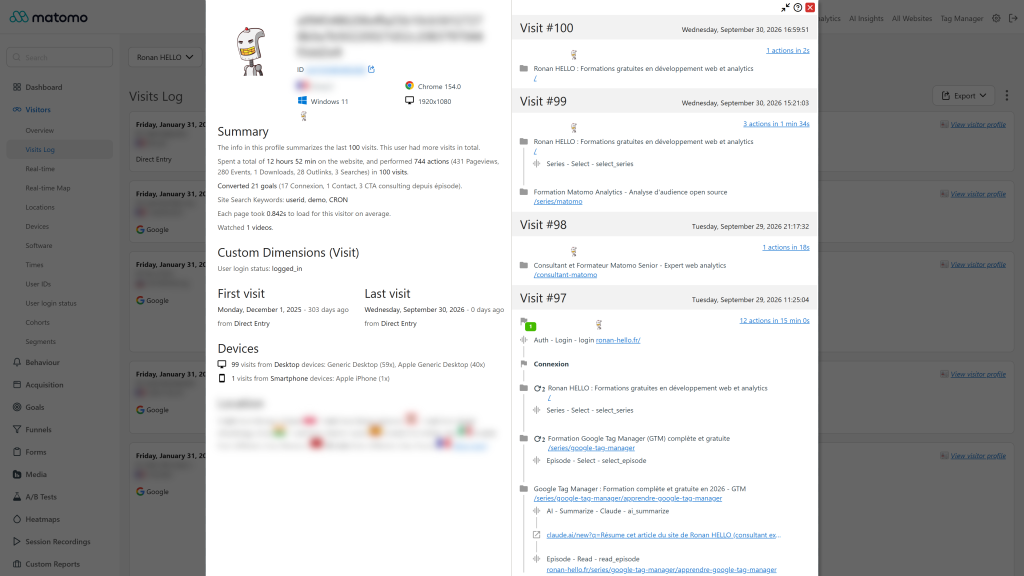
- Visitor profile picture: when a visit carries the SHA256 hash of the visitor email address, the visitor profile shows the matching Gravatar picture instead of the anonymous avatar. The most recent visit with a hash is used.
- Visits log: a small profile picture next to the visitor details (can be turned off).
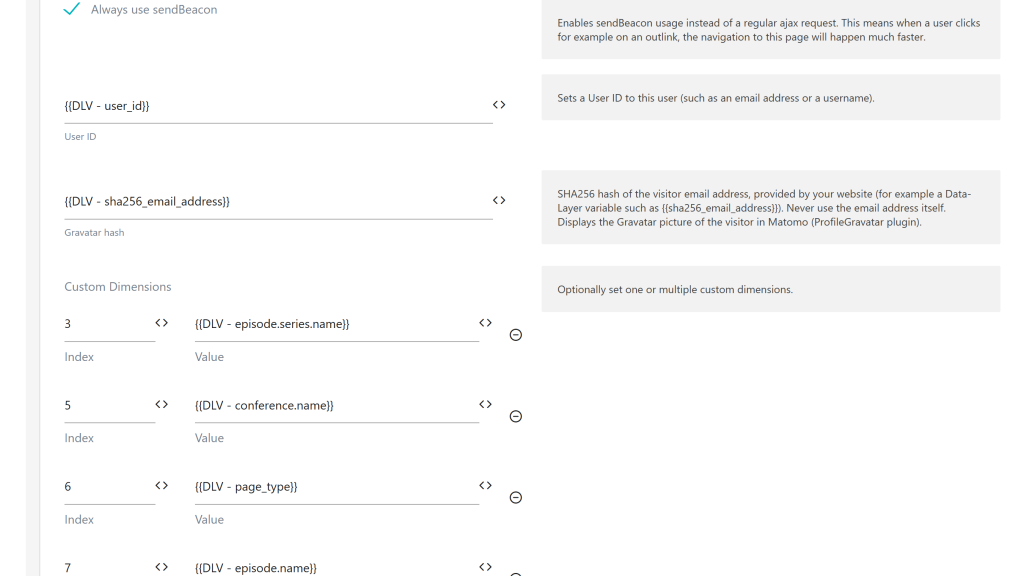
- Matomo Tag Manager field: a Gravatar hash field is added to the Matomo Configuration variable, right after User ID. Select a Data-Layer variable (for example
sha256_email_address), no Custom HTML tag or code needed.
- Other ways to send the hash:
_paq.push(['ProfileGravatar.setGravatarHash', hash]) (and resetGravatarHash on logout) with the JavaScript tracker, the gravatar_hash parameter of the Tracking HTTP API, or the PHP Tracker. The hash is attached to every tracking request, so it can be set after the page view.
- Segment and API: the hash is stored in a dedicated visit dimension, usable as the
gravatarHash segment. Live.getLastVisitsDetails returns gravatar_hash and gravatarUrl.
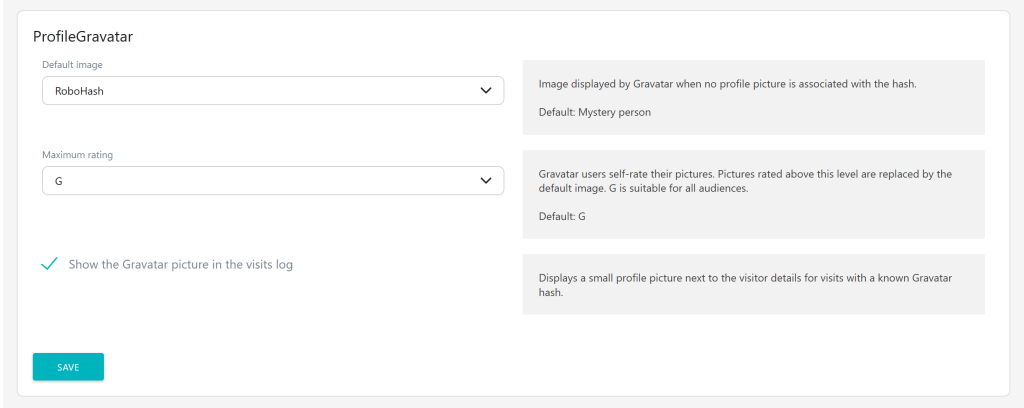
- Settings: default image when a visitor has no Gravatar (mystery person, identicon, MonsterID, Wavatar, Retro, RoboHash, blank) and maximum picture rating (G, PG, R, X).
- Only valid SHA256 or MD5 hashes are tracked, any other value is ignored.
Requirements
- Matomo 6 (
>=6.0.0-b1,<7.0.0-b1)
- PHP 8.1 or higher
- Matomo Tag Manager is optional, it is only needed for the Gravatar hash field.
Installation / Configuration
- Install and activate the plugin from Administration > Platform > Marketplace.
- Send the hash from your website, with Tag Manager or the tracker (see docs/index.md).
- Optionally adjust the default image, the rating and the visits log display in Administration > System > General settings > ProfileGravatar.
Privacy and data
- The plugin never needs the email address: only its SHA256 (or MD5) hash is tracked and stored in Matomo, like any other visit dimension.
- Pictures are loaded over HTTPS from gravatar.com by the browser of the Matomo users viewing the reports. Visitors themselves never contact Gravatar because of this plugin.
- A hash of an email address is still personal data under the GDPR: send it only for visitors who agreed to it, and include it in your data retention and deletion processes.
Need help with Matomo?
Openmost is an official Matomo Implementation Partner. We design Matomo tracking plans, including User ID and cross-device identification where your legal basis allows it, and implement them so your team can maintain them.
-
Gravatar on the visitor profile
-
Settings default image and rating
-
Tag Manager field for the Gravatar hash
1 - Install the plugin from the marketplace or via GitHub and enable it
Install this plugin from the Marketplace as superuser or download the plugin and install it on your server from FTP in
the /plugins folder, then activate it.
Requirements: Matomo 6.x, PHP 8.1+, MySQL 8.0+ or MariaDB 10.6+.
2 - Provide the hash of the visitor email address
The plugin never needs the email address of your visitors: your website provides the SHA256 hash of the email
address, for example in the data layer with the sha256_email_address key (the same key as Google enhanced conversions).
window._mtm = window._mtm || [];
_mtm.push({'sha256_email_address': 'a8cfcd74832004951b4408cdb0a5dbcd8c7e52d43f7fe244bf720582e05241da'});
Gravatar finds the profile when the email address was trimmed and lowercased before hashing. MD5 hashes are also
accepted, any other value is ignored by the plugin.
3 - Send the hash to Matomo
With Matomo Tag Manager (recommended)
No Custom HTML tag and no code are needed:
- Create a Data-Layer variable reading the key that contains the hash, for example
sha256_email_address (or user_data.sha256_email_address if you use the Google enhanced conversions structure).
- Edit your Matomo Configuration variable and select this variable in the Gravatar hash field, right after the User ID field.
- Publish a new version of your container.
The hash is sent with the requests of your Matomo tags, for the site of the configuration.
With the JavaScript tracker
Add this line to your tracking code, before _paq.push(['trackPageView']);:
_paq.push(['ProfileGravatar.setGravatarHash', 'a8cfcd74832004951b4408cdb0a5dbcd8c7e52d43f7fe244bf720582e05241da']);
The hash is sent with every following tracking request (page views, events, goals, downloads, outlinks, ecommerce,
content tracking and heartbeat), so you can also set it later, for example after a login in a single page application.
Call _paq.push(['ProfileGravatar.resetGravatarHash']); on logout.
With the Tracking HTTP API or the PHP Tracker
Add the gravatar_hash parameter to your request:
https://matomo.example.com/matomo.php?idsite=1&rec=1&url=https://example.com&gravatar_hash=XXXXXXXXX
$tracker->setCustomTrackingParameter('gravatar_hash', $sha256EmailAddress);
$tracker->doTrackPageView('Home');
Where is the picture displayed ?
- Visitor profile: the picture of the most recent visit with a hash replaces the anonymous avatar.
- Visits log: a small round picture is displayed next to the visitor details. You can hide it in the system settings.
- Live API:
Live.getLastVisitsDetails returns gravatar_hash and gravatarUrl for each visit.
- Segments: filter your reports on the
gravatarHash segment.
Settings
Go to Administration > System > General settings > ProfileGravatar:
- Default image: picture displayed when no Gravatar is associated with the hash (mystery person, identicon, retro...).
- Maximum rating: pictures rated above this level (G, PG, R, X) are replaced by the default image.
- Show the Gravatar picture in the visits log: enabled by default.
How to install this plugin
This plugin is available in the official marketplace of Matomo. You have to install it the same way as other plugins:
- Go to the administration panel
- Look for the Marketplace section and select "Plugins" in the dropdown
- Then search for "ProfileGravatar", install and activate the plugin.
- Follow the documentation to send the Gravatar hash with your tracking code or your Tag Manager configuration.
Which versions of Matomo are supported ?
Version 6.x of the plugin supports Matomo 6 (PHP 8.1+, MySQL 8.0+ or MariaDB 10.6+). Use version 5.x of the plugin for Matomo 5.
Does the plugin need the email address of my visitors ?
No, never. Your website provides the SHA256 hash of the email address (for example in the data layer with the
sha256_email_address key) and only this hash is sent to Matomo. Never push the email address in clear text in the
data layer or in the tracking code.
Where is the "Gravatar hash" field in Matomo Tag Manager ?
In the Matomo Configuration variable, right after the User ID field. Select a Data-Layer variable containing the
hash, then publish a new version of your container. The field is only displayed while the ProfileGravatar plugin is
activated.
Why is the anonymous avatar still displayed in the visitor profile ?
The picture is only displayed when at least one visit of the visitor has a valid hash. Check that:
- the hash is available before the page view is tracked (or sent with a later tracking request),
- the hash is a SHA256 (64 characters) or MD5 (32 characters) hexadecimal string, other values are ignored,
- the email address was trimmed and lowercased before hashing, otherwise Gravatar does not find the profile and displays the default image.
Is a hash of an email address personal data ?
Yes. A hash of an email address is a pseudonymous identifier under the GDPR: only send it for visitors who agreed to it,
as you would do for a User ID. The hash is stored in the gravatar_hash column of the visits and is deleted with the raw
data of the visits.
Does Gravatar receive data from my Matomo instance ?
When a Matomo user opens a visitor profile or the visits log, the browser loads the pictures from gravatar.com, so
Gravatar receives the hash and the IP address of the Matomo user. No request is made to Gravatar from the tracked website.
Why do I see "false" values in the gravatarHash segment ?
Versions prior to 6.0.0 stored false (or 0) for visits without a hash. These values are now ignored everywhere in
the plugin and are no longer tracked. They remain in the raw data of old visits, until your raw data is deleted.
Is the plugin active for all Matomo users in my instance ?
Yes, if you choose this plugin for your Matomo instance, all users will be able to use it.
How can I contribute to this plugin ?
You can help us develop this plugin by contacting us, or open an issue or a pull request on
GitHub. Any way you consider legitimate to contribute is welcome.
How long will this plugin be maintained ?
As long as possible. We use Matomo on many projects and are the first users of this plugin: if we see errors, we patch it as fast as possible!