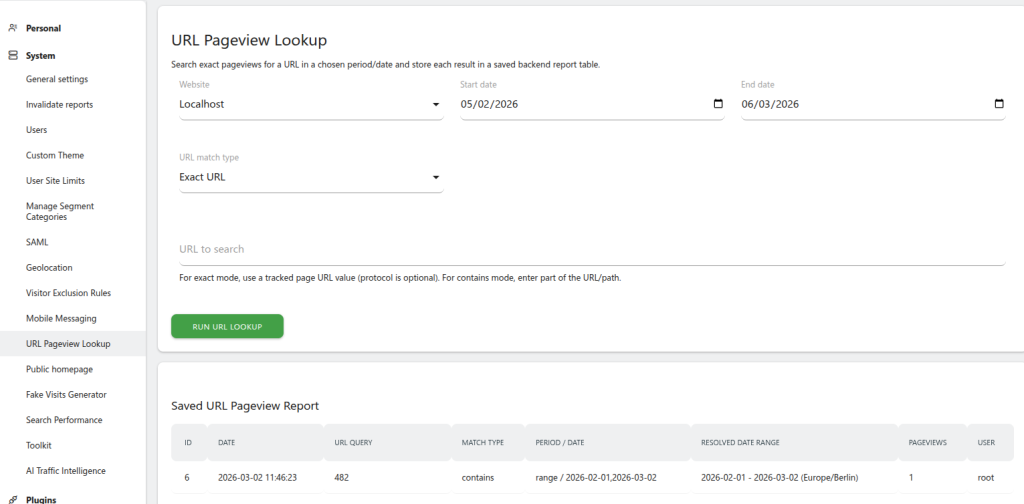
PageviewUrlLookup adds a dedicated admin page under Administration → URL Pageview Lookup. Select a site, a date range, a match mode, and a URL — the plugin queries log_link_visit_action in real time and instantly shows how many pageviews matched. Every result is automatically saved to a persistent report table so you can compare lookups over time.
Features
- Exact match — matches the full stored URL (protocol prefix and leading
www. stripped automatically, so https://example.com/page and example.com/page both work)
- Contains match — finds every URL whose path or domain includes your search string; LIKE metacharacters (
%, _, \) are escaped so results are always literal
- Timezone-aware — start/end dates are converted to UTC using the site's configured timezone, so "yesterday" means yesterday in the site's local time
- Date range guard — ranges longer than 366 days are rejected to protect database performance
- Persistent report table — the 300 most recent lookups per site are stored and displayed below the search form
- Admin-only — protected by per-site admin permission checks and CSRF nonce validation
Does this replace Matomo's built-in Pages report?
No. The Pages report aggregates already-archived data. This tool queries the raw log in real time, which is useful for ad-hoc lookups before archiving runs, or for URLs that fall below the reporting threshold.
Why is my exact-match count different from the Pages report?
The Pages report counts unique page views within a visit; this tool counts every matching row in log_link_visit_action, which is a raw action count. Also confirm the date boundaries: this plugin applies the site timezone, while some Matomo reports operate on UTC.
Can I export the saved report table?
Not from the UI in v1.0.0. The data lives in the matomo_pageview_url_lookup_report database table and can be queried directly or exported via a database client.
Is the lookup slow on large databases?
The query joins log_visit, log_link_visit_action, and log_action filtered by idsite and server_time. Performance depends on the size of your log tables and the available indexes. Keep date ranges reasonably short for fast results.