Turn Matomo's Events reports into a navigable analysis: open a detail page for any event category, action or name and see how it evolves and what it is combined with.
Features
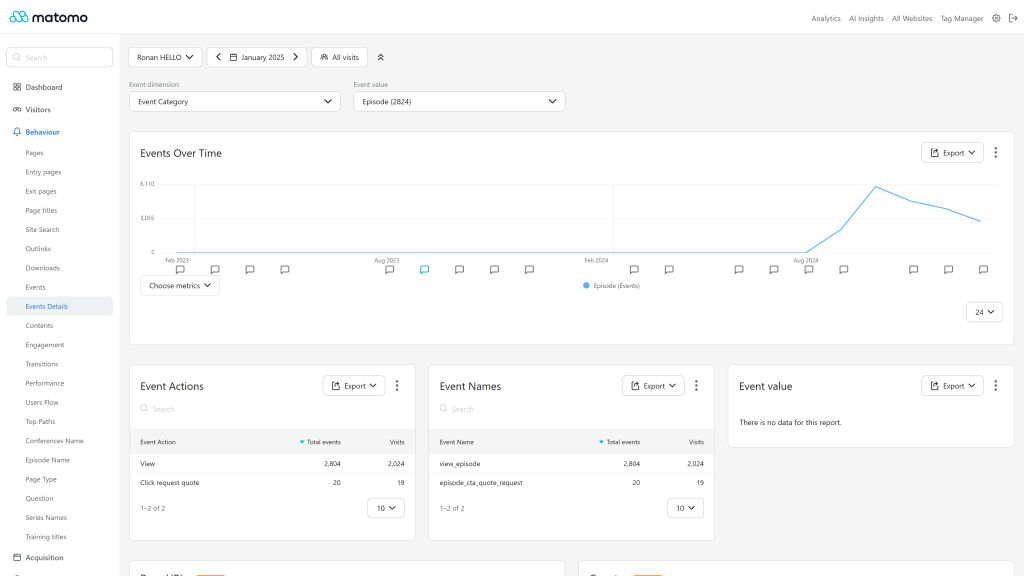
- Event detail pages: a "View Event Details" row action on the Events reports (Categories, Actions, Names) opens a dedicated page for the selected value. Selectors at the top of the page let you switch the dimension (category, action, name) and the value without going back to the report.
- Evolution graph of the selected value over time, with a metric picker (events, visits, event value, events with a value).
- Related breakdowns on each detail page: the two other event dimensions filtered on the selected value (for example the actions and names of a category) and the event values recorded for it.
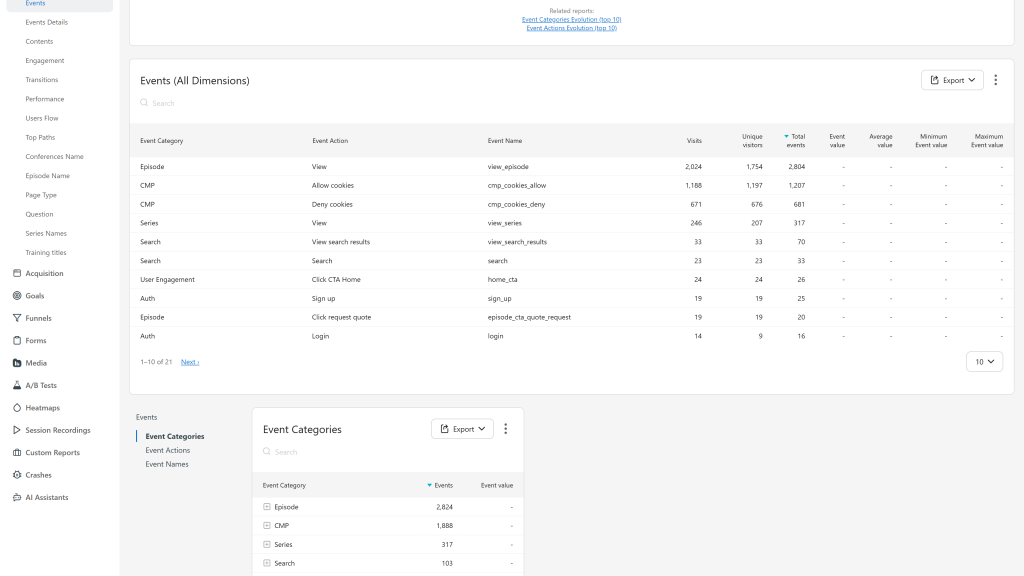
- Events (All Dimensions) report under Behavior > Events: category, action and name in one hierarchical table, with visits, unique visitors, events, total, minimum, maximum and average event value. It is also available as a dashboard widget.
- Top 10 evolution graphs for event names (under Behavior > Events), and for event categories and actions (from the Related Reports links), with one line per value.
- API methods for every breakdown, for example
EventsEnhanced.getEventActionsForCategory,EventsEnhanced.getEventNamesForAction,EventsEnhanced.getEventValuesForName,EventsEnhanced.getEventsWithAllDimensionsandEventsEnhanced.getEventNamesEvolution. Report metadata is complete, so API and AI clients (such as the McpServer plugin) can discover them. - Events derived from actions report under Behavior > Events: the events GA4 collects automatically (
session_start,first_visit,page_view,click,file_download,view_search_results, andvideo_start,video_progress,video_completewith Media Analytics,form_start,form_submitwith Form Analytics), rebuilt from Matomo data and kept apart from your events, so you can compare Matomo with the GA4 Events report line by line. - GA4 names for Media Analytics events: when the Media Analytics plugin is activated, its automatic video and audio events are named after the GA4 events (
video_start,video_pause,video_resume,video_seek,video_complete, andaudio_*for audio) instead of the media title, so the Event Names report lists interactions you can compare with GA4. - Segments, periods and the standard view permission of the Events reports apply everywhere.
- Translated into 12 languages.
Premium version
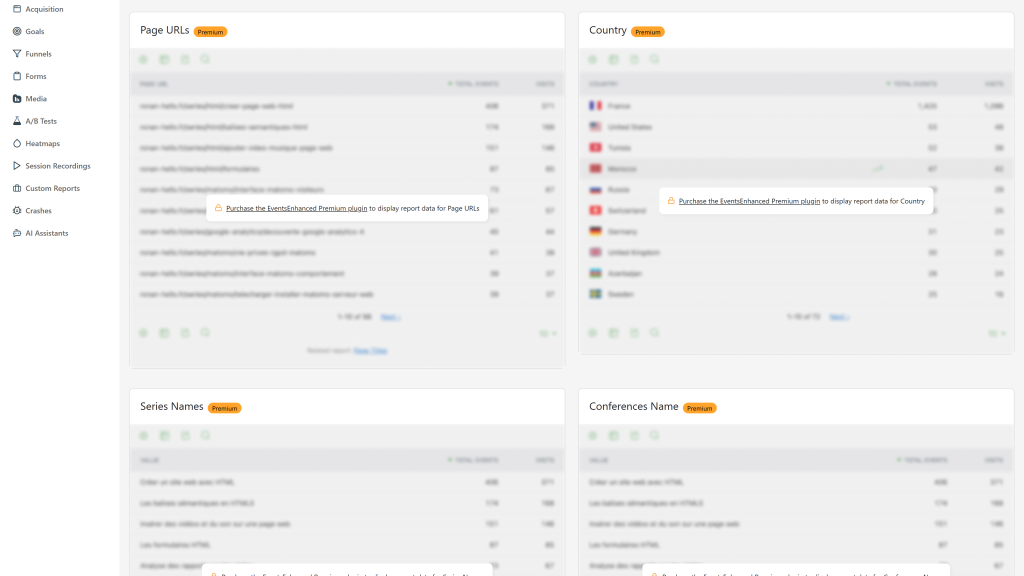
EventsEnhanced Premium is an add-on of this plugin: installed next to it, it replaces the previews of every detail page with three reports:
- Page URLs and Page titles where the selected events were actually triggered.
- Countries of the visitors who triggered them.
- Custom Dimensions: values of your action-scoped Custom Dimensions for the selected events.
Requirements
- Matomo 6.x (6.0.0 or later, below 7.0.0)
- PHP 8.1 or later
- The Events plugin (bundled with Matomo and enabled by default).
Installation / Configuration
- Install EventsEnhanced from the Marketplace (Administration > Platform > Marketplace), or copy the
EventsEnhancedfolder into thepluginsdirectory of your Matomo installation. - Activate it in Administration > Plugins.
- Open Behavior > Events, hover a row of any Events report and click the "View Event Details" icon.
There are no settings. Reports are built during archiving, so data appears for periods archived after activation. To see past periods, or to get the corrected numbers of this version for periods archived before an update, invalidate and re-archive them, for every period type (the default of the command), for example ./console core:invalidate-report-data --sites=1 --dates=2025-01-01,2025-12-31 --plugin=EventsEnhanced then ./console core:archive.
Privacy and data
All reports are computed inside your Matomo database from the events you already track. The plugin sends no data to third parties.
Need help with Matomo?
Openmost is an official Matomo Implementation Partner. Event reports are only as useful as the tracking behind them: we design Matomo tracking plans with consistent event naming, goals and custom dimensions, then implement them in your tag manager.
-
Event detail page with evolution and breakdowns
-
Events All Dimensions report
-
Premium reports previewed in the free edition
EventsEnhanced adds a detail page for every event category, action and name. From any Events report (Behavior > Events), hover a row and click the "View Event Details" icon.
Detail pages
Each detail page includes:
- Dimension selectors to switch between category, action and name, and between values, without leaving the page.
- Evolution graph of the selected value, with a metric picker (events, visits, event value, events with a value).
- Related breakdowns:
- Category pages: actions and names filtered on that category
- Action pages: categories and names filtered on that action
- Name pages: categories and actions filtered on that name
- Event values recorded for the selected value
- Page URLs and Page titles (premium): the pages where the selected events were actually triggered, not every page of the visits that contained them.
- Countries (premium): the countries of the visitors who triggered them.
- Custom Dimensions (premium): values of your action-scoped Custom Dimensions for the selected events.
The free plugin shows previews of the premium reports. EventsEnhanced Premium, an add-on installed next to this plugin, replaces them with the real reports. Keep this plugin activated with it: it still archives every common report.
Additional reports
- Events (All Dimensions): category, action and name in one hierarchical table under Behavior > Events, also available as a dashboard widget.
- Event Names Evolution (top 10) under Behavior > Events, plus Event Categories Evolution and Event Actions Evolution from the Related Reports links.
Events derived from actions
Behavior > Events > Events derived from actions, below Events (All Dimensions), lists the events GA4 collects automatically, rebuilt from Matomo data. They are not Matomo events: they complement Events (All Dimensions) without mixing with it and do not appear in the other Events reports. The Counted from column shows the Matomo data behind each row.
GA4 event Counted from session_start Visits first_visit Visits of new visitors page_view Pageviews click Outlinks file_download Downloads view_search_results Site searches video_start Media Analytics video plays (more than one second watched, as in Media Analytics) video_progress Media Analytics video plays, one event per 10, 25, 50 and 75% milestone the furthest position reached video_complete Media Analytics video plays that reached the end form_start Form Analytics form starts form_submit Form Analytics form submissionsThe video rows need Media Analytics and the form rows need Form Analytics. Each row opens the visitor log on its segment (actionType, visitorType==new, media_plays_type==video, form_num_starts>0 or form_num_submissions>0). In the API (EventsEnhanced.getEventsDerivedFromActions), the source row metadata names the Matomo data of each row (visits, new_visits, pageviews, outlinks, downloads, site_search, video_plays, video_progress, video_complete, form_starts, form_submissions).
Media Analytics events
When the Media Analytics plugin is activated, the event name of its automatic events is replaced by the GA4 event name and the action is capitalized while the event is tracked. The category is kept, the media title stays in the Media reports.
Category Action Event name MediaVideo Play video_start MediaVideo Pause video_pause MediaVideo Resume video_resume MediaVideo Seek video_seek MediaVideo Finish video_complete MediaAudio Play audio_start MediaAudio Pause audio_pause MediaAudio Resume audio_resume MediaAudio Seek audio_seek MediaAudio Finish audio_completeEvents tracked before the update keep the media title as event name and the lowercase action.
API methods
EventsEnhanced.getEventActionsForCategory,EventsEnhanced.getEventNamesForCategoryEventsEnhanced.getEventCategoriesForAction,EventsEnhanced.getEventNamesForActionEventsEnhanced.getEventCategoriesForName,EventsEnhanced.getEventActionsForNameEventsEnhanced.getEventValuesForCategory,EventsEnhanced.getEventValuesForAction,EventsEnhanced.getEventValuesForNameEventsEnhanced.getEventsWithAllDimensionsEventsEnhanced.getEventsDerivedFromActionsEventsEnhanced.getEventNamesEvolution,EventsEnhanced.getEventCategoriesEvolution,EventsEnhanced.getEventActionsEvolution
Archiving
Reports are built during archiving, so data appears for periods archived after activation. To fill past periods, or to get the corrected numbers of the latest version for periods archived before the update, invalidate and re-archive them as described in the FAQ.
I just installed the plugin, where is my history?
Activating the plugin schedules its reports for past periods (EventsEnhanced Premium does the same for its own reports): the next core:archive run rebuilds them from the raw logs, nothing to do. How far back follows the rearchive_reports_in_past_last_n_months setting of Matomo (6 months by default). To go further, set it in the [General] section of config/config.ini.php before activating the plugin, or invalidate older periods with the commands below. Periods whose raw logs were deleted (delete_logs_older_than) cannot be rebuilt.
What is the Events derived from actions report?
It lists the events GA4 collects automatically (page_view, click, file_download, video_start...), rebuilt from Matomo pageviews, outlinks, downloads, site searches, visits, Media Analytics plays and Form Analytics forms, so you can compare Matomo with GA4. These rows are not stored as Matomo events: your own events stay in Events (All Dimensions) and the other Events reports, the two never mix.
Why do my Media Analytics events show video_start instead of the video title?
The plugin renames the automatic Media Analytics events after the GA4 event names (video_start, video_complete...), so the Event Names report counts interactions instead of listing titles. The action is capitalized (Play, Finish...). Per video figures are in the Media reports of Media Analytics. Events you track yourself are renamed only when they use the MediaVideo or MediaAudio category with one of the actions play, pause, resume, seek or finish.
How do I access the event detail pages?
Open any Events report (Behavior > Events), hover a row and click the "View Event Details" icon.
Why is a detail page empty for past periods?
The reports are built during archiving. Periods archived before the plugin was activated have no data until you invalidate and re-archive them, for every period type (the default of the command), for example:
./console core:invalidate-report-data --sites=1 --dates=2025-01-01,2025-12-31 --plugin=EventsEnhanced
./console core:archive
Adjust --sites and --dates to your data. Keep the default periods: a month is built from its week archives, so a week archived before the plugin was active makes the month incomplete.
I updated the plugin, why do past reports still show the old numbers?
Version 6.0.1 fixes how the reports are archived: events without a name are counted under "Event Name not defined", the event value 0 is kept, the "Others" row of a truncated list is shown as "Others", and values with an apostrophe or another special character find their data. Reports archived before the update keep the old numbers until you invalidate and re-archive them with the commands above.
Why don't I see Custom Dimensions on the detail pages?
Custom Dimensions reports (premium) need the CustomDimensions plugin, at least one action-scoped Custom Dimension, and data for that dimension on the selected events.
Can I segment the detail page reports?
Yes, the segment, period and date selected in Matomo apply to every report of the detail page.
Does this plugin require any special permissions?
No. Anyone who can view the Events reports of a site can open its detail pages.
Which versions of Matomo are supported?
Version 6.x of the plugin supports Matomo 6 (PHP 8.1 or later). Use the 5.x versions of the plugin for Matomo 5.
Version
6.1.1
License
GPL v3+
Keywords
event, events, événement, événements, enhanced, better, amélioré, mieux
Last Updated
Oct 22nd 2026
Requirements
Matomo >=6.0.0-b1,<7.0.0-b1
PHP >=8.1.0
Matomo 5.x, Matomo 6.x
Downloads
7525
Changelog
Support
ronan@openmost.com
View and download this plugin for a specific Matomo version:
- Matomo 5.x
- Matomo 6.x (currently selected)