This plugin allows you to export, download, sync, and import your Matomo database. Plus you can export raw data to a CSV file and much more.
You can easily import the data into another Matomo instance. For example, you can use your real data into your development environment.
I have added some features to export raw data to a CSV file. This is useful if you want to use the data in another tool, such as Excel, Tableau, or PowerBI. This is a brand new plugin and some features are very experimental, if you have any issues, please create an issue on GitHub.
Caution
This plugin is not designed for exporting/importing large data sets(yet). Use at your own risk.
Features
- Export and download the database to a file
- Import a database from a file
- Export and download raw data to a CSV file
- Console commands to:
- Dump the database
- Sync the database
- Import the database
- Create the database
- Drop the database
- Cleanup old backups
- Export queries to CSV
- API endpoints to:
- Export raw data
In the works
We will update this plugin, probaly with paid features to connect to other analytics tools. Such as Snowlflake, Google BigQuery, Apache Kafka, etc. Stay tuned!
Installation
Install it via Matomo Marketplace
How to use
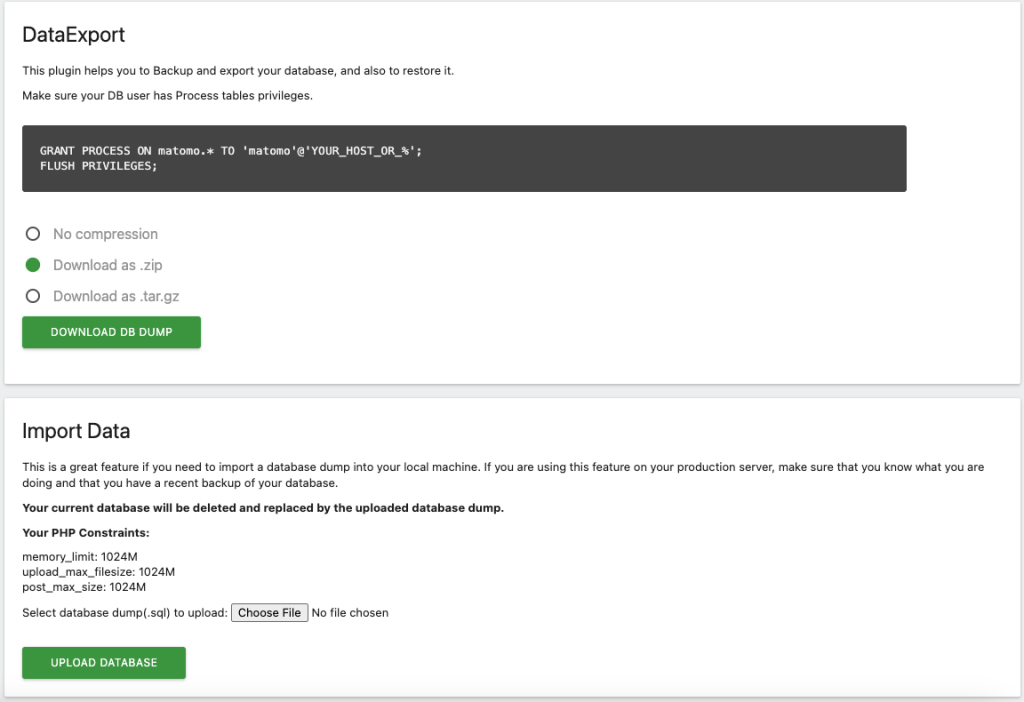
Navigate to Admin -> Platform -> Data Export and follow the instructions.
The UI
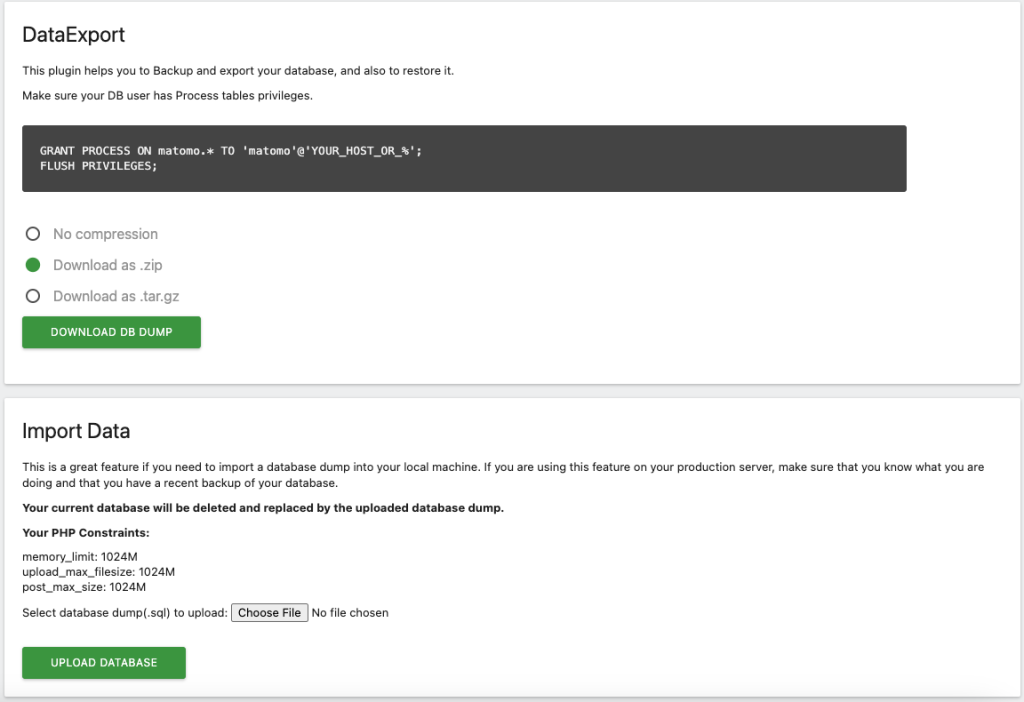
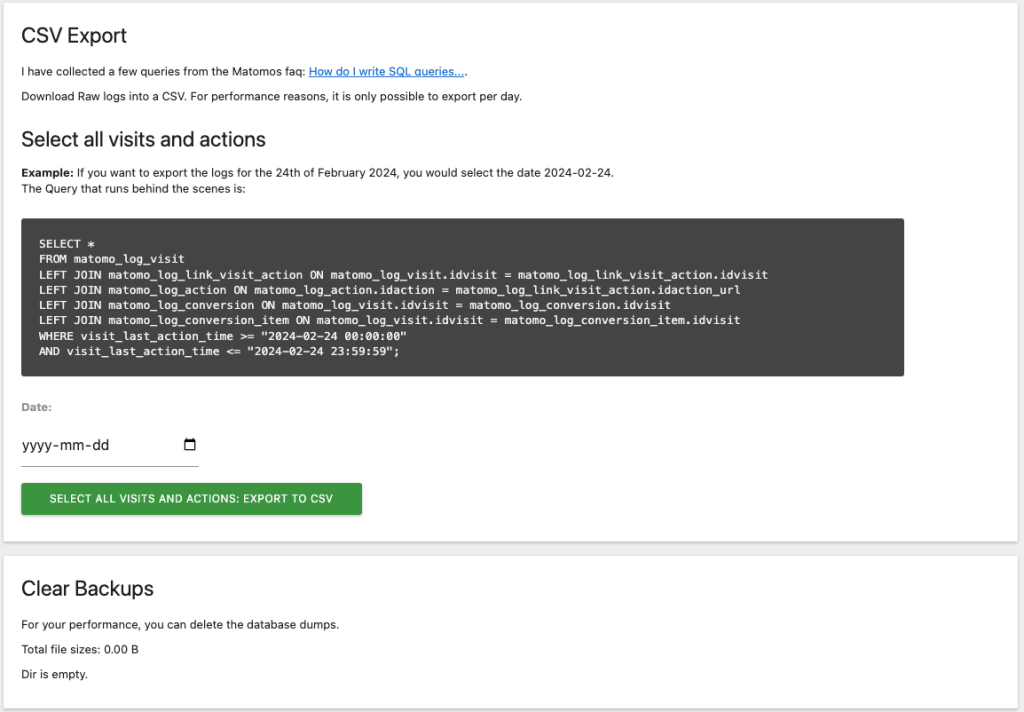
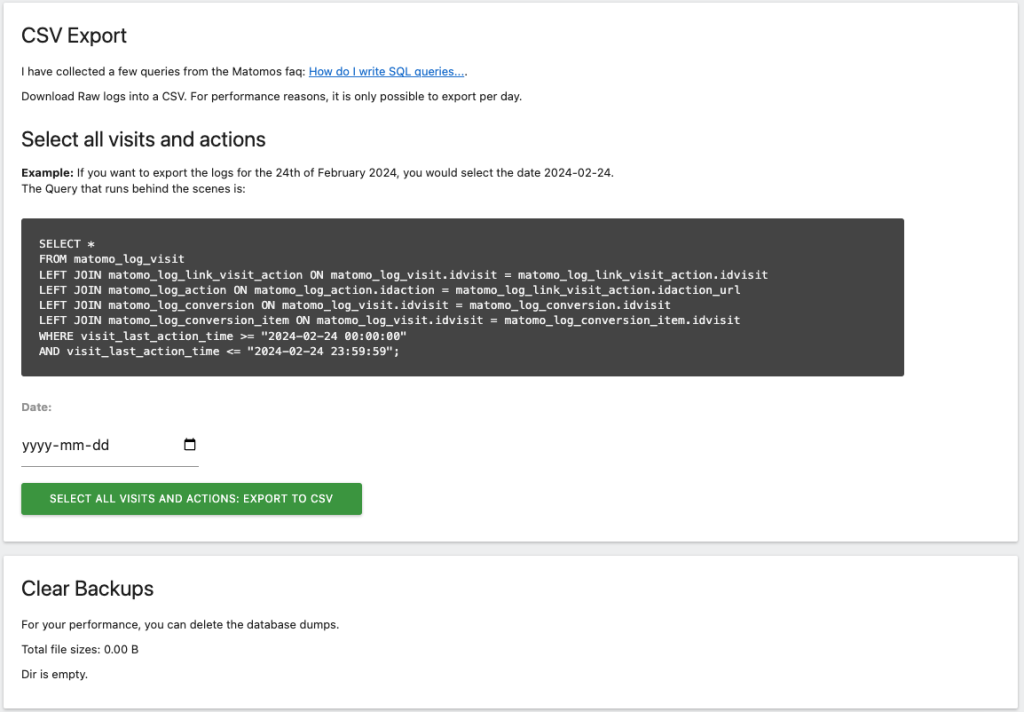
The UI is pretty straightforward. You can export the database, import a database, and export raw data to a CSV file.
Raw data exports
I have collected a few queries from the Matomos faq: How do I write SQL queries....
Command line
DB commands
$ ./console db:dump                       # whole database, method from the settings (default: auto)
$ ./console db:dump -c gzip               # write .sql.gz directly (fastest for large databases)
$ ./console db:dump --method=php -c tar   # force the built-in PHP dumper, compress as .tar.gz
$ ./console db:dump-logs -D 2024-02-24 -i 1,2   # log tables for one day and some sites
$ ./console db:import dump.sql            # also reads .sql.gz
$ ./console db:import --method=php dump.sql
$ ./console db:drop
$ ./console db:create
$ ./console dataexport:csv --date=2024-02-24 --idsite=1
Backups without mysqldump
Backups no longer require the mysqldump binary. The Backup method setting
(Admin → System → General settings → DataExport) has three options:
- Auto (default): uses
mysqldump(ormariadb-dump) when it is installed, otherwise the built-in PHP dumper. Ifmysqldumpfails, for example because of an SSL or privilege problem, the PHP dumper is used instead. - mysqldump: always use the binary, fail if it isn't available.
- PHP: always use the built-in PHP dumper.
The PHP dumper uses Matomo's own database connection settings (including the reader
database, sockets and SSL options), streams rows so memory use stays flat, and runs in
a consistent snapshot so tracking isn't blocked. It writes a standard SQL file that can
be imported with the mysql client or with db:import / the import form. Imports
also work without the mysql client.
Backups started from the admin page run in the background (a detached
./console dataexport:backup-job process, or after the response when exec() is
disabled), so multi-GB databases don't hit web server or proxy timeouts. The page
downloads the file when it is ready, and it stays in the backup list.
This is useful for the official Matomo Docker images and other slim containers, and for
hosts where exec() is disabled. The admin page shows which method will be used.
The DB user no longer needs the PROCESS privilege: mysqldump runs with
--single-transaction --quick --no-tablespaces.
Syncing databases
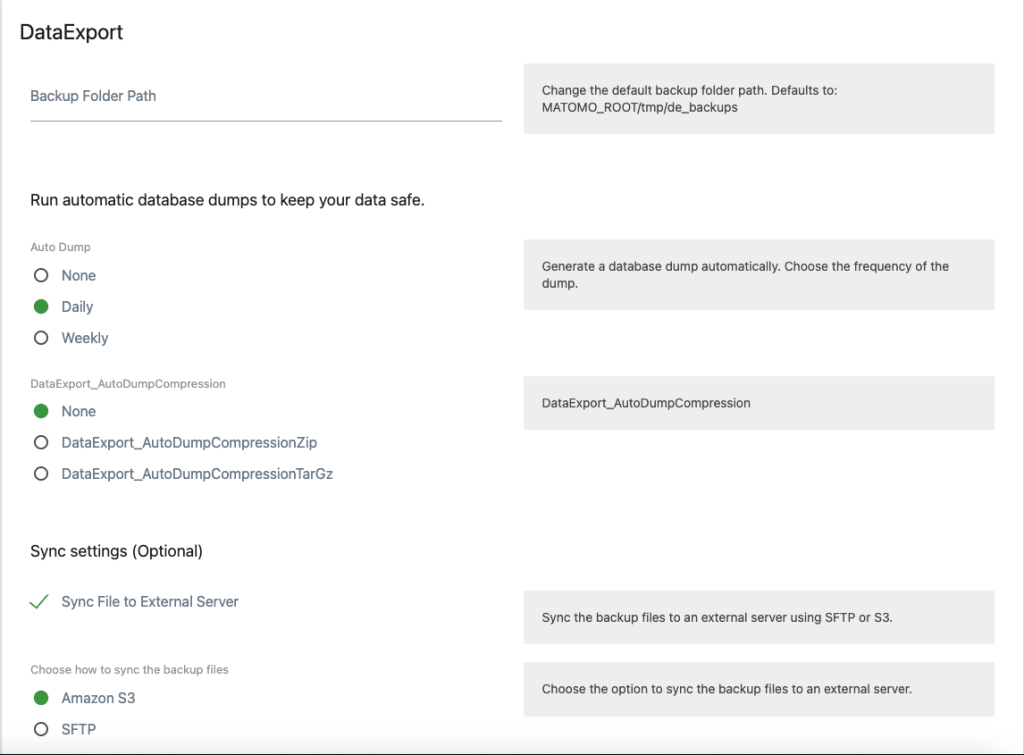
I have added an option to sync databases. This is useful if you want to sync your database to an external server or S3 bucket.
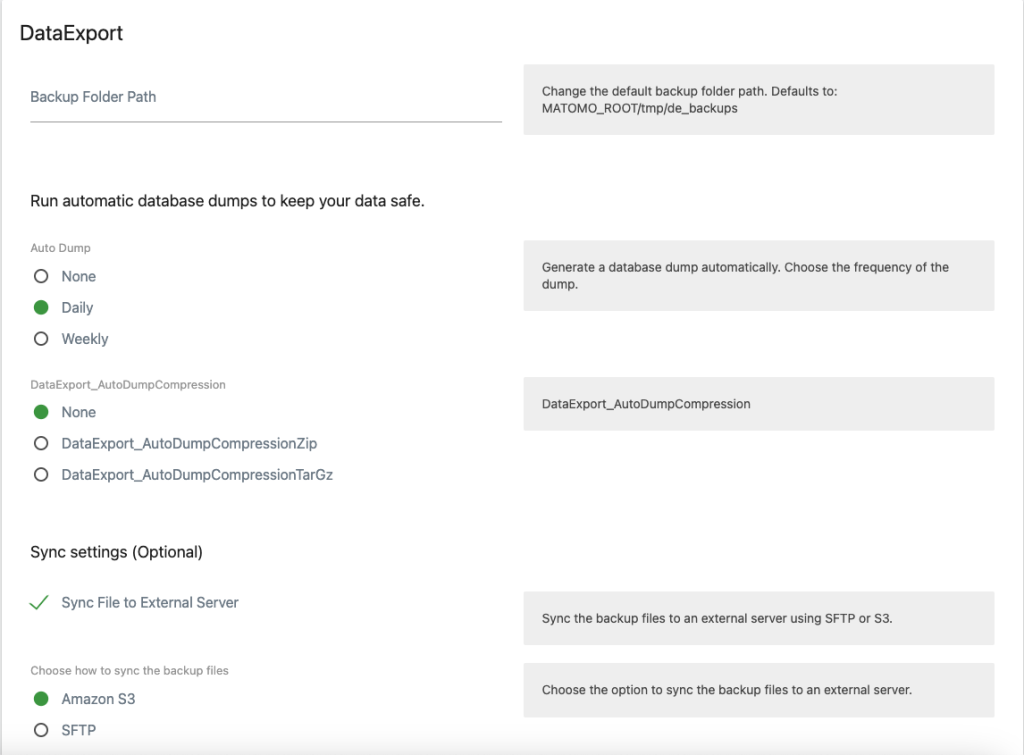
You need to configure the destination in: Admin(Cog wheel) --> System --> General settings --> Data Export
And Select the Checkbox, Sync File to External Server.
Fill in all the required settings.
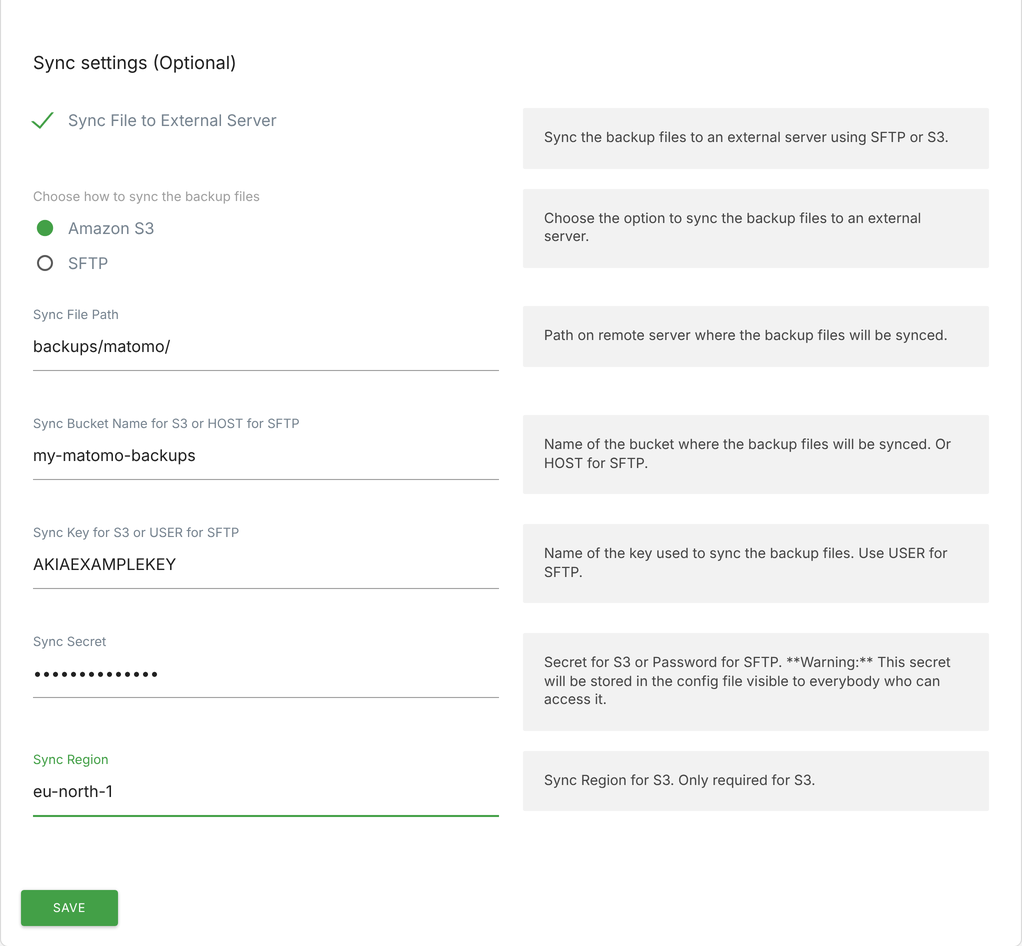
Then it should sync every time a new dump is generated with the scheduled-tasks, if you have set up a ./console core:archive-job, you don't necessarily need to run it manually, It will automatically run when the core:archive process runs, one exception is if you added the --disable-scheduled-tasks flag to the command.
You can also test the settings by running the following command:
$ ./console scheduled-tasks:run --force "Piwik\Plugins\DataExport\Tasks.dailyDatabaseDumpTask"
$ ./console scheduled-tasks:run --force "Piwik\Plugins\DataExport\Tasks.weeklyDatabaseDumpTask"
You can try to add the verbose flag -vvv for more log messages. If you encounter any bugs or issues, just create a new issue and I will try to fix it as soon as possible.
Just make sure you have added all the needed configuration settings in the UI or in your config.ini.php file.
Configuration
You can configure in the UI or add the following settings to your config.ini.php file:
[DataExport]
; dataExportBackupPath:
; Path to store the backups on the Matomo server
dataExportBackupPath = ""
; dataExportAutoDump:
; available options: "none", "daily", "weekly"
dataExportAutoDump = "none"
; dataExportAutoDumpCompression:
; available options: "none", "zip", "tar"
dataExportAutoDumpCompression = "none"
; dataExportDumpMethod:
; available options: "auto", "mysqldump", "php"
dataExportDumpMethod = "auto"
; dataExportDatabaseSSL (mysqldump only):
; available options: "auto", "enabled", "disabled"
dataExportDatabaseSSL = "auto"
; dataExportSyncExternal:
; 1 for true, 0 for false
dataExportSyncExternal = 0
; dataExportSyncOption:
; or "sftp"
dataExportSyncOption = "s3"
; dataExportSyncFilePath:
; Path for s3 or Remote Path for sftp
dataExportSyncFilePath = ""
; dataExportSyncBucketName:
; for s3 or Hostname for sftp
dataExportSyncBucketName = ""
; dataExportSyncKey:
; Access Key for s3 or Username for sftp
dataExportSyncKey = ""
; dataExportSyncSecret:
; Secret Key for s3 or Password for sftp
dataExportSyncSecret = ""
; dataExportSyncRegion:
; Region for s3
dataExportSyncRegion = ""
Cleanup command
Downloading files from the UI will generate a copy that stays on the server. In order to not take up too much disk space Cleanup is set to run once a day and it deletes files older than 7 days.
$ ./console scheduled-tasks:run --force "Piwik\Plugins\DataExport\Tasks.cleanBackupsFolderTask"
To manually delete all files, you can run:
$ ./console dataexport:clean-backups -f
API endpoints
I have started to add some API endpoints, but consider them experimental for now. CAUTION: The queries are run as live queries, so use sparingly.
You can specify the date, idSite, and format.
Example:
curl --request GET \
  --url 'https://YOUR_MATOMO_URL/index.php?module=API&method=DataExport.selectAllVisitsAndActions&date=2024-02-20&idSite=1&format=json&token_auth=YOUR_ADMIN_TOKEN'
Support
If you need help with exporting raw logs to a data warehouse, such as Snowflake, Google BigQuery, or Apache Kafka, contact me for a quote at hey@jorgeuos.com.
-
1-Default-view
-
2-Default-view
-
3-Settings-page
Documentation
Description
This plugin allows you to export, download, sync, and import your Matomo database. Plus you can export raw data to a CSV file and much more.
You can easily import the data into another Matomo instance. For example, you can use your real data into your development environment.
I have added some features to export raw data to a CSV file. This is useful if you want to use the data in another tool, such as Excel, Tableau, or PowerBI. This is a brand new plugin and some features are very experimental, if you have any issues, please create an issue on GitHub.
Caution
This plugin is not designed for exporting/importing large data sets(yet).
Features
- Export and download the database to a file
- Import a database from a file
- Export and download raw data to a CSV file
- Console commands to:
- Dump the database
- Sync the database
- Import the database
- Create the database
- Drop the database
- Cleanup old backups
- Export queries to CSV
- API endpoints to:
- Export raw data
In the works
We will update this plugin, probaly with paid features to connect to other analytics tools. Such as Snowlflake, Google BigQuery, Apache Kafka, etc. Stay tuned!
Installation
Install it via Matomo Marketplace
How to use
Navigate to Admin -> Platform => Data Export and follow the instructions.
Configuration
Example of the configuration file:
[DataExport]
dataExportBackupPath = ""
dataExportAutoDump = "daily"
dataExportAutoDumpCompression = "zip"
dataExportSyncExternal = 1
dataExportSyncOption = "sftp"
dataExportSyncFilePath = "/home/YOUR_USER/backups"
dataExportSyncBucketName = "192.168.0.1"
dataExportSyncKey = "USERNAME"
dataExportSyncSecret = "YOUR_PASSWORD"
dataExportSyncRegion = ""
License
GPLv3 for now.
View and download this plugin for a specific Matomo version:
- Matomo 5.x
- Matomo 6.x (currently selected)