Add a widget with your own content to Matomo dashboards: team news, links to internal resources, embedded videos, iframes, images or any HTML content.
Features
- One custom widget with its own title and content (text and HTML)
- Simple configuration in the General settings, editable by super users
- Any HTML content:
<iframe>, <img>, <svg> and <canvas> elements never overflow the widget width
- YouTube ready: YouTube and YouTube no-cookie iframes are allowed by the Matomo Content Security Policy
- Available on every website, in the Custom Widget category of the dashboard widget selector
- The widget can be embedded outside Matomo with the Widgetize feature
The Matomo 6 version of the plugin adds unlimited widgets, a dedicated management page with a code editor and live preview, per website display, allowed external domains and an HTTP API.
Requirements
- Matomo 5.0.0 or higher, below 6.0.0
Installation / Configuration
- Install and activate the plugin from the Matomo Marketplace (Administration > Platform > Marketplace).
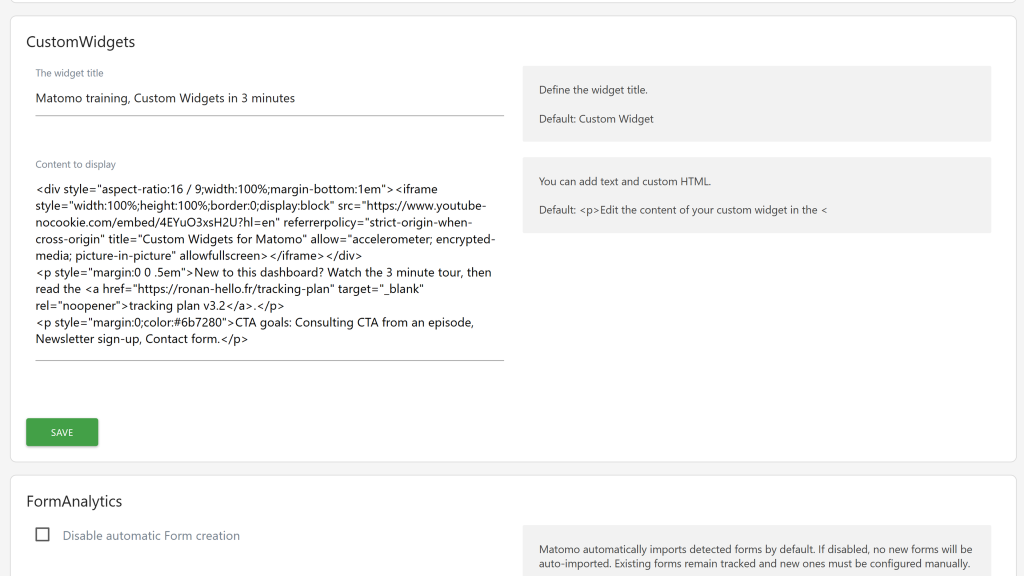
- Go to Administration > System > General settings, section CustomWidgets.
- Enter the widget title and the content to display, then save.
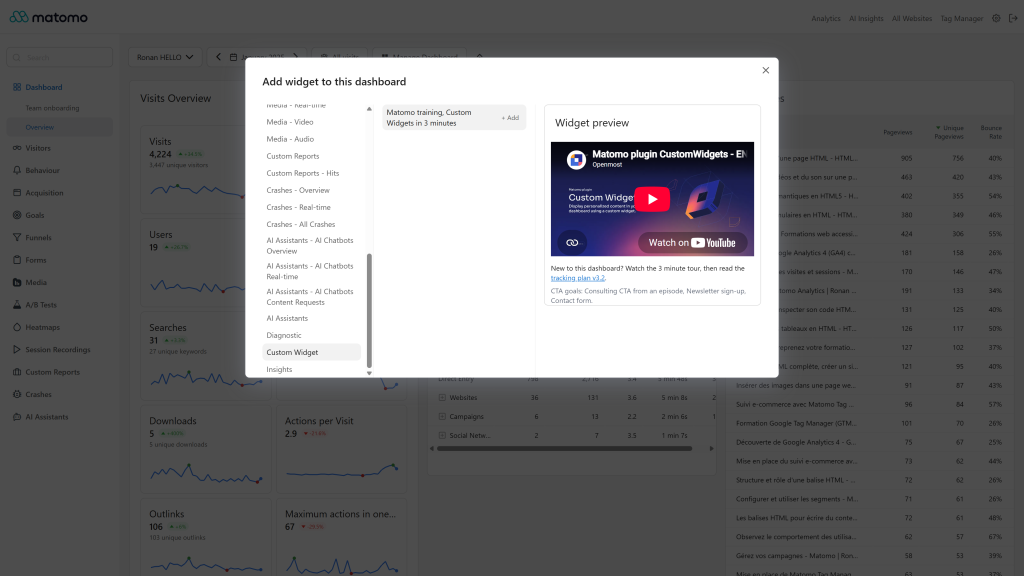
- Open a dashboard, click Dashboard > Widgets, and pick your widget in the Custom Widget category.
Privacy and data
The widget title and content are stored in the Matomo database as plugin system settings. The plugin sends nothing outside your Matomo instance. The HTML content is displayed as written and is not filtered, so only add content you trust.
Need help with Matomo?
Openmost is an official Matomo Implementation Partner. When you need widgets driven by your own data or business logic, we build custom Matomo plugins from a written spec, tested on the Matomo versions you run and maintained over time.
-
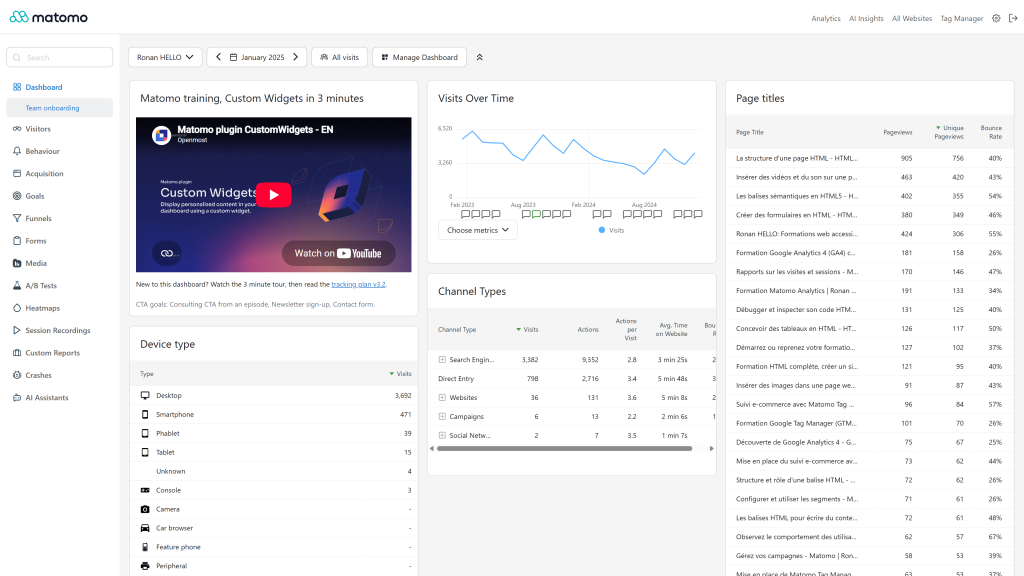
Custom widget on a dashboard next to reports
-
Pick the widget in the dashboard menu with live preview
-
Settings widget title and HTML content
Add custom content, such as text and custom HTML code, to your dashboards with a dedicated widget.
Share internal news, useful links, videos, iframes or any content with your team.
Configure the widget
- Go to Administration > System > General settings, section CustomWidgets.
- Enter the title of the widget and the content to display (text and HTML).
- Save the settings.
Add the widget to a dashboard
Open a dashboard, click on Dashboard, then Widgets and select the widget in the Custom Widget category.
Display external content
YouTube and YouTube no-cookie iframes are allowed by the Matomo Content Security Policy, so you can embed a video right away:
<iframe width="100%" height="315" src="https://www.youtube-nocookie.com/embed/VIDEO_ID" allowfullscreen></iframe>
Iframes, images, videos, SVG and canvas elements never overflow the widget width.
How to install this plugin?
This plugin is available in the official Matomo Marketplace. Install it the same way as other plugins:
- Go to the administration panel
- Open the Marketplace section and select "Plugins"
- Search for "CustomWidgets", install and activate the plugin
- Go to Administration > System > General settings, section CustomWidgets, to set the title and the content of the widget
Who can edit the widget?
Only super users can edit the widget, from the General settings. Every user can add it to their dashboards.
Can I create several widgets?
Version 5.x of the plugin provides one custom widget. The Matomo 6 version of the plugin supports unlimited widgets, managed from a dedicated page.
Why is my iframe not displayed?
Content loaded from another domain is blocked by the Matomo Content Security Policy. YouTube and YouTube no-cookie iframes are allowed by the plugin.
Is the content of the widget filtered?
No, the HTML is displayed as it is written, so only add content you trust.
How can I contribute to this plugin?
Open an issue or a pull request on GitHub, or contact us at ronan@openmost.com.
How long will this plugin be maintained?
As long as possible. We use Matomo and this plugin on many projects every day, so issues are fixed as fast as possible.