The Matomo AutoLogin Plugin adds new authentication and registration options by using incoming HTTP headers. It offers the following features:
- Login: Matomo will automatically sign in users by extracting their username and role information from the incoming HTTP header. If a user with that username already exists in Matomo, they will be logged in with the specified role (View, Write, Admin, or Super User).
- Registration: If the username provided in the HTTP header does not exist in Matomo, this plugin will register a new user with that username.
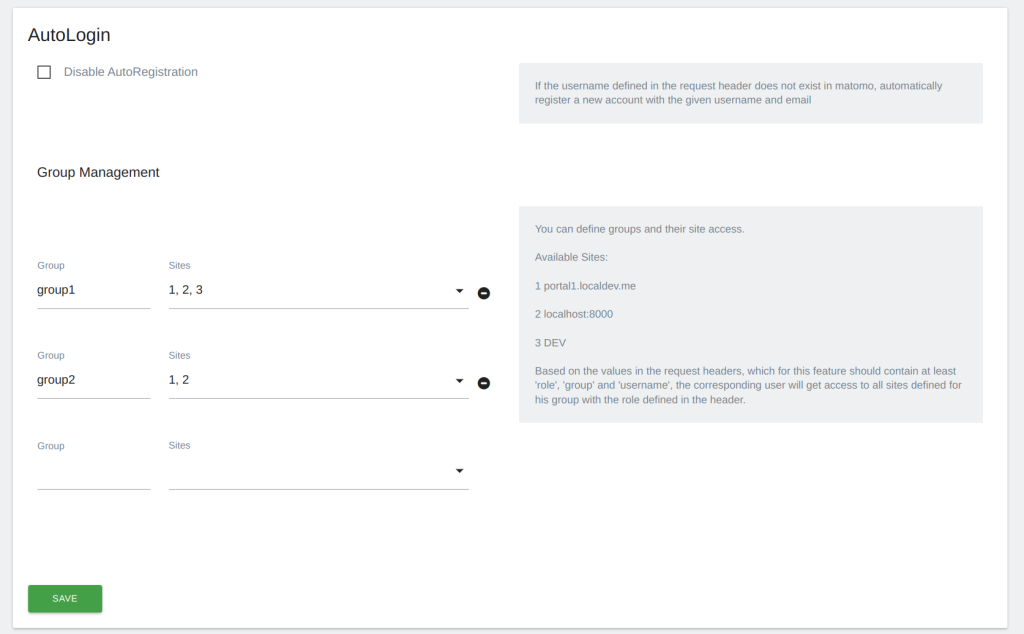
- Groups: This plugin also allows users to be assigned to specific groups based on the group information provided in the HTTP header. Users gain access to all sites available to their assigned group. Groups can only be created by Superusers in the system settings.
AutoLogin trusts the identity headers only when a request passes all of these checks:
- The plugin is enabled in the system settings (it is off after installation).
- The request comes from an address listed under "Trusted proxies". AutoLogin compares against
REMOTE_ADDRand ignoresX-Forwarded-For. - The request carries the configured shared secret in the
matomo-autologin-secretheader.
Possible setup:
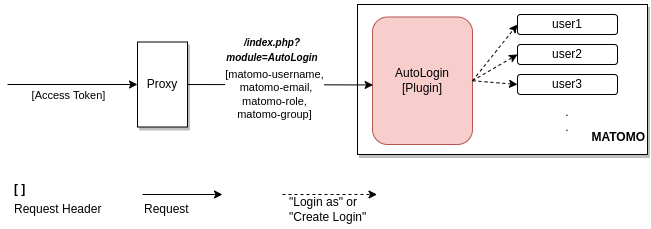
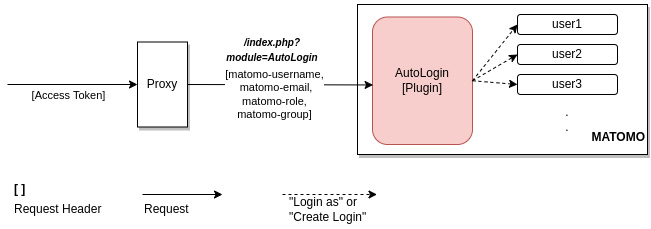
In this setup, all traffic towards Matomo goes through a proxy. The proxy validates an incoming access token from the user, extracts the username, role etc. from it and sets the matomo-* headers. The proxy must remove or overwrite every matomo-* header sent by the client, including underscore spellings such as matomo_username (some servers map both spellings to the same PHP variable, and AutoLogin can only detect this under mod_php), and Matomo must not be reachable without going through the proxy. With nginx in front of PHP-FPM, keep underscores_in_headers off (the default). With it on, a client-sent matomo_username reaches PHP as the same header and can replace the value the proxy set.
-
matomo autologin
-
plugin settings
View and download this plugin for a specific Matomo version:
- Matomo 4.x
- Matomo 5.x (currently selected)