Free, read-only configuration audit of your Matomo 5 On-Premise instance: 53 checks on the server, PHP, the database and config.ini.php, flagging what blocks the upgrade to Matomo 6, with a Markdown export.
Features
- 53 automated checks across 6 categories: Infrastructure & server, PHP, Database,
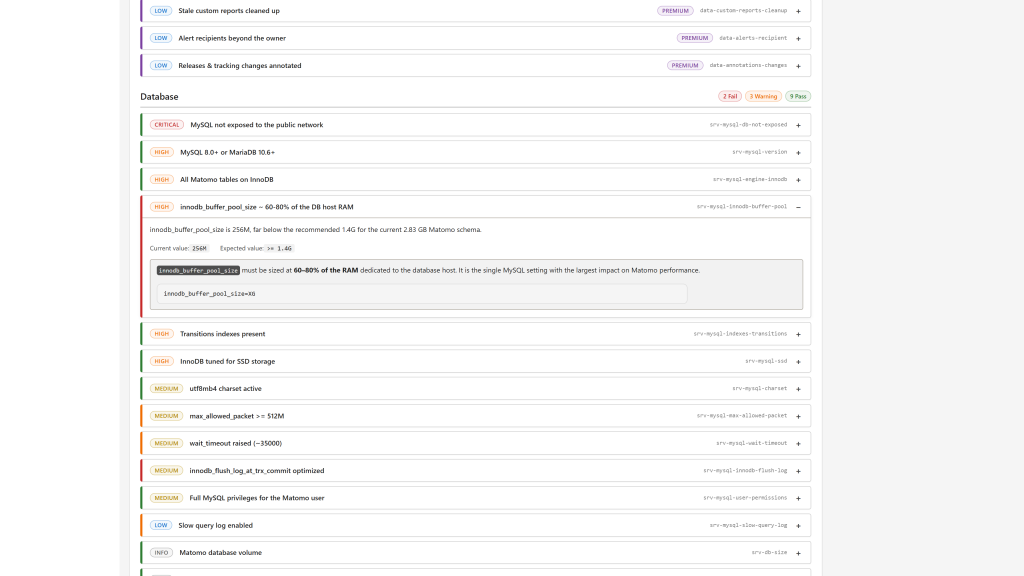
config.ini.phpsettings, Matomo general settings, Backups & monitoring. - Actionable findings: each finding has a status (pass, fail, warn, skip), a severity (critical, high, medium, low, info), the observed value, the expected value, a recommendation and, when relevant, a configuration snippet.
- Strictly read-only: the plugin never writes to
config.ini.php, to the database or to any file, and never stores the results. Every report is computed fresh. - Admin report for super users, with filters by category, severity, status and free text.
- Markdown export, ready to paste into a consulting deliverable, with an ASCII-only variant for diff-friendly pipelines.
- Console command
audit:run, with table or Markdown output and a--onlyfilter. - Theme-aware code blocks: configuration snippets follow the light or dark Matomo theme.
- 13 languages: English, Arabic, Chinese (Simplified), Chinese (Traditional), Dutch, French, German, Italian, Japanese, Polish, Portuguese, Spanish and Swedish.
- Premium checks listed: the 96 checks of Openmost Audit Premium appear in the report with a "Premium" badge, without being run.
Checks run by the free plugin
Category Checks Infrastructure & server (14) Matomo version, web engine, archiving cron, GeoIP database and its freshness, SMTP, write permissions ontmp/ and js/, file integrity, codebase on NFS, tracker cache TTL, tracker status, tracker hostname obfuscation, private directories not reachable, reverse-proxy client headers
PHP (8)
Version, PHP-FPM, memory_limit, max_execution_time, post_max_size, OPcache, required extensions, shell_exec / proc_open
Database (14)
Database size, tracking volume, MySQL / MariaDB version, InnoDB engine, utf8mb4 charset, max_allowed_packet, wait_timeout, innodb_flush_log_at_trx_commit, InnoDB buffer pool, Transitions indexes, database not exposed, slow query log, SSD tuning, MySQL user privileges
config.ini.php settings (12)
force_ssl, trusted_hosts, cors_domains, login brute-force protection, password complexity, auto-update, multi-server mode, unique visitors for ranges and years, custom reports max dimensions, MariaDB schema, admin IP allowlist
Matomo general settings (4)
Custom logo, TrackingSpamPrevention filters, CORS domains in sync with the UI, timezone consistency between PHP, MySQL and Matomo
Backups & monitoring (1)
Application logs written to a persistent file
Premium checks
The following checks are listed with a "Premium" badge and only run in Openmost Audit Premium:
Category Checks Infrastructure & server (4) TLS certificate validity, CDN/WAF in front of Matomo, HTTP/2, HTTPS redirect (read-only HTTP probes) Public file exposure (8)matomo.php and matomo.js reachable, opt-out endpoints, favicon, heatmap configuration endpoint, tracker integrity hash (read-only HTTP probes)
Plugins (11)
Plugin inventory, invalid, deprecated and outdated plugins, recommended official plugins, TrackingSpamPrevention, QueuedTracking, FormAnalytics
Privacy / GDPR (9)
IP and geolocation anonymization, raw and aggregated data retention, PII removal, third-party cookies, Do Not Track, Live reports, Heatmaps and Session Recording
Users & permissions (10)
Super user count, 2FA, anonymous access, dormant and shared accounts, API token scope, Tag Manager roles, ActivityLog, read-only MySQL user
Web sites (14)
URLs, excluded IPs and query parameters, URL fragments, e-commerce, site search, timezones, currencies, duplicates, heatmap breakpoints, IP geolocation, cross-domain tracking
Data quality (16)
Goals, event naming, Custom Dimensions, segments, custom reports, funnels, alerts, annotations, Search Console, tracking failures
Matomo Tag Manager (8)
Containers, environments, Matomo tag, naming conventions, per-environment site ID, tracker URL pointing at this Matomo
High traffic / performance (12)
Browser archiving, archive freshness, PHP-FPM workers, MySQL connections, slow query log, QueuedTracking with Redis, CDN for tracker assets, segments and custom reports counts, multi-server topology
Multi-server / HA (4)
Shared database, read replica, load balancer, dedicated archiver
The Markdown export ends with the list of the premium checks (title, id and severity), grouped by category, without any result.
Requirements
- Matomo 5.0.0 or higher (
>=5.0.0,<6.0.0-b1) - PHP 8.1 or higher
- A MySQL or MariaDB version supported by Matomo 5
The PHP and database version checks apply the Matomo 6 requirements (PHP 8.1+, MySQL 8.0+ / MariaDB 10.6+) but report them as warnings rather than failures: those versions still run Matomo 5, they only block the upgrade. For Matomo 6, use the 6.x releases of this plugin.
Installation / Configuration
- Install the plugin from the Matomo Marketplace (Administration > Marketplace), or copy it into
plugins/Audit/and runphp console plugin:activate Audit. - Open Administration > Diagnostic > Audit as a super user. The report is computed on every page load, there is nothing to configure.
- Click Export Markdown to download the report as a
.mdfile. Append&plain=1to the export URL to replace the emoji status badges with[PASS],[FAIL],[WARN],[SKIP]and[PREMIUM].
From the command line:
php console audit:run
php console audit:run --format=markdown > audit.md
php console audit:run --only=srv-php-version,cfg-force-ssl
audit:debug-metrics and audit:debug-translations are troubleshooting helpers.
With Audit Premium
Audit Premium is an add-on of this plugin: installed and activated next to it, it runs the 96 premium checks in this report, the Markdown export and audit:run, instead of only listing them, and adds an HTTP probes box to the report for the checks that send read-only requests to your Matomo host. Keep this plugin activated with it.
Privacy and data
- Read-only: the plugin reads
config.ini.php, runs read queries (SELECT,SHOW) and inspects the PHP runtime. It writes nothing and stores nothing. - No outbound HTTP request and no telemetry.
- Every page and export requires super user access.
- The Markdown export only contains the values the checks report, never the content of
config.ini.php, credentials or salts.
Need help with Matomo?
Openmost is an official Matomo Implementation Partner. For an expert review on top of the automated checks, we run independent Matomo audits covering tracking, privacy and configuration, delivered as a written report with every fix ranked by impact.
-
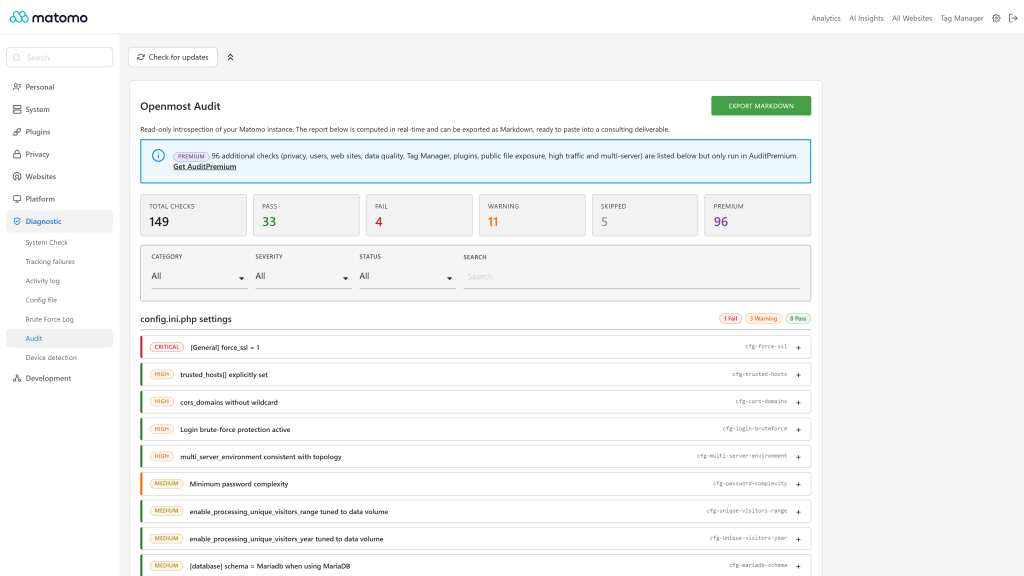
Audit summary with free and premium checks
-
Expanded finding with recommendation and snippet
-
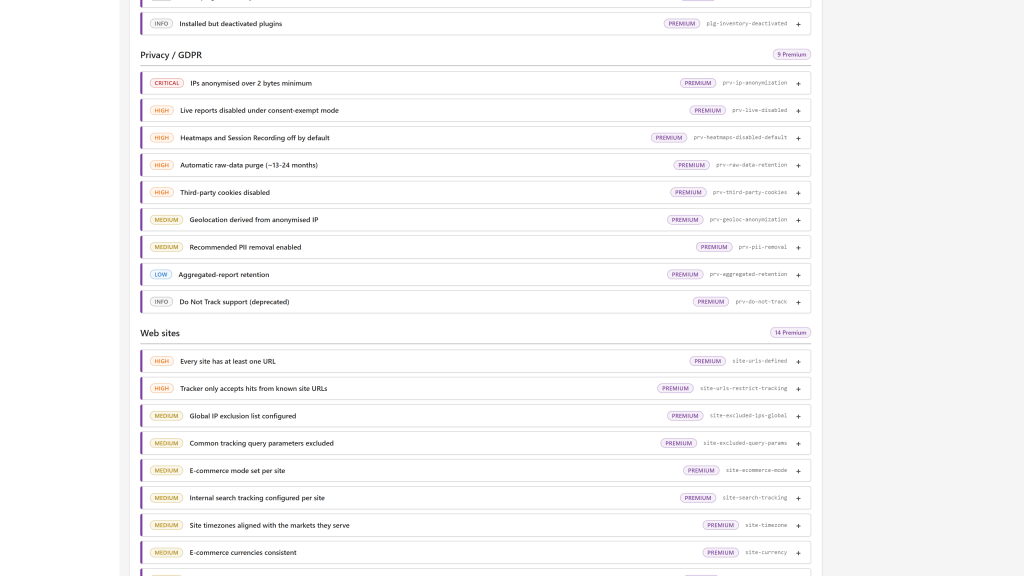
Premium checks listed in the free edition
Openmost Audit is a free, read-only plugin that audits the configuration of your Matomo On-Premise instance and produces an actionable, structured report, without touching a single setting.
It is designed for consultants, ops teams and super users who need a quick, repeatable way to check that a Matomo installation is properly configured.
What the free plugin checks
The free plugin runs 53 automated checks across 6 categories:
- Infrastructure & server (14): Matomo version, web engine,
archiving cron, GeoIP database and its freshness, SMTP, write
permissions on
tmp/andjs/, file integrity, codebase on NFS, tracker cache TTL, tracker status, tracker hostname obfuscation, private directories not reachable, reverse-proxy client headers. - PHP (8): version, PHP-FPM,
memory_limit,max_execution_time,post_max_size, OPcache, required extensions,shell_exec/proc_open. - Database (14): database size, tracking volume, MySQL / MariaDB
version, InnoDB engine,
utf8mb4charset,max_allowed_packet,wait_timeout,innodb_flush_log_at_trx_commit, InnoDB buffer pool, Transitions indexes, database not exposed, slow query log, SSD tuning, MySQL user privileges. config.ini.phpsettings (12):force_ssl,trusted_hosts,cors_domains, login brute-force protection, password complexity, auto-update, multi-server mode, unique visitors for ranges and years, custom reports max dimensions, MariaDB schema, admin IP allowlist.- Matomo general settings (4): custom logo, TrackingSpamPrevention filters, CORS domains in sync with the UI, timezone consistency between PHP, MySQL and Matomo.
- Backups & monitoring (1): application logs written to a persistent file.
Each finding carries a severity (critical, high, medium, low, info), a status (pass, fail, warn, skip), the observed value, the expected value, a recommendation and, when relevant, a configuration snippet.
Premium checks
96 more checks are listed in the report with a "Premium" badge. They are not run by the free plugin:
- Privacy / GDPR (premium): IP and geolocation anonymization, data retention, PII removal, third-party cookies, Live reports, Heatmaps and Session Recording.
- Users & permissions (premium): super user count, 2FA, anonymous access, dormant and shared accounts, API token scope, Tag Manager roles, ActivityLog.
- Web sites (premium): URLs, excluded IPs and query parameters, e-commerce, site search, timezones, currencies, duplicates, cross-domain tracking.
- Data quality (premium): goals, event naming, Custom Dimensions, segments, custom reports, funnels, alerts, annotations, Search Console, tracking failures.
- Matomo Tag Manager (premium): containers, environments, Matomo tag, naming conventions, per-environment site ID, tracker URL pointing at this Matomo.
- Plugins (premium): plugin inventory, invalid, deprecated and outdated plugins, recommended official plugins, QueuedTracking, FormAnalytics.
- Public file exposure (premium): tracker files, opt-out endpoints, favicon and heatmap configuration endpoint, through read-only HTTP probes.
- High traffic / performance (premium): archiving settings, PHP-FPM workers, MySQL connections, QueuedTracking with Redis, CDN for tracker assets, segments and custom reports counts.
- Multi-server / HA (premium): shared database, read replica, load balancer, dedicated archiver.
- HTTP probes (premium): TLS certificate validity, CDN/WAF, HTTP/2 and HTTPS redirect checks of the Infrastructure & server category.
Purchase Openmost Audit Premium version
Key features
- Read-only: never writes to
config.ini.php, to the database or to any file, and never stores the results. - No outbound HTTP calls, no telemetry.
- In-app report under Administration > Diagnostic > Audit, for super users, with filters by category, severity, status and a free-text search.
- Markdown export: one click downloads the report as a
.mdfile, ready to paste into a Word, Notion or Confluence deliverable. Add&plain=1to the export URL for ASCII status markers instead of emoji. - Console command:
php console audit:runprints the report as a table,--format=markdownas Markdown,--only=<id>,<id>restricts it to some checks. - 13 languages: English, Arabic, Chinese (Simplified), Chinese (Traditional), Dutch, French, German, Italian, Japanese, Polish, Portuguese, Spanish and Swedish.
Requirements
Matomo 5.0.0 or higher and PHP 8.1 or higher. For Matomo 6, use the 6.x releases of this plugin.
Installation
Install the plugin from the Matomo Marketplace (Administration > Marketplace), then open Administration > Diagnostic > Audit as a super user.
The premium version (AuditPremium) is an add-on: installed next to this plugin, it runs the premium checks in the same report.
Source code and support
The plugin is open source (GPL v3+): https://github.com/openmost/Audit. Questions: ronan@openmost.com.
What does the free plugin check?
53 automated checks in 6 categories: Infrastructure & server, PHP,
Database, config.ini.php settings, Matomo general settings and
Backups & monitoring. Each finding gives a status (pass, fail, warn,
skip), a severity, the observed and expected values and a
recommendation.
What are the checks with a "Premium" badge?
The report also lists 96 checks that only run in the premium version: Privacy / GDPR, Users & permissions, Web sites, Data quality, Matomo Tag Manager, Plugins, Public file exposure, High traffic / performance and Multi-server / HA, plus 4 Infrastructure & server checks that need HTTP probes (TLS certificate, CDN/WAF, HTTP/2, HTTPS redirect). The free plugin shows their title and severity but does not run them, so they have no result. Select "Premium" in the status filter to list only them.
Does the plugin modify anything on my instance?
No. The plugin is read-only: it reads config.ini.php, runs read
queries (SELECT, SHOW) against the database and inspects the PHP
runtime. It never writes to config.ini.php, to the database or to
any file, and it does not store the results: every report is computed
when you open the page or run the command.
Does it make outbound HTTP calls or send data to a third party?
No. The free plugin makes no HTTP request and has no telemetry. The HTTP probes (TLS certificate, CDN/WAF, HTTP/2, HTTPS redirect, public file exposure) are a premium feature.
Who can run an audit?
Only super users. The menu entry is hidden for other users and every page and export requires super user access.
How do I export the report?
Click Export Markdown on the report page to download a .md file
with the instance information, a summary and the findings grouped by
category. Add &plain=1 to the export URL to replace the emoji status
badges with [PASS], [FAIL], [WARN], [SKIP] and [PREMIUM].
From the command line, use php console audit:run --format=markdown > audit.md.
The export contains the results of the free checks, followed by the list of premium checks (title, id and severity) without any result.
Can I run it from the command line?
Yes:
php console audit:runprints the results as a table.php console audit:run --format=markdownprints the Markdown report.php console audit:run --only=srv-php-version,cfg-force-sslruns only the given checks.
audit:debug-metrics and audit:debug-translations are helpers for
troubleshooting.
What happens if both Audit and AuditPremium are installed?
Audit Premium is an add-on of the free plugin. Keep both activated:
the free plugin shows the report and runs the premium checks the
add-on provides, so the 149 checks run in the same report, the
Markdown export and audit:run. An HTTP probes box appears on the
report for the premium checks that probe your Matomo host.
Which languages are available?
English, Arabic, Chinese (Simplified), Chinese (Traditional), Dutch, French, German, Italian, Japanese, Polish, Portuguese, Spanish and Swedish. The report follows the language of the Matomo user.
Which Matomo versions are supported?
This 5.x release line targets Matomo 5.0.0 or higher, with PHP 8.1 or higher. The 6.x releases target Matomo 6.
On Matomo 5 the PHP and database checks report the Matomo 6 requirements (PHP 8.1+, MySQL 8.0+ / MariaDB 10.6+) as warnings rather than failures: those versions still run Matomo 5, they only block the upgrade to Matomo 6. PHP 8.2 or later is recommended, as PHP 8.1 no longer receives security fixes.
Where can I get help?
- GitHub issues: https://github.com/openmost/Audit/issues
- Email: ronan@openmost.com
Version
5.2.0
License
GPL v3+
Keywords
security, performance, configuration, audit, Openmost, diagnostics, checklist, system-check
Last Updated
Oct 21st 2026
Requirements
PHP >=8.1.0
Matomo >=5.0.0,<6.0.0-b1
Matomo 5.x, Matomo 6.x
Downloads
385
Changelog
Support
ronan@openmost.com
View and download this plugin for a specific Matomo version:
- Matomo 5.x (currently selected)
- Matomo 6.x